Book an operation
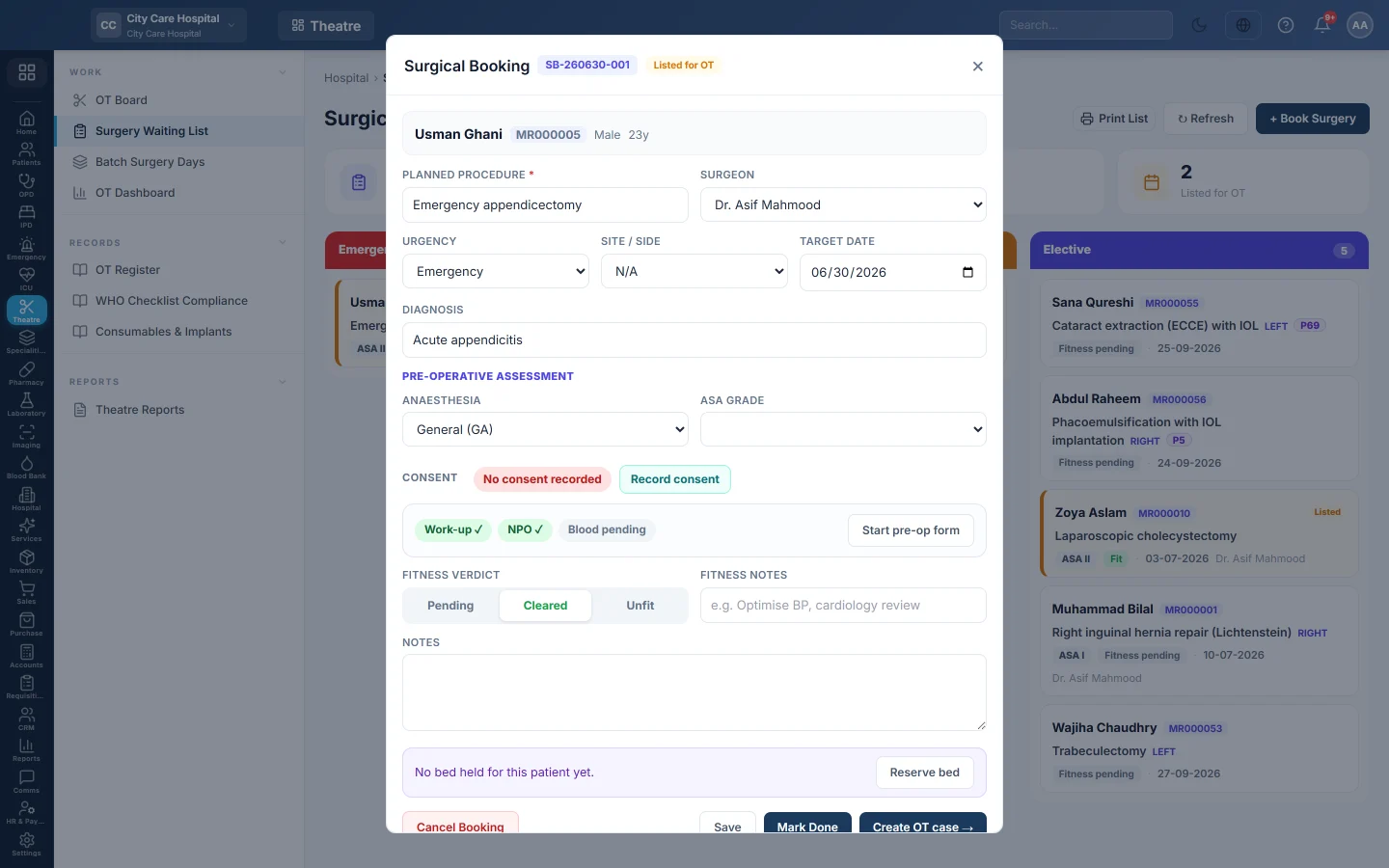
Take a patient from the surgeon's decision to a theatre slot - book the surgery, clear pre-op fitness, hold a bed, admit, and schedule the case on the OT board.
An operation starts as a booking on the waiting list. When the patient is fit, the booking is listed for OT and becomes a case on the theatre list.
Before you begin
- The patient is registered. See Register a patient.
- Theatres are set up on the OT Board, and surgeons exist as doctors.
- For a fixed price, the surgical package exists. See Packages.
Where to find it
Open Operation theatre → Work → Surgery Waiting List. A doctor can also click Book OT in OPD Consultation; the booking then appears here.
1. Book the surgery
- Click Book Surgery.
- Pick the Patient, type the Planned Procedure and choose the Surgeon.
- Choose the Urgency, the Site / Side and the Target Date.
- Type the Diagnosis and pick a Package if one applies.
- Click Create Booking.
Open the booking again to see the Estimate of what the patient pays, and print it for the family.
2. Clear pre-op fitness
- Open the booking.
- Under Pre-Operative Assessment, choose the Anaesthesia and the ASA Grade.
- Tick Consent, Investigations done, NPO confirmed and Group & save / crossmatch when each is done.
- Set the Fitness Verdict to Cleared, or Unfit with Fitness Notes such as Optimise BP.
- Click Save.
3. Hold a bed and admit
- Click Reserve bed on the booking to hold a ward bed until the day.
- When the patient arrives, admit them. See Admit a patient.
A day case done without admission can be billed later; billing opens a day-case stay.
4. List for OT and schedule the case
- On the cleared booking, click List for OT →.
- Click Create OT case →. The OT Board opens with Schedule Surgery filled in.
- Choose the Theatre, the Date / Time and the Duration.
- Choose the Anaesthetist, and the Linked Admission.
- Click Schedule.
The case appears on the theatre's column for that day. On the day, run it. See Run a surgery case.
Common questions
List for OT is greyed out. The Fitness Verdict is not Cleared yet.
It is an emergency. Book it with Emergency urgency. Emergencies are not stopped at anaesthesia for a missing fitness check. You can also schedule straight on the OT Board.
The patient will not go ahead. Click Cancel Booking and give the reason. It is counted in the cancellation reports.
Many patients for the same operation on one day? Schedule them in one theatre, then run them as a batch. See Batch Surgery Days.
Спасибо. Если помощь всё ещё нужна, напишите на info@eloerp.net.