OT Board
The operation theatre schedule for a day - a column per theatre with each case's time, procedure, patient, surgeon and status - and where you schedule surgeries and set up theatres.
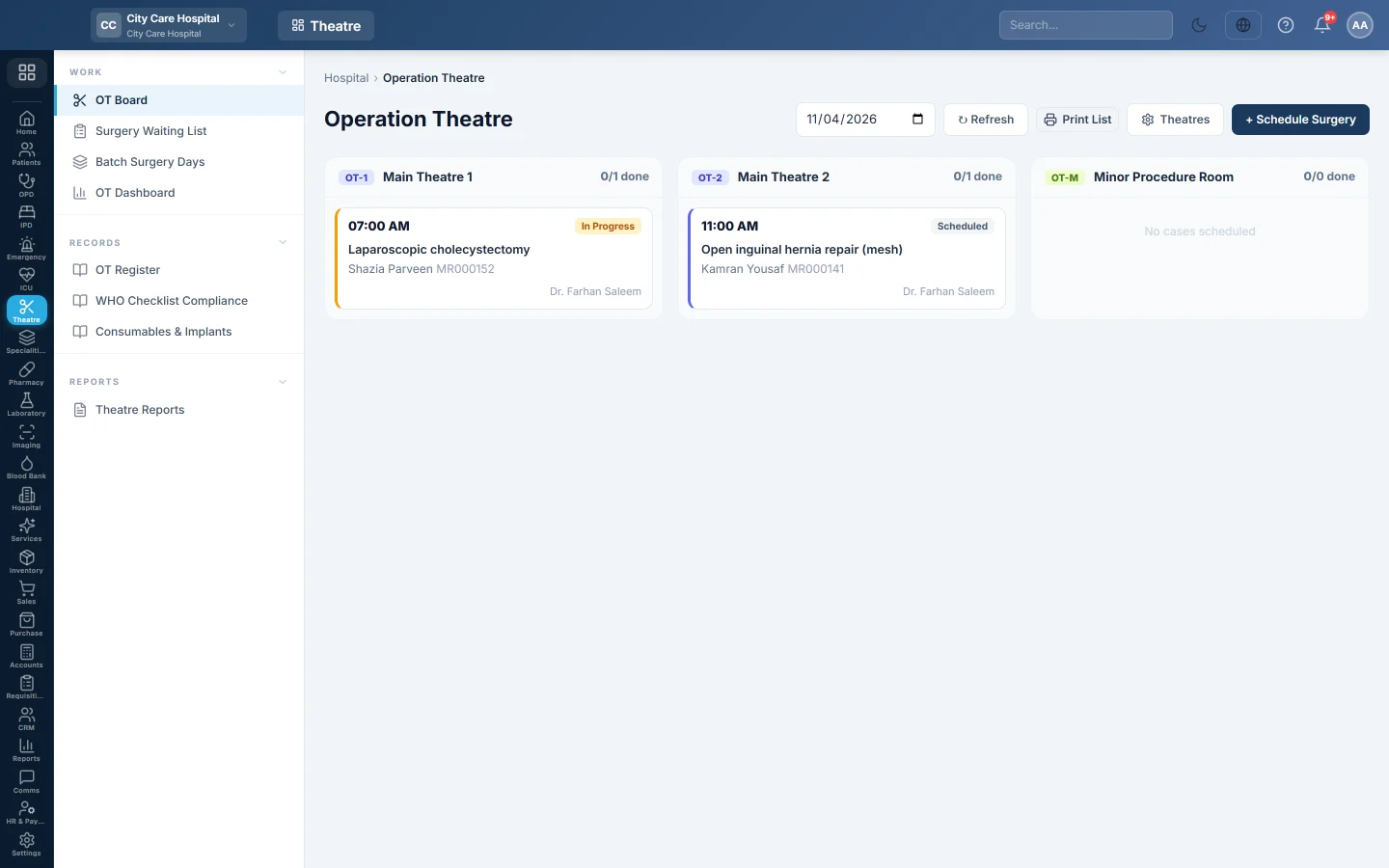
The OT Board is the theatre list for a day. Each theatre has a column of cases in time order, coloured by status. Click a case to run it.
Before you begin
- Theatres are set up. Until then the page says No theatres configured yet.
- Scheduling and cancelling need the OT schedule permission. Running a case needs the OT operate permission. Setting up theatres needs the OT manage permission. See Users & Roles.
- Surgeons and anaesthetists exist as doctors. See Doctors.
Where to find it
Open Operation theatre → Work → OT Board. The page is titled Operation Theatre.
Read the board
- Pick the date at the top.
- Each column header shows the theatre's code, name and how many cases are done.
- Each case card shows the time, status, procedure, patient, MRN and surgeon. Emergency cases are marked Emergency.
The statuses are Scheduled, Pre-op, Anaesthesia, In Progress, Recovery, Completed and Cancelled. Click a card to open the case. See Run a surgery case.
Schedule a surgery
- Click + Schedule Surgery.
- Pick the Patient, the Theatre and the Department.
- Set the Date / Time and the Duration.
- Type the Procedure and choose the Side, Anaesthesia and Priority (Elective or Emergency).
- Choose the Surgeon and the Anaesthetist.
- Choose the Linked Admission. It is needed to bill the case; Walk-in / none opens a day-case stay when you bill.
- Type the Pre-op Diagnosis.
- Click Schedule.
Most cases start from the waiting list instead, so the booking and its fitness check travel with the case. See Book an operation.
Set up theatres
- Click Theatres.
- Under the list, type the Code and Name, and choose the Type: General, Minor or Emergency.
- Click Add Theatre. Click Edit to change one.
The same window holds two theatre rules:
- Anaesthesia record required: a case cannot be completed until the anaesthetist signs the anaesthesia record. Local anaesthesia cases are exempt.
- Discharge from recovery required: a case cannot be completed until the recovery nurse scores the patient (Aldrete 9 or more, or intensive care) and chooses where they go.
Common questions
A case is not on the board. It is on another date or in an inactive theatre. Check the date at the top.
How do I print the theatre list? Click the print button next to Refresh. It prints the OT Schedule for the day.
Where are camp cataract lists? Group them on Batch Surgery Days.
Thank you. If you still need help, write to info@eloerp.net.