Hold a video or phone consultation
Book a remote consultation by video or phone, record the patient's consent and the meeting link, and find today's remote clinic.
A remote consultation in EloERP is an ordinary appointment with the same doctor, fee, prescription and record. Only the way the patient attends changes: by video or by phone. Use whatever video service or phone number the hospital already uses.
Before you begin
- The doctor has a clinic and a schedule. See Doctors and Doctor Schedules.
- Booking needs the appointments create right.
- The patient is registered. See Register Patient.
Where to find it
Open Appointments in the hospital's OPD menu. See Appointments.
Book a remote consultation
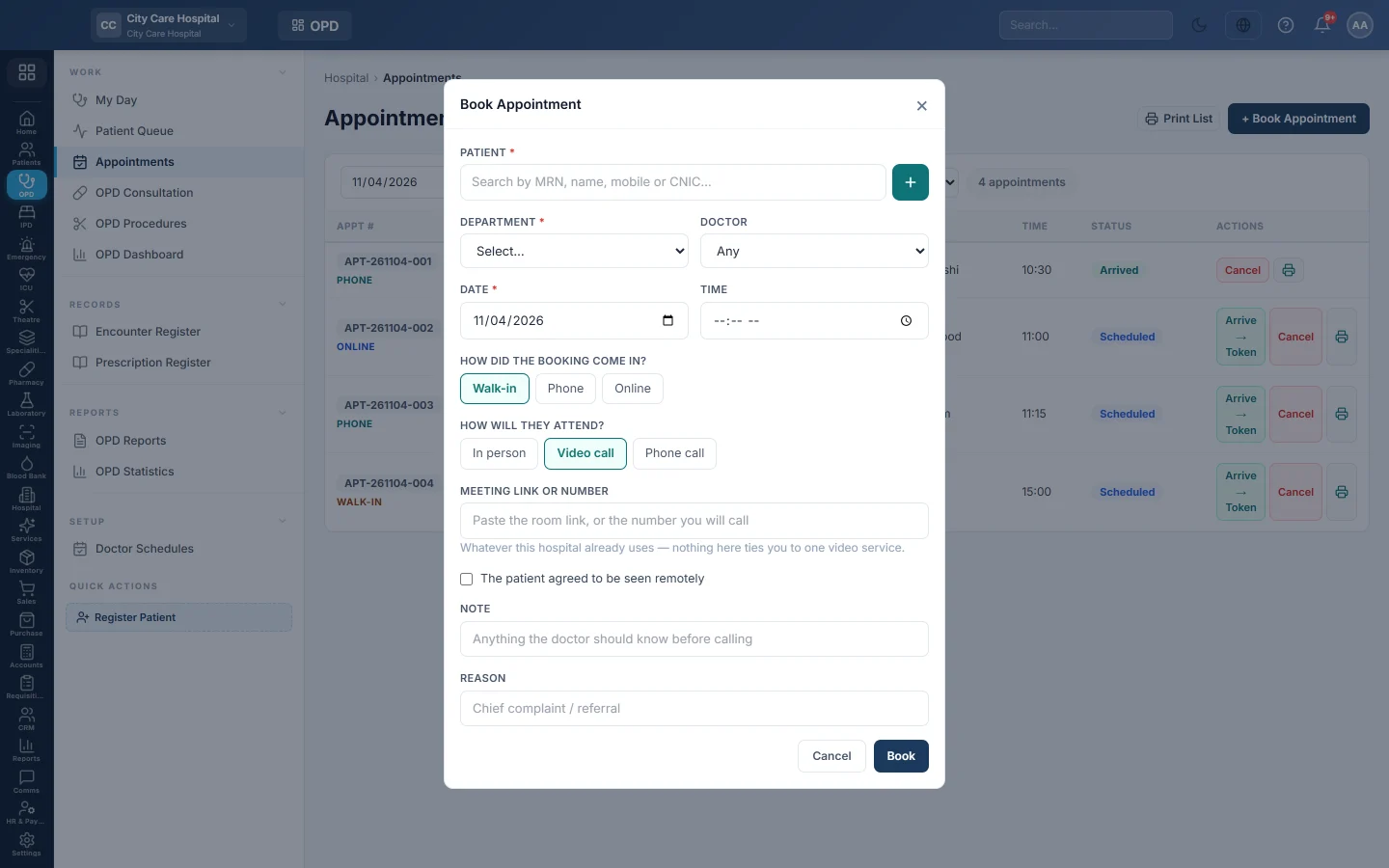
- Click + Book Appointment.
- Pick the patient, the department, the doctor, the date and the time, as for any booking.
- Under How will they attend?, click Video call or Phone call.
- In Meeting link or number, paste the room link, or the number you will call.
- Tick The patient agreed to be seen remotely once they have said yes.
- In Note, write anything the doctor should know before calling.
- Type the Reason and click Book.
The patient's agreement is kept as a consent on their record, with the time it was given.
Run the remote clinic
- On the appointments list, choose Video only or Phone only in the attendance filter to see today's remote clinic.
- Remote bookings show a video or phone tag.
- At the time, click Join to open the meeting link.
- The doctor writes the consultation and prescription as for a visit in person. See OPD Consultation.
Common questions
Which video service should we use? Any. EloERP stores the link or number you paste; it does not tie you to one service.
How does the patient pay? As for any consultation: collect the fee at the Billing Counter.
The video failed and we switched to a phone call. Carry on. The consultation is the same record either way.
Gracias. Si todavía necesita ayuda, escriba a info@eloerp.net.