Appointments
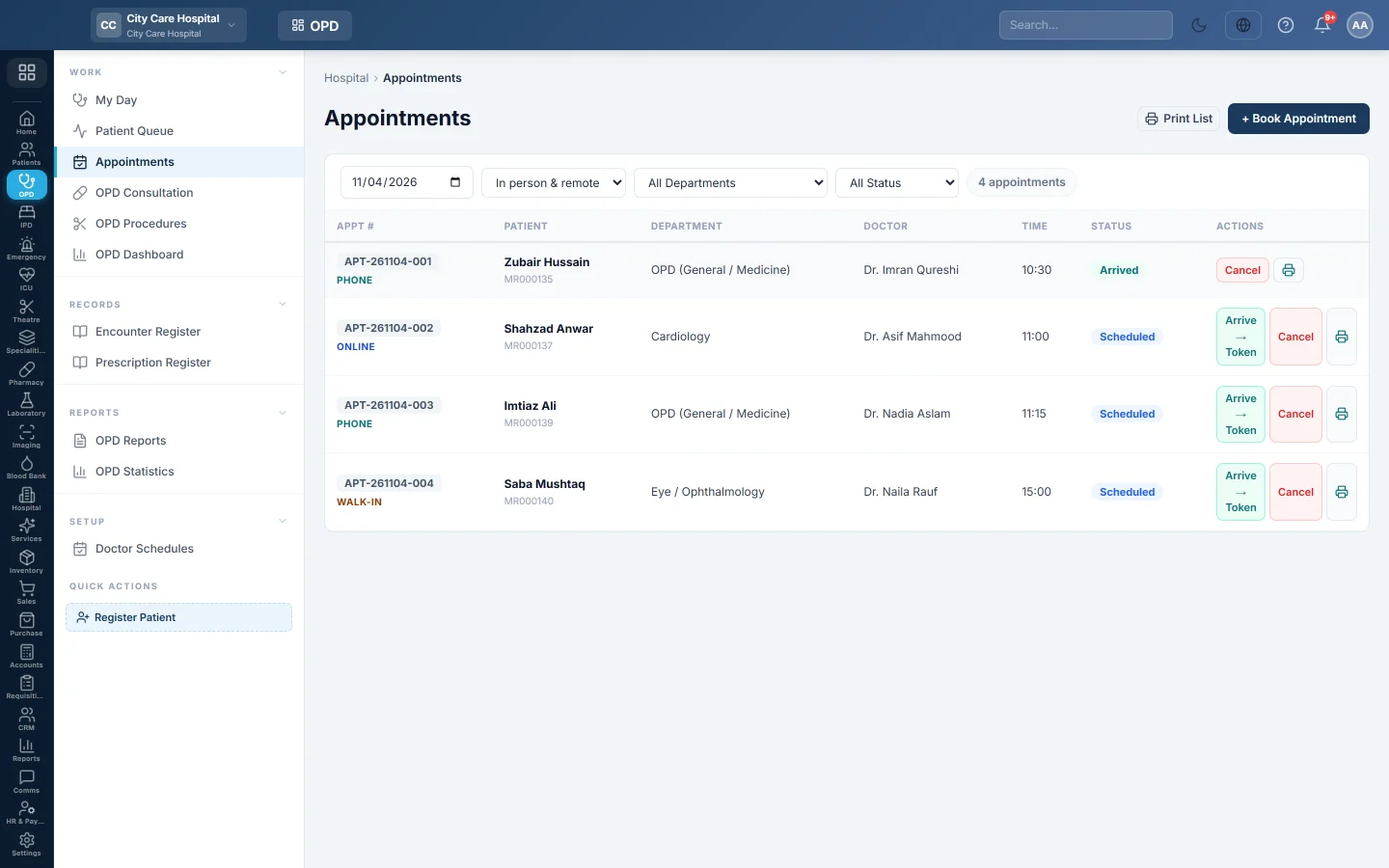
Book OPD appointments in a doctor's free slots, for in-person, video or phone visits, and turn an arriving patient's booking into a token.
Appointments books patients into a doctor's clinic. When a booked patient arrives on the day, Arrive → Token puts them in the queue.
Before you begin
- The doctor has clinic hours on Doctor Schedules, so their free slots show when you book.
- Your role needs the appointment create permission. Arrive → Token needs the queue manage permission, and Cancel its own permission. See Users & Roles.
- If the hospital takes walk-ins only, the page says Walk-ins only and you cannot book. This is set under Queue rules on Patient Queue.
Where to find it
Open Outpatients (OPD) → Work → Appointments. You can also click + New Visit on a patient file, or Book on Follow-ups.
Book an appointment
- Click + Book Appointment.
- Find the patient in Patient, or register them with +.
- Choose the Department and the Doctor.
- Pick the Date.
- Under Available slots, click a free time. Taken slots are greyed out, and the box shows how many places are left.
- Under How did the booking come in?, choose Walk-in, Phone or Online.
- Under How will they attend?, choose In person, Video call or Phone call.
- Type the Reason, such as the chief complaint.
- Click Book.
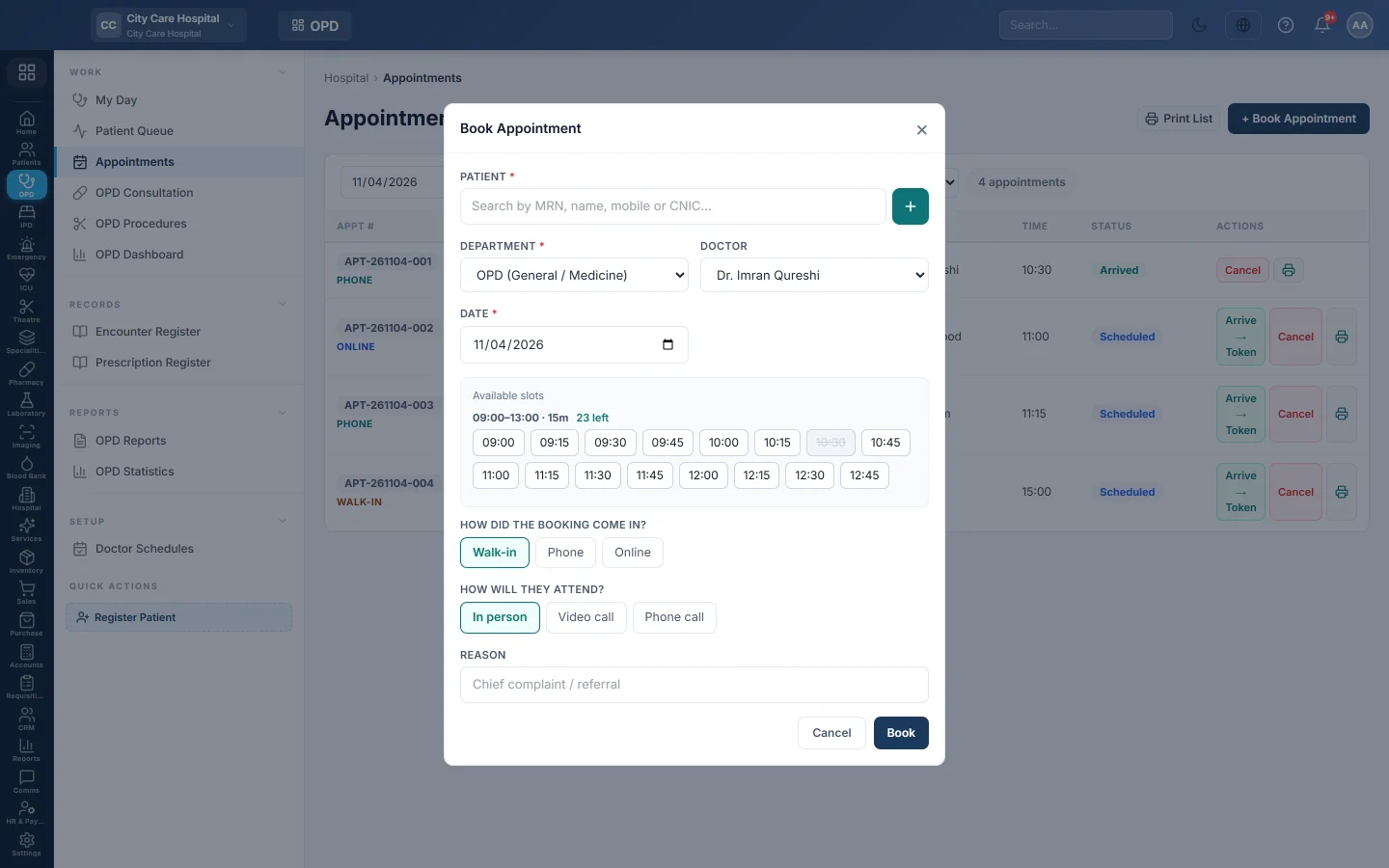
For a video or phone visit, paste the Meeting link or number, tick The patient agreed to be seen remotely, and add a Note for the doctor. A Join button then appears on the row.
If the doctor has no schedule that day, the box says so and you can type a Time yourself.
When the doctor is on leave
The slot box says The doctor is on leave with the dates. Click Back on … — book that day to move to the next working day, or pick another doctor shown. If neither is offered, click Add to the waiting list.
When the patient arrives
- Find today's appointment.
- Click Arrive → Token.
The message shows the token number and the visit number. Clicking it again returns the same token, never a second one. A patient can only arrive on the day of the appointment.
When the hospital takes the fee Before token, the message adds that the consultation fee is due at the counter. The token shows Fee due on Patient Queue until it is collected there or with Collect fee; the doctor can still see the patient.
Find, print or cancel
- Filter by date, In person & remote, All Departments and All Status.
- Click the printer on a row to print the appointment slip.
- Click Cancel and confirm to cancel a booking.
Statuses are Scheduled, Arrived, In Consultation, Completed, Cancelled and No Show.
Common questions
No slots appear for the doctor. The doctor has no clinic on that weekday, or no schedule is published. Add one on Doctor Schedules, or type a time.
All slots are greyed out. The session is full. Pick another day or doctor. Some places may be kept for walk-ins by the queue rules.
Arrive → Token says the patient can only arrive on the day. The appointment is for another date. Change the date by cancelling and booking again.
How do I mark a patient who never came? Use No-show on their token on Patient Queue or My Day.
Thank you. If you still need help, write to info@eloerp.net.