Billing Counter
One screen where the cashier bills a patient for consultations, procedures, tests and scans together, takes the payment and prints one receipt that tells the patient where to go next.
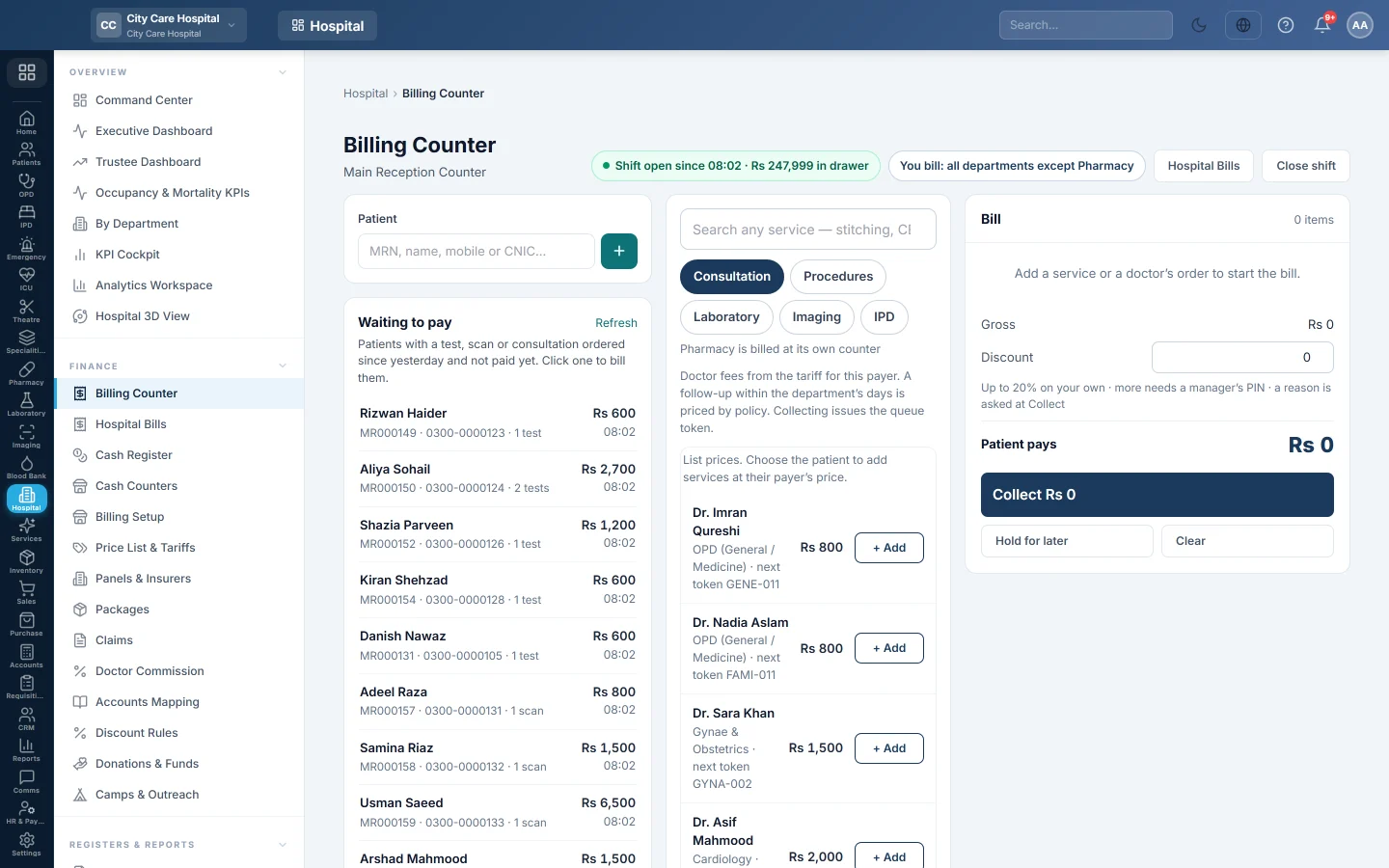
The Billing Counter is the cashier's main screen. You pick the patient, add what they pay for from any department you are allowed to bill, collect the money and print one receipt. Paying releases each item to its department: a consultation gets its queue token, a test goes to the sample desk and a scan goes to Imaging.
Before you begin
- Open your cash shift on Cash Register. Without an open shift you can only bill a panel. See Open and close a cashier shift.
- Departments, doctors and their fees exist. See Departments and Doctors.
- Prices for procedures, tests and scans are set in Price List & Tariffs.
- Payment methods such as Cash, Card and Bank are set up and given to you. See Payment Methods.
- What you may bill comes from your role and from Where they take money on your user. Billing Setup shows who bills what.
Where to find it
Open Hospital → Finance → Billing Counter.
The top of the screen shows your counter, Shift open since with the cash in your drawer, and You bill: with the departments you may bill. When more than one counter is open, Counters open now lists them and who is working at each.
Bill a patient
- In Patient, type the MRN, name, mobile or CNIC and pick the patient. To bill someone who is waiting, click their name under Waiting to pay instead.
- Check the patient card: Pays as (self-pay or their panel), Owes, and whether they are Admitted.
- Under Ordered, not yet paid, click Add on each test, scan or referral the doctor ordered, or click Add all orders.
- To add anything else, pick a tab (Consultation, Procedures, Laboratory, Imaging) or search in Search any service, then click + Add.
- For a procedure such as dressing or stitching, use − and + on the bill line to set the quantity.
- Check the bill on the right. Lines are grouped by department.
- Click Collect to take the payment.
See Take a payment at the billing counter for the payment window step by step.
Give a discount
If your role allows discounts, a Discount box appears under the bill. Type the amount. The note under it shows your limit, for example Up to 10% on your own.
When you collect, EloERP may ask for a Reason and, above your limit, a Manager PIN. A manager types their own PIN and clicks Approve and save. Set the reasons and limits on Discount Rules.
A follow-up within the department's free days is taken off automatically as Follow-up (hospital policy).
Bill a panel patient
When the patient belongs to a panel, a Payer box appears. Choose the panel to bill it, or Self-pay to take cash. A panel bill needs no payment: click Bill to panel, then Bill to panel & print. The amount goes to the panel's account. See Panels & Insurers.
Charity cover
When the hospital settles charity at the counter and the patient has a welfare band, the bill shows Charity covers with the amount. Patient pays is only their share. See Donations & Funds.
Hold a bill for later
Click Hold for later to park the bill without a number. Nothing is sent to departments. It appears under Held on this shift; click Resume to finish it or Discard to drop it. Clear empties the bill on screen.
Admitted patients
The IPD tab never adds admission charges to the bill. For an admitted patient it shows the admission account:
- Charges, Advance on hand and Outstanding, with charges by department.
- Before the final bill: what must be done before discharge billing, such as open lab orders.
- + Receive advance: enter the Advance amount and Method, then click Receive.
- Interim bill prints the charges so far.
- Final bill on the admission account opens the admission's billing screen. See Admissions.
What happens in the books
Collecting posts one voucher for the bill:
- The cash or bank ledger of each payment method is debited with what was paid by that method.
- Each department's revenue ledger is credited with its lines. The ledgers come from Accounts Mapping or the department's own revenue ledger.
- A discount is debited to Discount Allowed (5211).
- For a panel bill, the panel's receivable is debited instead of cash.
- Charity cover is debited to the charity care ledgers instead of cash.
The payment is recorded on your open shift, so it shows on your X and Z reports.
Common questions
Collect is greyed out. Choose a patient, add at least one line, and open your shift. A price error under the bill also blocks it.
An order shows Pay at another counter. You are not set up to bill that department. Ask an administrator to add it under Where they take money on your user.
Two cashiers tried to collect the same test. The second one is refused with the bill number that already paid it.
Where do I reprint a receipt? On Hospital Bills, click the printer on the bill's row.
Why is Pharmacy not here? Medicines are billed at the pharmacy. See Dispensing & Stock.
A patient wants money back. A user with the void right opens Hospital Bills. For a service not done yet, use Refund some lines; to cancel everything, void the bill. The refund comes out of that user's open drawer. See Refund one line of a bill.
Thank you. If you still need help, write to info@eloerp.net.