Close the restaurant day
The end-of-day checklist for a restaurant: settle every open table, clear the kitchen and deliveries, take the riders' cash, clock waiters out, pay out tips and close the cashiers' shifts.
Before the cashiers close their shifts, every order of the day should be settled or cancelled and every rider's cash taken in. Closing a shift does not check for open orders, so work through this list first.
Before you begin
- You need a role that can see Order Control, and the cashiers need their shift open. See Open and close a shift.
- Work in the branch you are closing. Switch to it in the top bar.
Where to find it
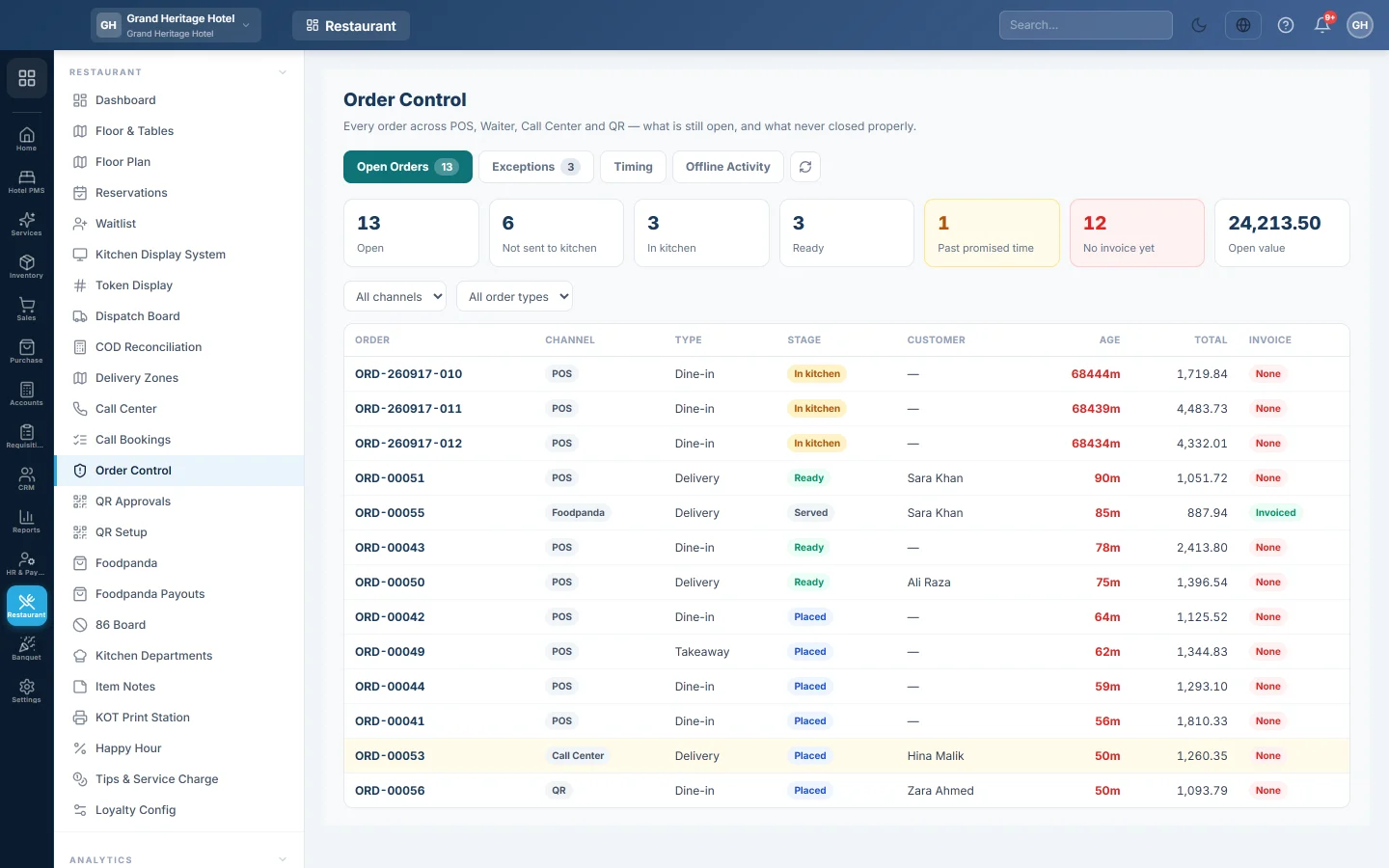
The steps use several screens; each step names its screen. Start at Restaurant → Restaurant → Order Control.
1. Settle every open order
- On the till, click 📋 Open. Settle each order still listed, see Take a dine-in order at the table.
- Click Held Orders. Recall and settle any parked order, or delete the ones that will not be paid.
- On Order Control, check Open Orders is empty for today.
- On the Exceptions tab, look at Served, never billed and Cooked, not sold. Each one is food that left the kitchen without a bill.
2. Clear the kitchen
On the Kitchen Display System, every ticket should be bumped to served. A ticket left on the board is a dish that was never cooked or never marked.
3. Finish the deliveries
- On the Dispatch Board, mark every delivered order as delivered, or RTO if it came back.
- On COD Reconciliation, pick each rider, count their cash and click Post Remittance.
- If you use Foodpanda, check today's orders on Foodpanda.
See Run a delivery from phone call to cash for the full delivery flow.
4. Clock the waiters out
Each waiter taps Clock Out in the waiter app. Their orders and tips are credited to the shift they clocked in for. See Use the waiter app.
5. Pay out tips and service charge
On Tips & Service Charge, open the Pool tab and share out the day's pool to staff.
6. Close the cashiers' shifts
Each cashier counts the drawer and closes their shift, and the manager prints the Z-Report. See Open and close a shift and Z-Report (End of Shift).
7. Look at the day
Open the restaurant Dashboard for the day's sales, covers, kitchen times and food cost.
Common questions
An old order is still open from yesterday. Open it from 📋 Open on the till and settle it if the guest paid. To drop an unpaid order, load it, click ⏸ Hold Order, then click the bin button on it under Held Orders and confirm. An order that was already in the kitchen keeps its table until you discard it. Until then it shows under Stale open on Order Control.
A shift closed but an order is still open. The order is not lost. Settle it on the next shift; it posts on the day you settle it.
The Z-Report cash does not match. Check that every rider's cash was posted on COD Reconciliation, and that cash tips were not put in the drawer. See Tips & Service Charge.
谢谢。 如果仍需帮助,请发邮件至 info@eloerp.net。