Run a delivery from phone call to cash
The whole home-delivery day in order, from booking a phone order to the kitchen, the rider and the cash on delivery being posted.
A home delivery passes through four screens: the call centre books it, the kitchen cooks it, the dispatcher sends it with a rider, and the cashier takes the rider's cash. This page puts them in order.
Before you begin
- Delivery & riders and Call centre are switched on for your company by your service provider.
- You have Delivery Zones for the areas you serve, each added while switched to the branch that delivers.
- Your riders are users with the Rider role, and your agents have the Call Center role. See Users & Roles.
Where to find it
Everything is under Restaurant → Restaurant: Call Center, Call Bookings, Kitchen Display System, Dispatch Board and COD Reconciliation.
1. Book the order
On Call Center, find or add the caller, pick their address, add the dishes, set Promised in and the Payment, choose 🍳 Send to Kitchen and click Book Order.
If the customer is not ready yet, choose ⏸ Hold Order instead. Send it later from Call Bookings.
2. Cook it
The KOT reaches the kitchen. The cook marks it ready on the Kitchen Display System when it is packed.
3. Send it with a rider
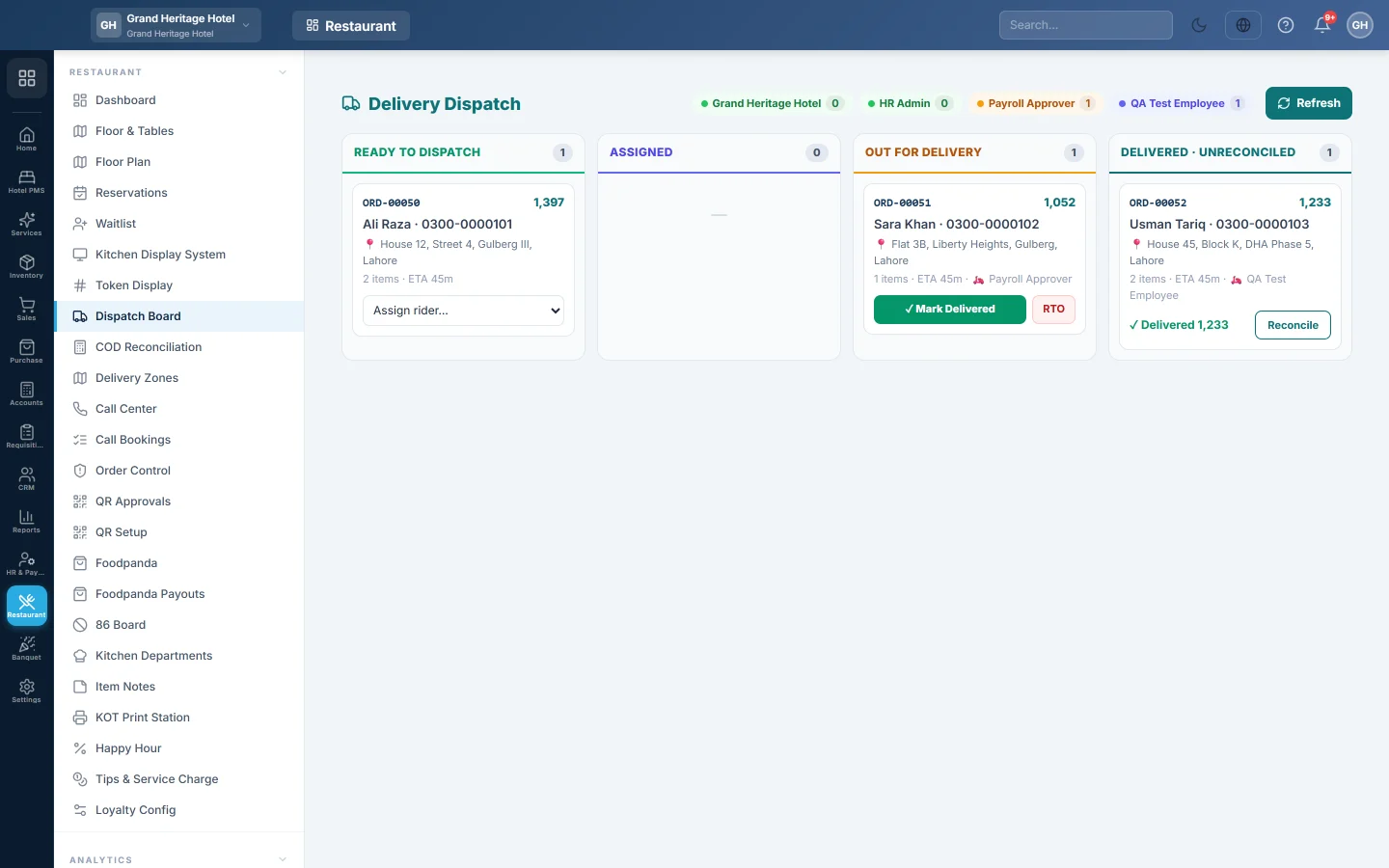
- On the Dispatch Board, the order appears in Ready to Dispatch.
- Pick the rider in Assign rider….
- Click 🛵 Out for Delivery when the rider leaves. A rider using the rider screen taps Picked Up instead.
4. Mark it delivered
Click ✓ Mark Delivered and enter the cash the rider collected, or let the rider tap Delivered on their phone. The sale is posted now, with the delivery fee, and the cash counts as "with the rider".
If the sale cannot be posted, the board says so and the order is not marked delivered. Fix the cause it names and mark it delivered again. An order the customer paid at the till before it left shows as Prepaid in Ready to Dispatch; the rider collects nothing.
If the order comes back, click RTO instead.
5. Take the rider's cash
On COD Reconciliation, pick the rider, tick the orders, count the cash into Cash received and click Post Remittance. Any short or over is posted with it.
6. Check at day end
Open Order Control and look at Exceptions. Taken, not delivered and Cooked, not sold show deliveries that never finished.
What happens in the books
- Mark Delivered: Rider COD Clearing is debited with the bill; sales, tax and the delivery fee are credited; stock and cost move.
- Post Remittance: Cash in Hand or the bank is debited and Rider COD Clearing is credited; any difference goes to Cash Short/Over.
At the end of the day Rider COD Clearing should only hold the cash riders have not handed in yet.
Common questions
Where do I see what each rider still owes? On COD Reconciliation, pick the rider. The rider sees the same figure as Cash in hand on their phone.
The rider has two orders. Do I post them separately? No. Pick the rider once on COD Reconciliation; all their delivered orders are listed and ticked together.
What about Foodpanda deliveries? Foodpanda's rider delivers them and Foodpanda pays you later. See Foodpanda and Foodpanda Payouts.
Thank you. If you still need help, write to info@eloerp.net.