Open and close a shift
Start the cashier's shift with the opening float, count the drawer at the end, close the shift and hand it to the manager for the Z-Report.
A shift is one cashier's time on the till, from the opening float to the final count. Every sale, return and cash movement in between belongs to it, so the drawer can be checked against Expected Cash at the end.
Before you begin
- The cashier's user has Enable Cash Register ticked under Users & Roles. Without it the till never asks for a shift and sales are not tied to one.
- The role has Access POS Terminal. Opening Sales → POS → Cash Register from the main menu needs View Cash Register. Managers who check shifts also need View X-Report (Mid-Shift) and View Z-Report (End of Shift).
- Register Mode in POS Settings decides who shares a drawer. Shift-Locked (Default) gives each cashier their own shift; Shared Register gives the branch one shift for everyone.
- To charge a shortage to the cashier, link the user to an employee, see Employees.
Where to find it
- The till asks for the opening float itself when you open Sales → POS → POS Terminal.
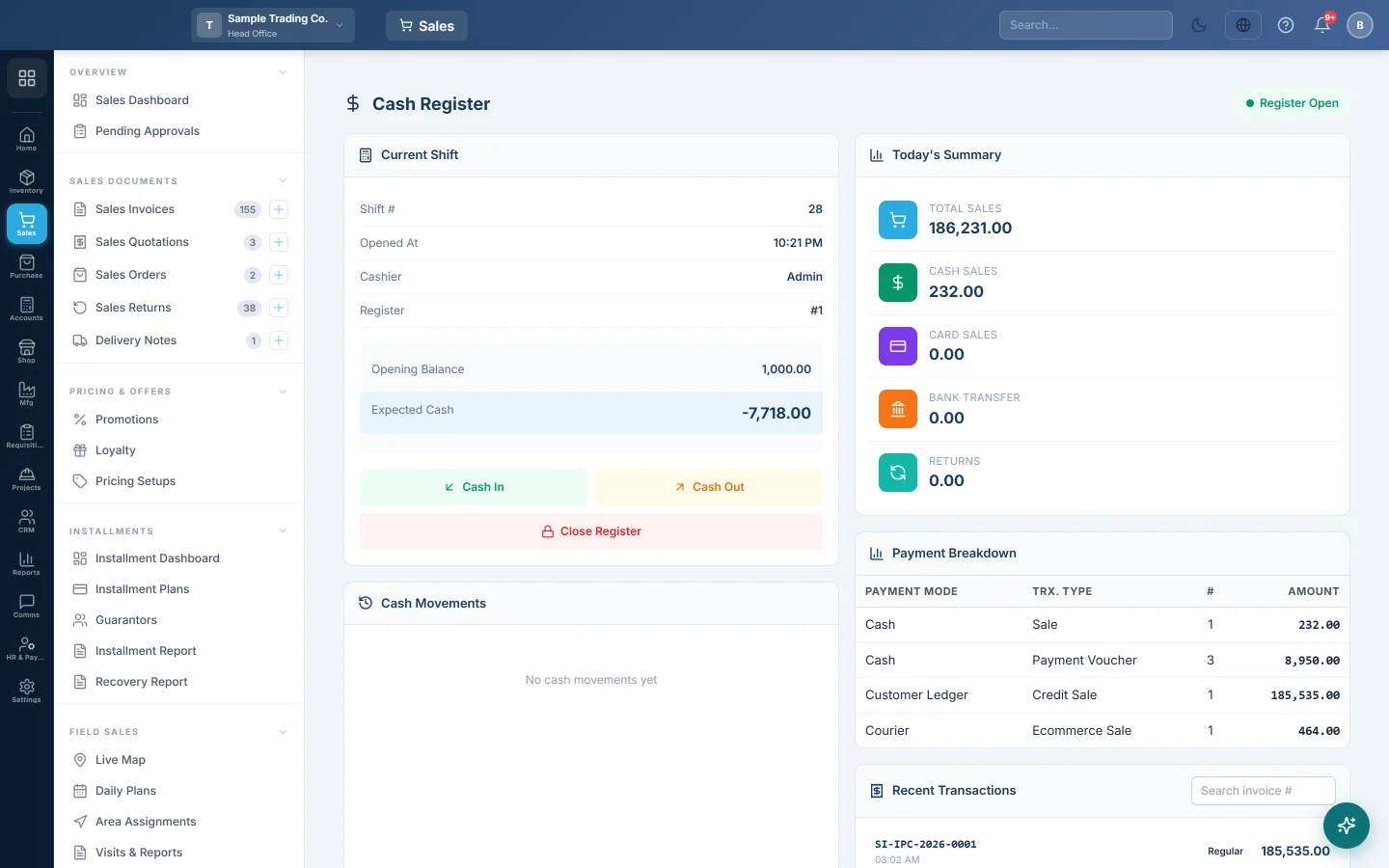
- The Cash Register tab in the till, or Sales → POS → Cash Register, opens and closes the shift.
- The X Report tab, or Sales → POS → X-Report (Mid-Shift), can also close it.
Open the shift
- Count the cash in the drawer before the first customer.
- Open the POS Terminal. The Open Cash Register screen covers the till.
- Type the count in Opening Balance.
- Leave Register Number at 1 unless your shop numbers its drawers.
- Click Open Register & Start. The till opens for selling.
There is no way to skip this screen. Log out is the only other button on it.
If you already have a shift open, EloERP resumes it instead of starting a new one. When the float you typed differs, the message says the new count was not applied. Close the old shift first if you meant to start fresh. In Shared Register mode you join the branch's open shift, and the message names who opened it.
During the shift
- Use Cash In and Cash Out on the Cash Register screen whenever cash enters or leaves the drawer for a reason other than a sale. See Cash Register.
- Check the running totals on the X Report at any time. It changes nothing.
Close the shift
Count the drawer first, then close in one of two ways.
On the Cash Register screen:
- Click Close Register.
- Check Expected Cash.
- Type your count in Actual Cash Counted. The window shows Over or Short.
- Click Close Register.
On the X Report, to count note by note:
- Click Close Shift.
- In Close Shift — Cash Denomination, enter how many of each note and coin you have. Grand Total adds them up and Diff shows the gap.
- Click Close Shift. The message asks you to open the Z-Report to finalize.
Once closed, the till asks for a new opening balance the next time someone opens it.
Finalize the shift
A manager finalizes each closed shift on the Z-Report (End of Shift). The final count is entered there, and any shortage or overage is posted. Until then the shift shows as Closed · Pending.
What happens in the books
- Opening and closing a shift post nothing. The sales and returns were posted as they happened.
- Cash In and Cash Out change the drawer figure only; accounts staff post them later from Cash movements to post.
- Finalizing the Z-Report posts the cash difference, if there is one and the manager chooses to post it.
Common questions
The till shows the Open Cash Register screen every time. Your shift is closed, or the server could not be reached. Enter the float and click Open Register & Start; an open shift is resumed, not doubled.
I typed the wrong opening balance. Close the shift straight away and open a new one with the right count. A resumed shift keeps its first opening balance.
Can two cashiers share one drawer? Yes, with Shared Register in POS Settings. Then the shift belongs to the drawer, and anyone can sell into it.
I closed the register but the manager does not see my count. Closing records your count. The manager still has to finalize the shift on the Z-Report.
Does this work on the offline till? Yes. The shift opens, runs and closes on the till without internet. The Z-Report is finalized online once the shift has uploaded. See Shifts, X and Z reports on the offline till.
Sales say "not linked to any register". They were made while no shift was open. Open the shift before the first sale. See Close the day: shift and reports.
Thank you. If you still need help, write to info@eloerp.net.