Record your first purchase
Enter a supplier's bill as a purchase invoice so the stock comes in and the amount you owe is recorded.
When goods arrive with the supplier's bill, enter it as a purchase invoice. It adds the goods to stock at the price you paid and records what you owe the supplier.
Before you begin
- The products you are buying. See Add your products.
- The supplier, unless you are paying cash on the spot. See All Suppliers.
- A warehouse for the goods to go into. See Warehouses.
- Payment methods, if you pay part of the bill now. See Payment Methods.
Where to find it
Purchase → Purchases → Invoices, then + New Invoice. The side menu also has a New Invoice quick action.
Enter a purchase invoice
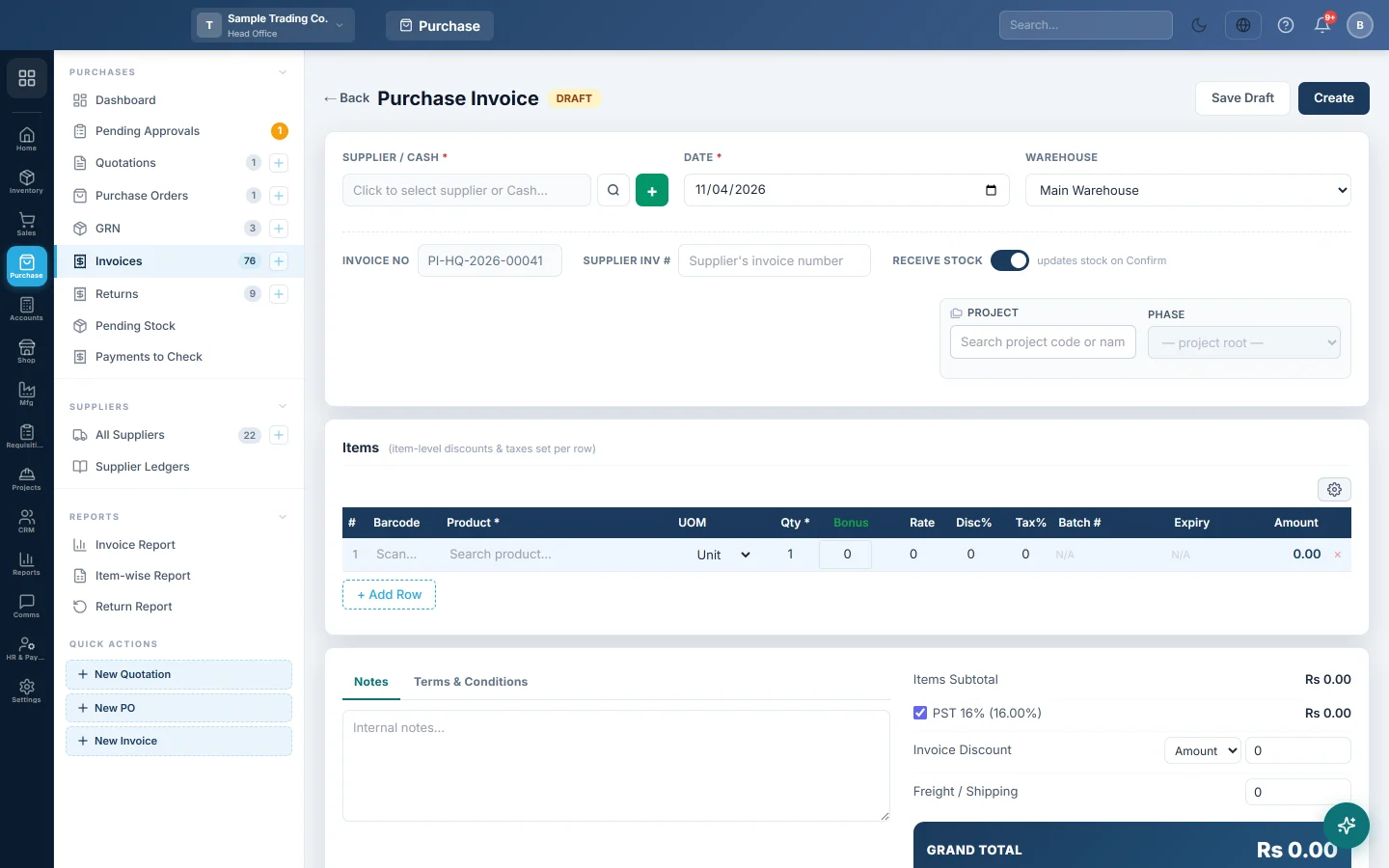
- Open Purchase → Purchases → Invoices and click + New Invoice.
- Click the SUPPLIER / CASH box. In Select Supplier, search for the supplier, or pick Cash Purchase when there is no supplier account.
- To add a supplier on the spot, click + next to the box, fill in Supplier Name and click Create & Select.
- Check the DATE and choose the WAREHOUSE the goods go into.
- Type the bill's number in SUPPLIER INV # so you can find it later.
- Leave RECEIVE STOCK on to add the goods to stock when you confirm.
- In Items, search for each product or scan its barcode. Enter the Qty and the Rate you paid, plus any Disc% or Tax% on the bill.
- For products tracked by batch, fill in Batch # and Expiry.
- Add any Invoice Discount or Freight / Shipping, and check that the GRAND TOTAL matches the bill.
- If you paid part of the bill now, enter it in Down Payment and choose the account in Paid from. Tick Full to fill in the whole amount.
- Click Create. The invoice is saved and confirmed in one step.
When you use purchase orders
If you order first and receive later, the path is longer:
- Raise a purchase order and send it to the supplier.
- When the goods arrive, receive them on a GRN. This adds the stock.
- When the bill arrives, click → Inv on the confirmed GRN in the GRN list to make the purchase invoice. The invoice then records only what you owe; it does not add the stock a second time.
See Purchase Invoices for every option on the invoice screen.
What happens in the books
When the invoice is confirmed:
- Inventory is debited with the value of the goods. If the stock is not received yet, or a GRN receives it, the value goes to Goods Received Not Invoiced instead, and the GRN moves it into Inventory.
- Tax on the bill is debited to Input Tax, freight to Freight Inward, and a discount on the whole bill is credited to Discount Received.
- The supplier's ledger is credited with the invoice total. For a Cash Purchase, the cash account is credited instead.
- A down payment posts a payment: the supplier's ledger is debited and the account in Paid from is credited.
- The average cost of each product is worked out again with the new price.
Common questions
It says "Cash purchase requires full payment". A cash purchase cannot leave a balance owing. Tick Full next to Down Payment, or pick the supplier instead of Cash Purchase.
The invoice needs approval before I can confirm it. Invoices at or above the threshold in Settings → Purchases → Purchase Preferences must be approved. A user with approval rights clicks Approve, then Confirm Invoice.
I pay the supplier later. Open the invoice and click Add Payment, or make a payment voucher. See Take a payment and pay a supplier.
I typed the wrong rate. Open the invoice, correct it and click Update. The stock value and the supplier's balance are posted again with the new figures.
Some goods went back to the supplier. Make a purchase return against the invoice. Do not edit the quantity down.
Teşekkür ederiz. Hâlâ yardıma ihtiyacınız varsa info@eloerp.net adresine yazın.