PMS Reports Hub
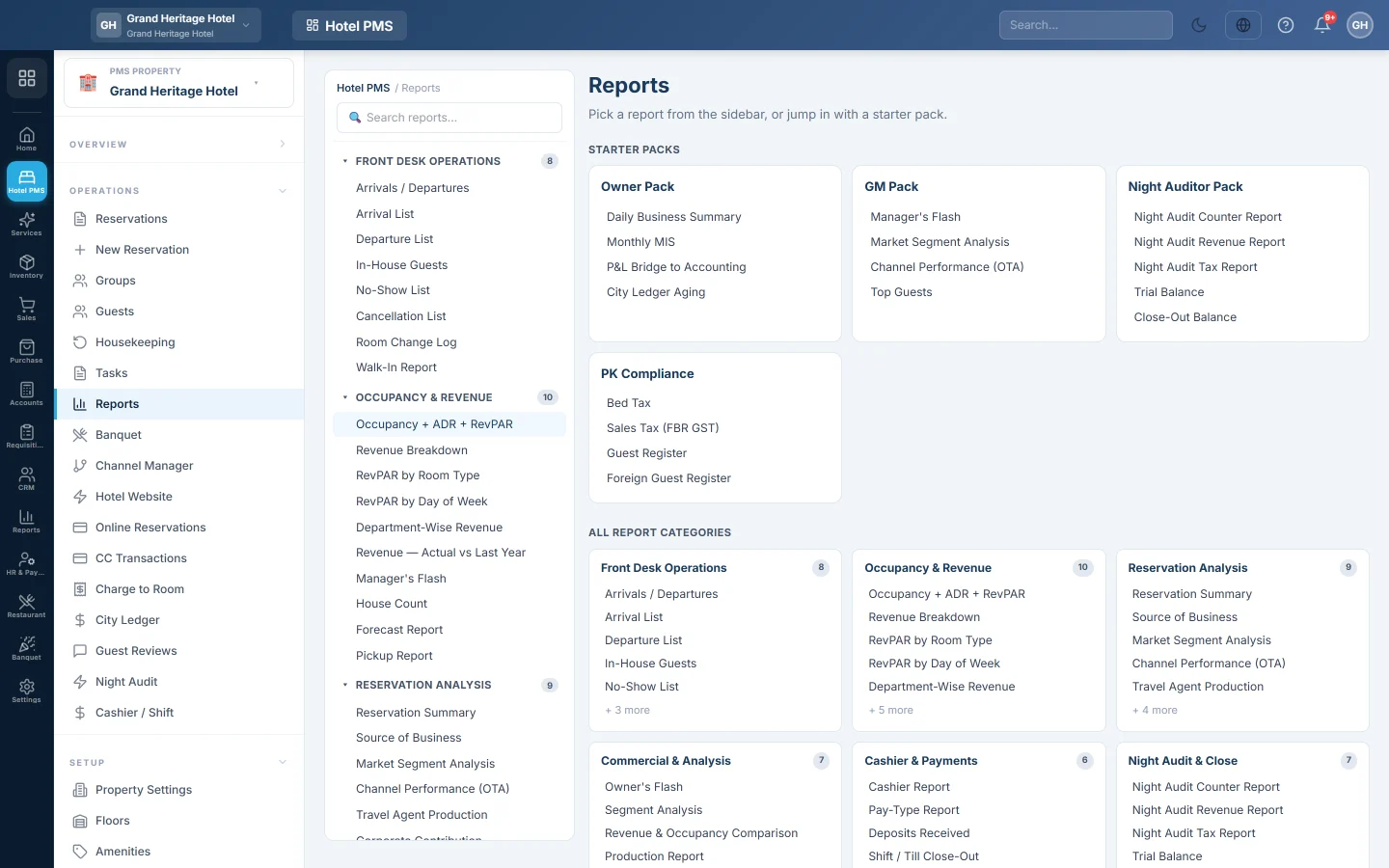
The home of the hotel reports, with more than 80 reports in 13 groups, starter packs for the owner, manager, night auditor and tax filing, search and favourites, and export to CSV, Excel or print.
The PMS Reports Hub holds every hotel report in one place: front desk lists, occupancy and revenue, reservations, cashier, night audit, housekeeping, guests, city ledger, banquet, tax and management reports. Starter packs open the set each role needs.
Before you begin
- Your role needs the hotel reports permission; the tax reports need the compliance permission. See Users & Roles.
- Reports show the hotel picked in the PMS Property box in the side menu, in its currency.
Where to find it
Open Reports → Hotel PMS Reports → PMS Reports Hub, or Hotel → Operations → Reports.
Find a report
- Starter packs open a ready set: Owner Pack, GM Pack, Night Auditor Pack and PK Compliance.
- Recently viewed and Favourites keep the reports you use most. Click the star on any report (its tip reads Add favourite) to pin it.
- Search reports… in the side list finds a report by name.
- All report categories lists every group. A report marked coming soon cannot be opened yet.
The report groups
| Group | Examples |
|---|---|
| Front Desk Operations | Arrivals / Departures, In-House Guests, No-Show List, Room Change Log, Walk-In Report |
| Occupancy & Revenue | Occupancy + ADR + RevPAR, Revenue Breakdown, RevPAR by Room Type, Forecast Report, Pickup Report |
| Reservation Analysis | Reservation Summary, Source of Business, Market Segment Analysis, Channel Performance (OTA), Group Pickup |
| Commercial & Analysis | Segment Analysis, Production Report, Rate Report, Year on Year, Agent Commission |
| Cashier & Payments | Cashier Report, Pay-Type Report, Deposits Received, Shift / Till Close-Out, Refunds / Voids |
| Night Audit & Close | Night Audit Counter, Revenue and Tax reports, Trial Balance, Close-Out Balance, Posting Audit |
| Housekeeping | Room Status Discrepancy, Assignment Sheet, Task Completion, OOO / OOS Rooms |
| Guest Intelligence | Guest History, Top Guests, VIP Arrivals, Guest Trial Balance, Nationality Mix, Repeat Guest Ratio |
| City Ledger / Direct Billing | City Ledger Aging, Direct Billing by company and travel agent, City Ledger Collections |
| Banquet & POS | Banquet Event Summary, Revenue by Hall, Menu Mix, POS Outlet Revenue, POS Item Demand |
| Compliance & Tax | Bed Tax, Sales Tax (FBR GST), Guest Register, Foreign Guest Register |
| Activity & Audit Log | Reservation Activity Log, Employee Activity, Rate Override Log, Discount / Comp Log |
| Executive / MIS | Daily Business Summary, Monthly MIS, Budget vs Actual, Group Console Rollup, P&L Bridge to Accounting |
Run, export and print a report
- Open the report.
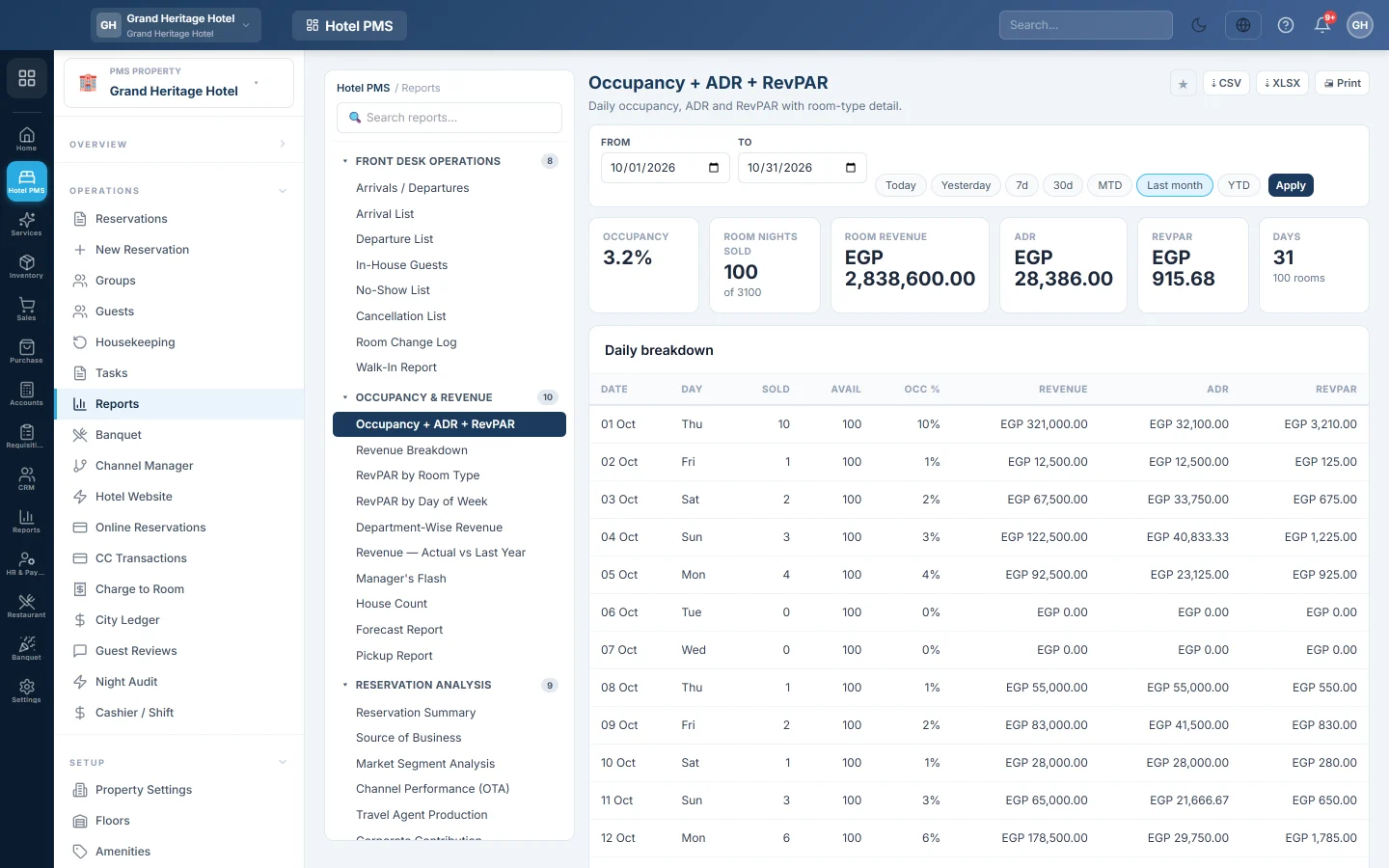
- Set From and To, or click Today, Yesterday, 7d, 30d or Last month.
- Click Apply.
- Click ⇣ CSV or ⇣ XLSX to download it, or Print for a printed copy.
To get the daily business report, manager's flash or monthly MIS by email, see Scheduled Reports.
Common questions
A report shows No data. Nothing happened in the dates picked, or you are looking at another property. Widen the dates or check the PMS Property box.
Which reports should the night auditor print? The Night Auditor Pack. See Run the night audit.
Why does Budget vs Actual show no budget? Enter targets on Budget Targets.
Do the hotel reports match my accounts? P&L Bridge to Accounting compares the hotel's revenue with what was posted to the books. See Profit & Loss for the accounts view.
Merci. Si vous avez encore besoin d’aide, écrivez à info@eloerp.net.