Run the night audit
The night auditor's routine, step by step, from clearing missed arrivals and overdue departures to ticking the checklist, closing the business date and checking the reports.
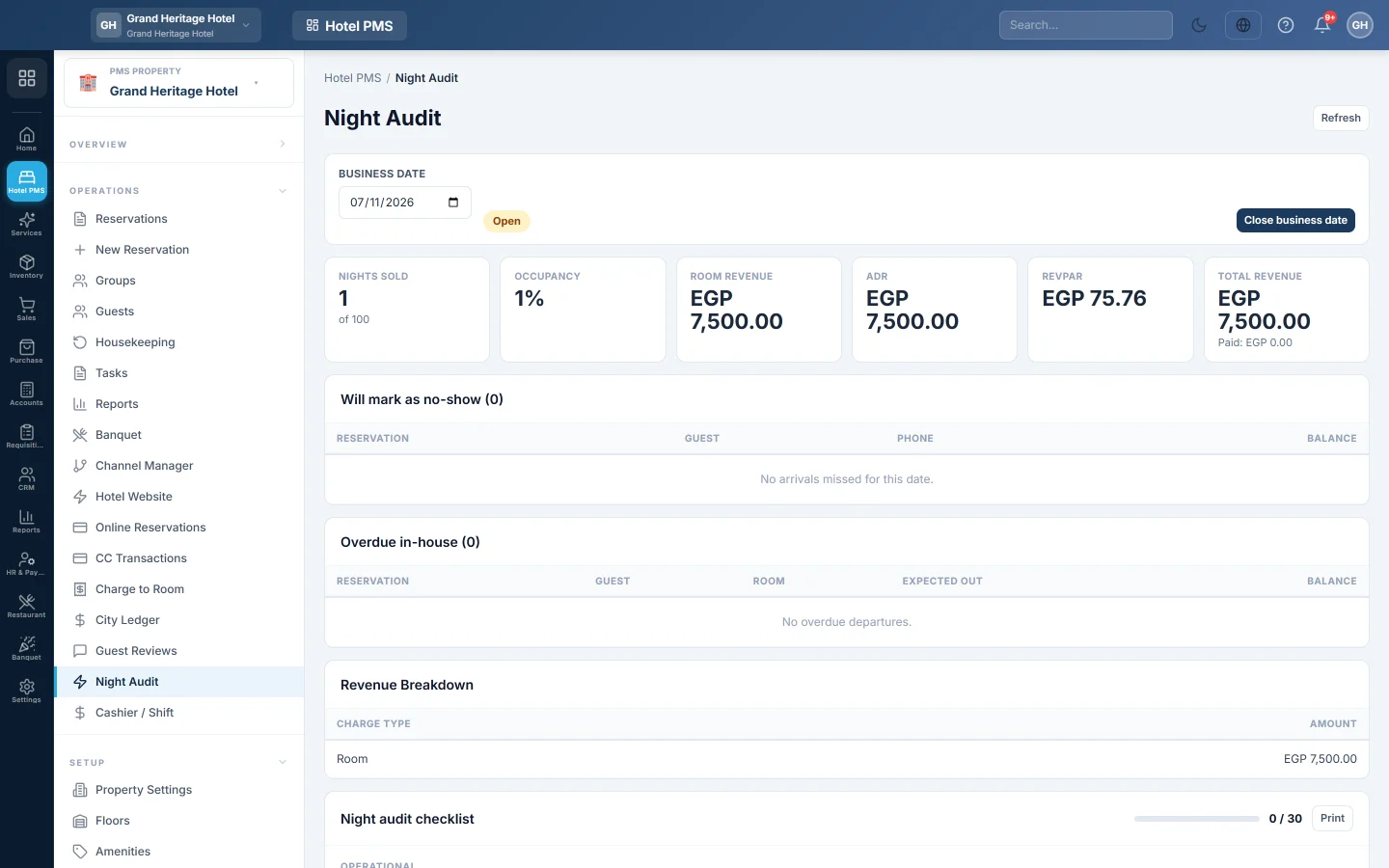
Run the night audit once for every hotel day, normally late at night when the desk is quiet. It takes a few minutes when the day's work is up to date.
Before you begin
- Your role has the night audit permission. See Users & Roles.
- The day's arrivals are checked in and the day's charges are posted, including outlet bills charged to rooms.
Where to find it
Open Hotel → Operations → Night Audit.
1. Check the business date
Make sure Business date is the day you mean to close. If it shows an earlier day, that day was never closed; close it first.
2. Deal with missed arrivals
Look at Will mark as no-show. For each guest:
- If the guest has arrived, open the booking and check them in.
- If the guest called to say they arrive late, change the booking's arrival date.
- If the guest is a real no-show and you charge a fee, mark the no-show yourself so you can charge it. See Cancel a reservation or mark a no-show.
Bookings still in the list when you close are marked no-show without a fee.
3. Deal with overdue departures
Look at Overdue in-house. Check out guests who have left, see Check out and settle a folio, or extend the stay of guests who are staying on.
4. Check the money
Compare Total revenue and Revenue breakdown with what you expect. Close your cashier shift and count the drawer, see Cashier / Shift.
5. Tick the checklist
Work through the Night audit checklist, for example:
- Operational: arrivals, departures and room statuses.
- Financial: cash, cards and folio balances.
- Audit & Security: the user activity log and voids and discounts reviewed.
- Reports & Reconciliation: the end-of-day revenue and occupancy reports produced, tax reconciled.
- Guest Experience: feedback, special requests and wake-up calls handed over.
Each tick records who ticked it and when. Click Print for a paper copy.
6. Close the business date
- Click Close business date.
- Read the summary: how many bookings will be marked no-show and how many overdue departures are flagged.
- Type Notes (optional), for example anything the morning shift must know.
- Click Close date.
The message confirms the close and the revenue posted. The day appears under Recent closes and the next day becomes the business date.
7. Print the reports
Open the night audit reports, such as the revenue and trial balance reports, in PMS Reports Hub, and leave them for the manager.
What happens in the books
Closing posts the day's charges as revenue on the business date: room, food and beverage, other income and sales tax. See Night Audit for the entries.
Common questions
I closed the day by mistake. Click Reopen last close. The revenue voucher is reversed and you can close the day again.
Can a day be skipped? No. Days are closed in order, one at a time.
What if nobody ran the audit for several days? Close each open day in turn, starting with the oldest.
Thank you. If you still need help, write to info@eloerp.net.