Dispensing & Stock
The hospital pharmacy counter. See every prescription waiting to be given, dispense it with or without a bill, and watch medicine stock, low stock and expiry.
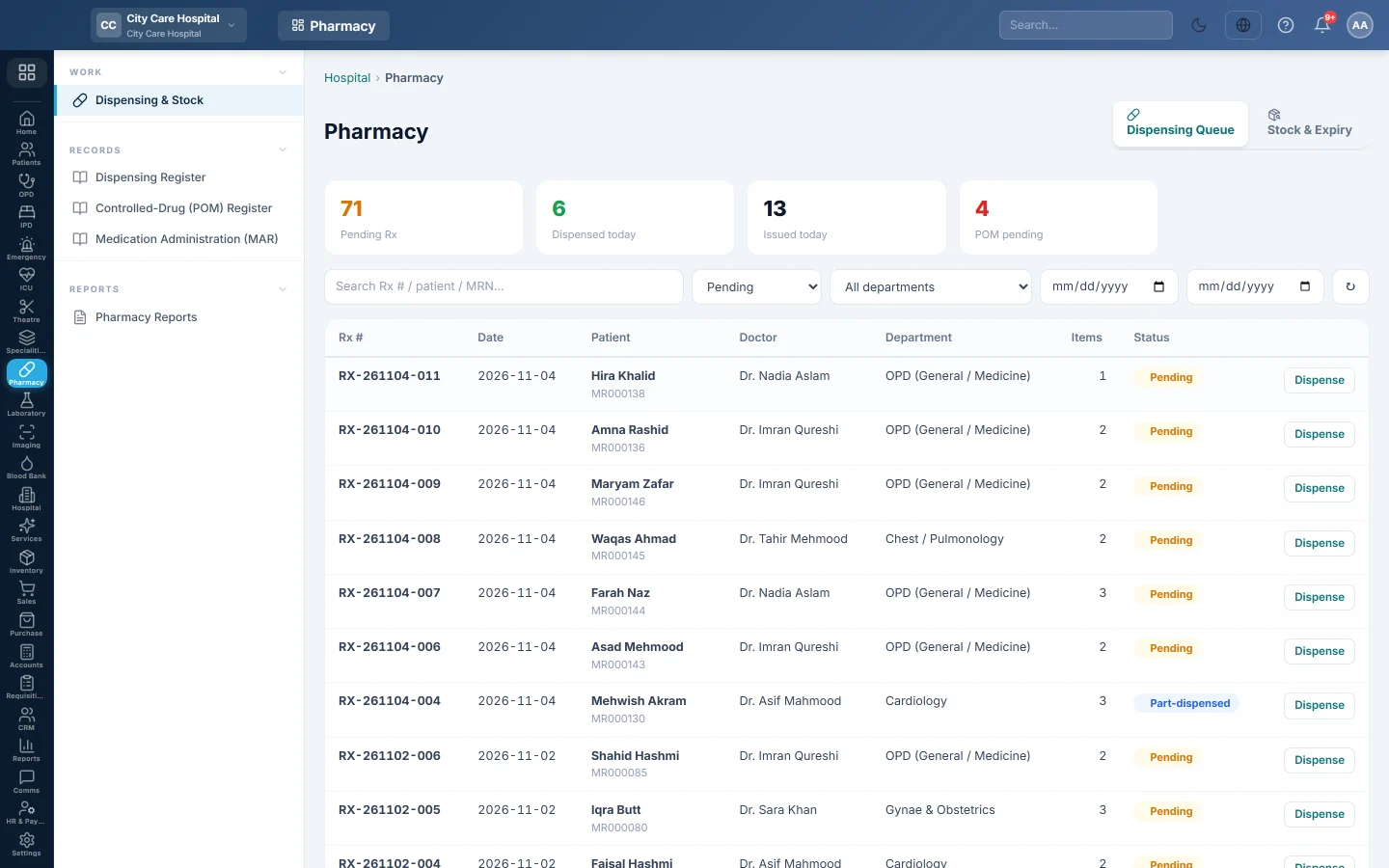
Dispensing & Stock is the pharmacy counter screen. The Dispensing Queue tab lists the prescriptions doctors have signed, and the Stock & Expiry tab shows what you have on the shelf.
Before you begin
- The Pharmacy department must be on for your hospital. Your service provider switches hospital departments on.
- Your role needs a pharmacy permission: view to see the queue, dispense to give medicines. See Users & Roles.
- Medicines are products in your inventory with a sale price. Turn on stock and, for batch-tracked medicines, batch and expiry on the product. See All Products.
- The branch has a store (warehouse) the medicines leave from. See Warehouses.
- To charge a hospital rate instead of the product's sale price, add Pharmacy (medicine, by name) rows in Price List & Tariffs.
- To take payment at the counter, open your cash shift on Cash Register. A bill to a patient's panel needs no shift.
Where to find it
Open Pharmacy → Work → Dispensing & Stock.
How prescriptions reach the queue
- OPD: the prescription the doctor writes in OPD Consultation arrives when the doctor signs the consultation. Until then it is a draft and cannot be dispensed.
- Ward: a medication order on an admitted patient's chart arrives at once, marked Ward prescription.
- Emergency: a medicine ordered on an ER visit arrives at once, marked ER prescription.
Read the queue
The four counters at the top show:
| Counter | What it counts |
|---|---|
| Pending Rx | Prescriptions with something still to give, including part-dispensed ones. |
| Dispensed today | Prescriptions fully dispensed today. |
| Issued today | Prescriptions written today. |
| POM pending | Pending prescriptions marked prescription-only. |
Each row shows the Rx #, Date, Patient with MRN, Doctor, Department, the number of Items and the Status. Pending prescriptions come first, newest at the top.
Find a prescription
- Type an Rx number, patient name or MRN in Search Rx # / patient / MRN… and press Enter.
- Pick a status: Pending (the default), Part-dispensed, Dispensed or All.
- Narrow it by All departments or by the two date boxes, which filter on the prescription date.
- Click ↻ to reload.
Dispense a prescription
Click Dispense on a pending row. The drawer lists each medicine with its directions, this branch's stock, quantity and price. Tick the lines to give, check the quantities and click the dispense button. A bill prints the patient's 80 mm slip. The full steps are in Dispense a prescription.
On a row that is already dispensed the button reads View. It shows what was given, the batch and the time it was dispensed.
Check stock and expiry
- Click the Stock & Expiry tab.
- Read the counters: Products, Out of stock, Low stock, Expiring ≤ 90d and Expired.
- Search with Search medicine name / SKU…, or pick Low stock, Out of stock or Expiring ≤ 90 days in the list.
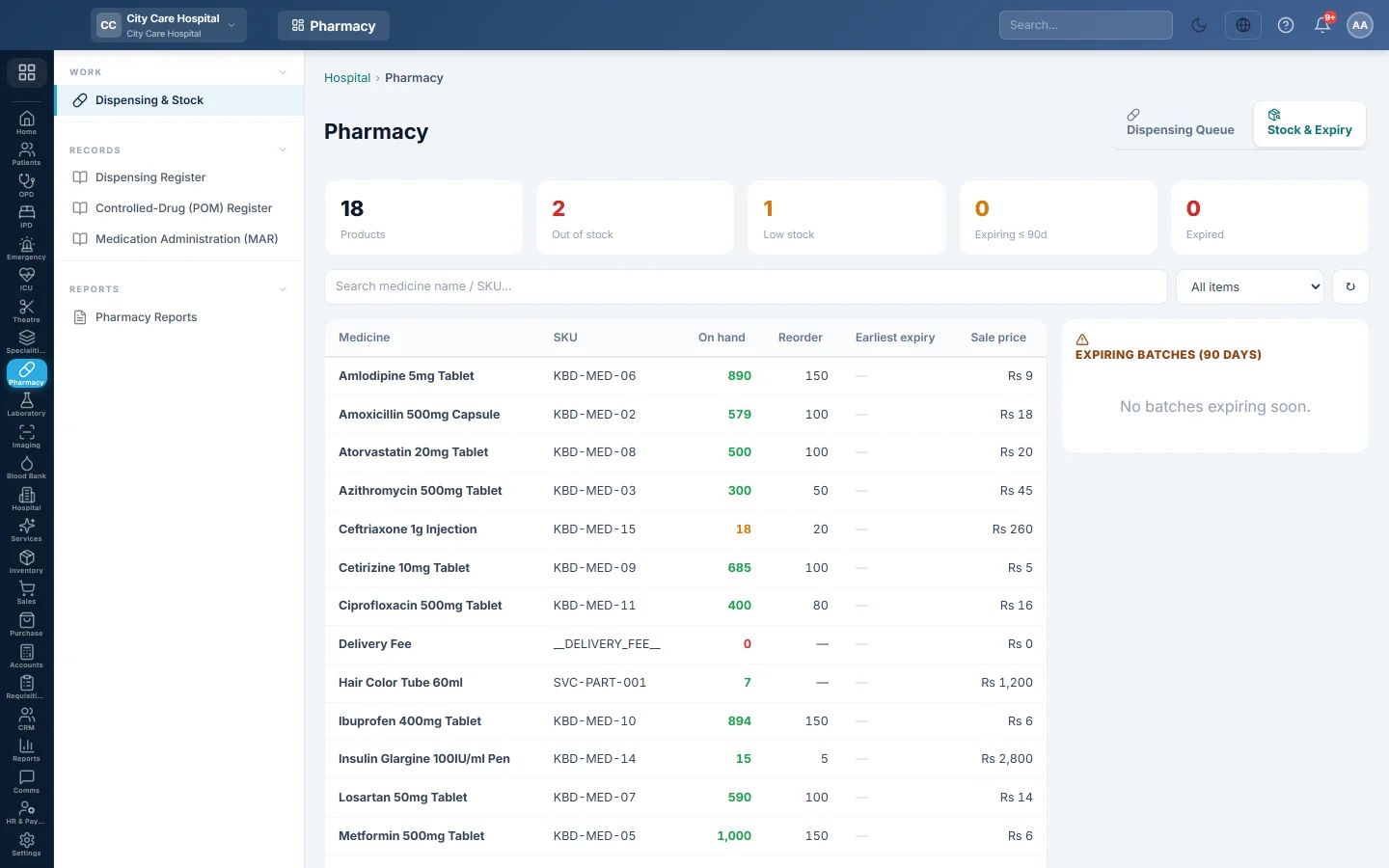
The table shows On hand, the Reorder level, the Earliest expiry of a batch still in stock, and the Sale price. Red quantities are out of stock; amber ones are at or below the reorder level. The Expiring batches (90 days) panel lists the 15 batches that expire soonest, with expired ones struck out.
Buying, receiving and moving medicines is done in Purchase and Inventory, like any other product.
Common questions
A prescription the doctor wrote is not in the queue. The doctor has not signed the consultation yet. A draft prescription only reaches the pharmacy once the consultation is signed.
A line says "free-text (no product link)". The doctor typed the medicine instead of picking it from your products. You can still give it, but no stock is taken out. It can be billed only if a Pharmacy tariff row matches its name.
A line says "unpriced". There is no Pharmacy tariff row for that name and the linked product has no sale price. Add a price, or untick the line to give it without a bill.
Why does the queue show "Part-dispensed"? Some lines, or part of a quantity, were given and the rest was left. It stays in the queue until the rest is given or the prescription is closed.
Where do I return unused ward medicines? On the patient's discharge page, before the final bill. See Take back unused ward medicines.
Where is the list of what was dispensed? See Dispensing Register and the other Pharmacy Reports.
Merci. Si vous avez encore besoin d’aide, écrivez à info@eloerp.net.