Dispensing Register
Every medicine line prescribed in a period, with patient, dose, quantity and whether the prescription has been dispensed. Print it on A4 or export it.
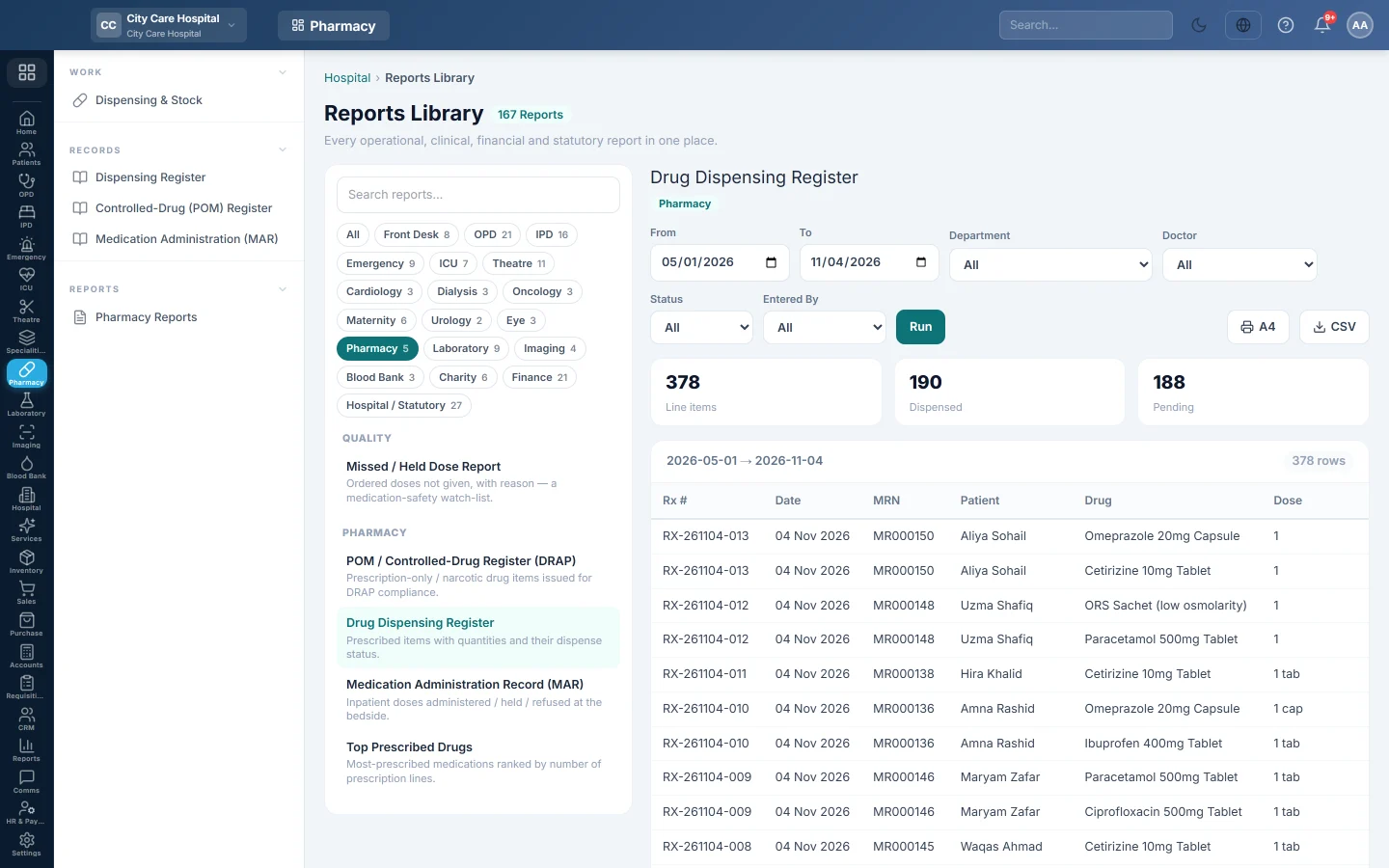
The Dispensing Register lists every medicine line on the prescriptions written in a period, one row per line, with the prescription's dispense status. Pharmacists use it to check what was asked for and what is still waiting.
Before you begin
- Your role needs permission to view hospital reports. See Users & Roles.
- Prescriptions come from the OPD, the wards and the ER, and are dispensed on Dispensing & Stock.
Where to find it
Open Pharmacy → Records → Dispensing Register. It opens the Reports Library with Drug Dispensing Register already selected and run for this month.
Run the register
- Set From and To. They filter on the prescription date.
- Optionally pick a Department, a Doctor, a Status or Entered By (the user who wrote the prescription).
- Click Run.
- Click A4 to print it with your letterhead, or CSV to download every matching row.
The boxes above the table count Line items, Dispensed and Pending.
Read the columns
| Column | What it shows |
|---|---|
| Rx # | The prescription number. |
| Date | The prescription date. |
| MRN, Patient | The patient. |
| Drug, Dose, Frequency | The medicine line as the doctor wrote it. |
| Qty | The quantity prescribed, not the quantity given. |
| Status | The prescription's status: Draft, Issued, Partial or Dispensed. |
Issued is what the pharmacy queue calls Pending; Partial is Part-dispensed. Draft means the doctor has not signed the consultation yet.
Common questions
Why does Pending include drafts? Pending counts every line whose prescription is not fully dispensed, including unsigned drafts. Pick Issued under Status to see only what is waiting at the counter.
How do I see what was actually given and from which batch? Click View on the prescription on Dispensing & Stock. It shows the quantity given and the batch per line.
The A4 print shows only part of the list. The print takes up to 2,000 rows. For more, narrow the dates or use CSV.
Where are the other pharmacy reports? See Pharmacy Reports.
Merci. Si vous avez encore besoin d’aide, écrivez à info@eloerp.net.