Pharmacy Reports
The pharmacy's reports in the hospital Reports Library — dispensing, controlled drugs, bedside doses, missed doses and top prescribed drugs — with filters, A4 print and CSV.
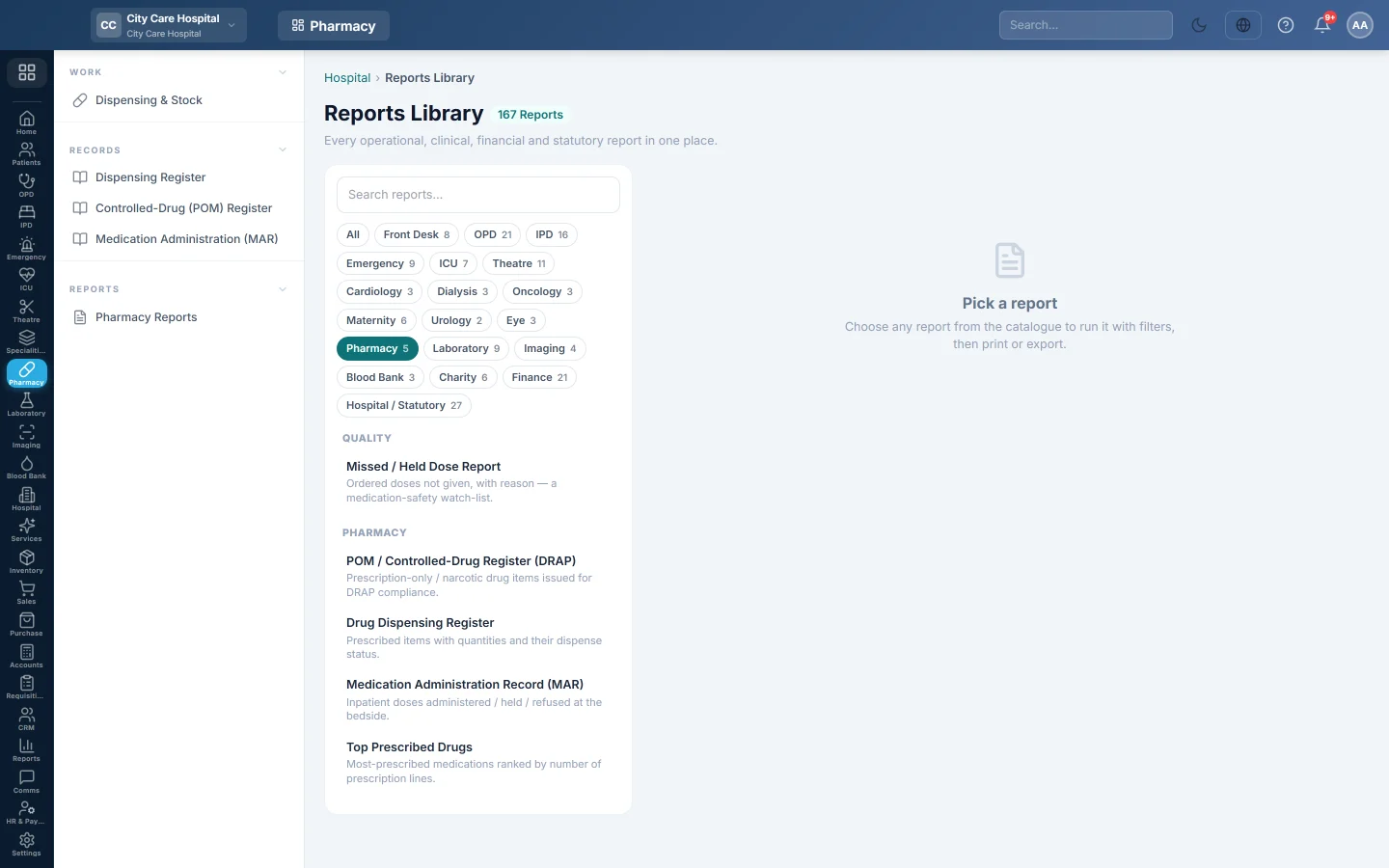
Pharmacy Reports opens the hospital Reports Library filtered to the pharmacy. Pick a report on the left, set the dates and filters, then run, print or export it.
Before you begin
- Your role needs permission to view hospital reports. See Users & Roles.
- The Pharmacy department must be on for your hospital.
Where to find it
Open Pharmacy → Reports → Pharmacy Reports. The Pharmacy chip is already selected above the report list. Click All to see every hospital report.
The pharmacy reports
| Report | What it shows |
|---|---|
| POM / Controlled-Drug Register (DRAP) | Medicine lines on prescriptions marked prescription-only. No screen marks a prescription POM yet, so it stays empty for now. |
| Drug Dispensing Register | Every prescribed medicine line with its dispense status. See Dispensing Register. |
| Medication Administration Record (MAR) | Inpatient doses given, held or refused at the bedside. See Medication Administration (MAR). |
| Missed / Held Dose Report | Inpatient doses that were held or refused, with the nurse. A medication-safety watch-list. |
| Top Prescribed Drugs | Medicines ranked by the number of prescription lines, with % of Lines, Patients and Total Qty. |
Run a report
- Click the report in the list. It runs at once for this month.
- Change From and To if needed.
- Set the other filters the report offers, such as Department, Doctor, Status or Entered By.
- Click Run.
- Click A4 to print on your letterhead, or CSV to download the full result.
The screen shows 50 rows a page; use ‹ and › to move between pages. CSV includes every row, not just the page you see.
Common questions
Where is the pharmacy's revenue? Pharmacy bills are in the Finance reports, for example Bill Register (Detailed) and Department-wise Revenue. Click the Finance chip.
Top Prescribed Drugs counts medicines that were never dispensed. Yes. It counts prescription lines, whether or not the pharmacy gave them.
Is there a stock or expiry report here? No. Use the Stock & Expiry tab on Dispensing & Stock, or the stock reports in Inventory.
The report is empty. Check the dates, and clear the Status filter. A filter left from an earlier run can hide every row.
Merci. Si vous avez encore besoin d’aide, écrivez à info@eloerp.net.