Let guests see, pay and cancel their bookings online
Switch on the Bookings card of the customer portal so hotel guests can see their stays and bill, pay the balance online and, if you allow it, cancel within your cancellation terms.
Your hotel guests can sign in to "My Account" with a code and see their own bookings. For each stay they see the dates, room, status and bill, can pay what is still owed online and, when you allow it, cancel the booking themselves.
Before you begin
- The customer portal is switched on for your company and a sign-in code can be sent by WhatsApp, SMS or email. See Customer Portal.
- A guest sees a booking only when the booking's main guest has the same phone or email as the one they sign in with. Keep the guest's phone and email correct on the booking.
- To take payments online, your Hotel Website is published and a payment gateway is active.
- Before you let guests cancel online, check your terms on Policies and on each rate plan.
Where to find it
Open Settings → Configuration → Customer Portal. The Bookings switch is under What customers see. It shows only when the Hotel module is on and you have a hotel property.
Your guests open the portal address shown on that page, or click Manage my booking on your hotel website.
Switch on the Bookings card
- Open Settings → Configuration → Customer Portal.
- Under What customers see, tick Bookings.
- To let guests cancel by themselves, also tick Guests can cancel online. Leave it off if you want guests to call you.
- Click Save.
Both switches are off until you turn them on. With Bookings on, your hotel website shows Manage my booking in its footer and on the booking confirmation page.
What the guest sees
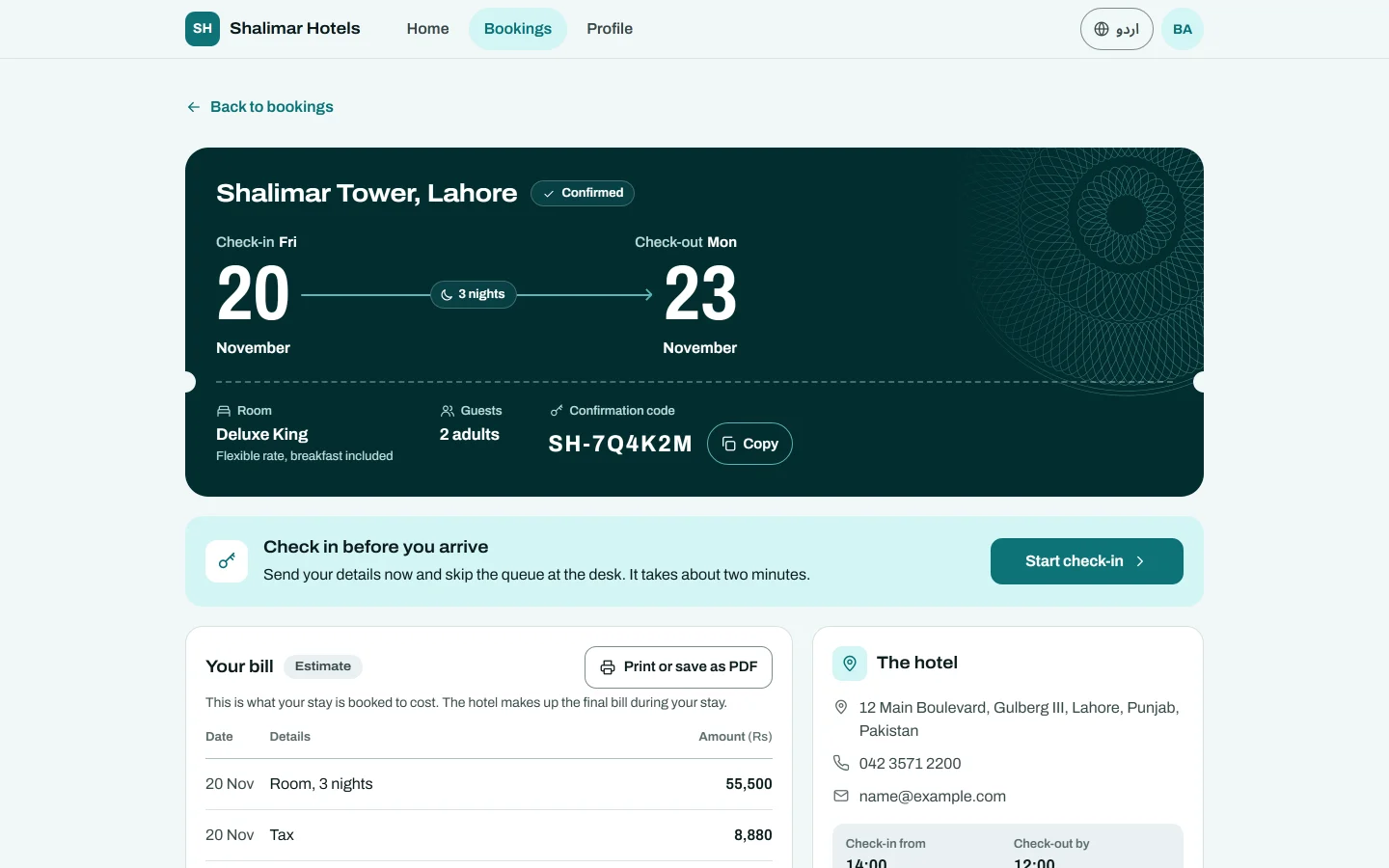
The guest's home page has a Bookings card with the next stay. View bookings lists them under Upcoming and Past. Opening a booking shows:
- The dates, Room, Guests and the Confirmation code.
- A status, for example Confirmed, Awaiting payment, Awaiting confirmation, Checked in or Cancelled.
- Your bill: the charges and payments on the folio. Before check-in it is marked Estimate and lists what the stay is booked to cost.
- The hotel: your address, phone, and the Check-in from and Check-out by times.
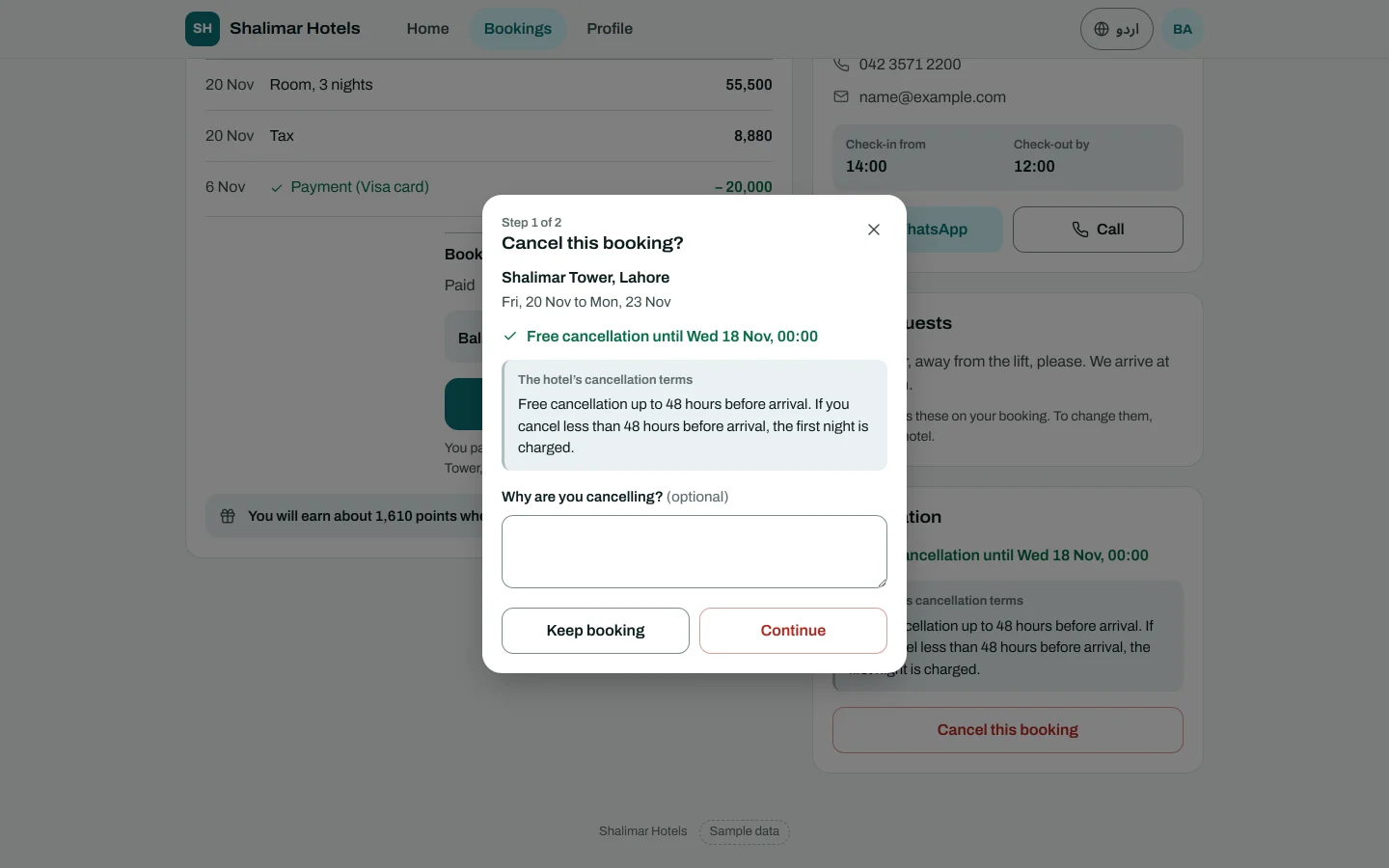
- Cancellation: your terms in plain words, and whether the booking can be cancelled here.
Internal notes, who posted a line, commission and the travel site a booking came from are never shown.
How a guest pays the balance
- The guest opens the booking and clicks Pay balance.
- Your hotel website's payment page opens for the amount still owed.
- The guest pays through your gateway and comes back to the booking.
When the gateway confirms the payment, it is posted to the booking's folio, as for a payment request sent from the desk. Nothing is marked paid before that. The payment link works for 24 hours; the guest can always get a new one.
Pay balance is shown only when the booking is Tentative, Confirmed or Checked in, at least Rs 1 is owed, a gateway is active, and the booking is in your website's currency.
How a guest cancels
With Guests can cancel online on, the guest clicks Cancel this booking, may type Why are you cancelling?, and clicks Yes, cancel booking. Before that, the booking page tells them Free cancellation until a date, You can cancel now free of charge, or Cancelling now costs an amount.
The booking is then cancelled exactly as if the desk had clicked Cancel:
- The room goes back on sale and your channel manager is told.
- A promo code use is handed back.
- The reason on the booking reads Cancelled online by the guest, with the guest's own words.
- Your staff with the reservations permission get a bell notice, Booking … was cancelled online by the guest. It says if money was paid or a fee applies.
- Your own notification rules for a cancelled reservation are sent.
Which terms apply
EloERP reads the terms in this order, and the website's booking wizard shows the same words:
- A rate plan with Refundable unticked, or a non-refundable booking: the guest cannot cancel online.
- Your default Cancellation policy on Policies: its tiers are the terms, and the fee is the one the desk's Cancel works out.
- Otherwise the rate plan's Cancellation hours: free until that many hours before arrival. After that, the guest must contact you.
Hours are counted to the start of the arrival day, on the hotel's clock.
Bookings a guest cannot cancel or pay online
The guest is asked to contact you instead for:
- Bookings from a travel site, through the channel manager, or from a travel agent. They are told to use the place they booked with.
- Group bookings, and stays billed to a company.
- Bookings on or after the arrival day, and bookings that are in house, checked out, cancelled or a no-show.
- Non-refundable rates, and a booking whose free period on the rate plan has ended.
- Any booking when Guests can cancel online is off. They still read your terms.
Travel-site bookings cannot be paid online either.
Common questions
A guest says they cannot see their booking. They signed in with a phone or email that is not on the booking's main guest. Check the guest's phone and email, or ask them to sign in with the other one.
Pay balance does not appear. Nothing is owed, no gateway is active, your hotel website is not published, or the booking is in another currency than the website.
A rate plan says 24 hours, but I never set that. New rate plans start with Cancellation hours at 24. Change it on Rate Plans before you turn on online cancelling.
The guest cancelled after paying a deposit. The deposit stays on the folio as a credit. Refund it from the folio, or keep it under your terms and tell the guest.
Can the guest change their dates online? No. They contact the hotel. The booking page has buttons to call or message you.
What else can I offer guests in their account? Pre-arrival check-in, loyalty points on stays and saved details with Book again.
Thank you. If you still need help, write to info@eloerp.net.