Labour
Keep a daily labour sheet for the site, cost own staff, daily-wage workers and contractor gangs to the project, and pay the daily wages owed.
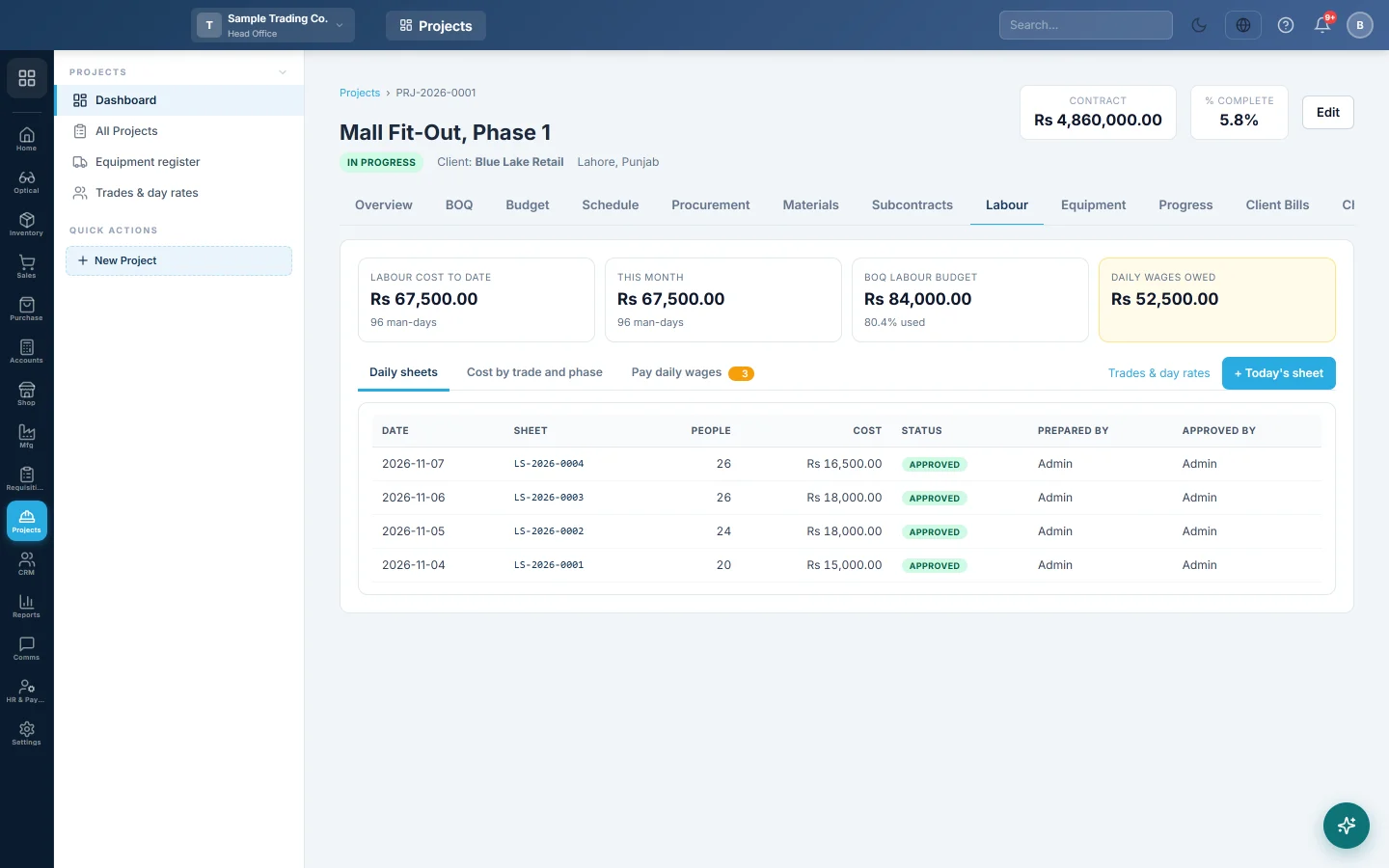
The Labour tab records who worked on site each day and what it cost. Approved sheets count as labour cost on the project, and the daily wages owed are paid from the same tab.
Before you begin
- Set the day rates for each trade under Trades & day rates.
- Own staff come from your employee list. See Employees.
- A labour contractor must exist as a supplier. See All Suppliers.
- To pay wages, you need a payment method with a cash or bank account. See Payment Methods.
- Your role needs View Site Labour Sheets and Create Site Labour Sheets. Approve Labour Sheet lets you approve and reopen. Pay Daily Wages lets you pay. See Users & Roles.
Where to find it
Open Projects → Projects → All Projects, click the project, then open the Labour tab.
Fill in today's sheet
- Click + Today's sheet. If today's sheet exists, click Open today's sheet instead.
- Check the Date. A new sheet starts from the last sheet's people, so change only what is different.
- On each line, pick Who: Own staff, Daily wage or Contractor gang.
- For Own staff, pick the Employee and type the Hours and Overtime h.
- For Daily wage, pick the Trade, type Names (optional) and the Headcount. The Day rate comes from the trade; type over it if needed.
- For Contractor gang, pick the Contractor and Trade, and type the Man-days and the agreed Rate.
- Pick the Phase the work was for.
- Add lines with + Own staff, + Daily wage or + Contractor gang.
- Click Save draft, or Submit to send it for approval.
The top of the sheet shows the People and the Cost for the day.
How each line is costed
- Own staff: (hours + overtime hours) × the employee's cost per hour. That is basic salary plus allowances, divided by the month's working days and the contracted hours.
- Daily wage: headcount × day rate, plus overtime hours × the trade's overtime rate per hour.
- Contractor gang: man-days × the agreed rate.
Approve a sheet
- Open the sheet from Daily sheets.
- Click Approve. The day's cost now counts on the project.
- To correct it, click Reopen. Its cost and any wages voucher are taken back.
A sheet whose wages are already paid cannot be reopened. Delete that payment voucher first.
Pay daily wages
- Click Pay daily wages. It lists approved daily-wage lines not yet paid.
- Tick the lines being paid now. Picked shows the total.
- Click Pay picked wages.
- Pick Paid by, the Date and a Reference.
- Click Record payment of …, which shows the picked total, such as Rs 18,000.
One payment voucher is recorded for all the lines picked.
See labour cost
- Labour cost to date and This month, with the man-days.
- BOQ labour budget: quantity × labour rate on every BOQ line, and the % used.
- Daily wages owed: approved daily wages not yet paid.
- Cost by trade and phase: man-days, hours and cost of approved sheets, by trade and by phase.
What happens in the books
- Own staff: no voucher. Payroll already books the salary, so the sheet only allocates that cost to the project.
- Daily wage: approving the sheet posts a journal voucher. Project Labour Cost is debited and Wages Payable is credited with the day's wages.
- Paying wages: a payment voucher debits Wages Payable and credits the cash or bank account of the payment method.
- Contractor gang: no voucher. The man-days stay a commitment until the contractor's purchase invoice on this project is posted.
Common questions
Why is the day rate empty? The trade has no day rate yet. Set it under Trades & day rates, or type the rate on the line.
Is own staff paid twice? No. Own staff is not paid from this tab. Payroll pays them.
I deleted the wages payment voucher in Accounts. What happens? Those lines show as owed again under Pay daily wages.
Why can I not pick a contractor? The contractor list is your suppliers. Add the labour contractor as a supplier first.
Gracias. Si todavía necesita ayuda, escriba a info@eloerp.net.