Register a donor and record a donation
Register a blood donor, run the pre-donation checks and questionnaire, and record the collection so the bag goes into quarantine for screening.
This task takes a donor from the front desk to a labelled bag in quarantine. EloERP checks the donor against your rules before it lets you record the collection.
Before you begin
- Your role needs Register Donors & Record Donations. See Users & Roles.
- Your donor rules and the Whole Blood component are set in Blood Bank Setup.
- For a replacement donor, the patient's blood request already exists on Blood Requests.
Where to find it
Open Blood Bank → Work → Donors & Donations.
Register the donor
- Search for the donor by name, phone or CNIC. If found, skip to the next section.
- Click + New Donor.
- Fill in Full name, CNIC, Phone, Sex, and Date of birth or or Age (years).
- Choose the Donor type, for example Replacement for a relative giving blood for a patient.
- Click Save.
Record the donation
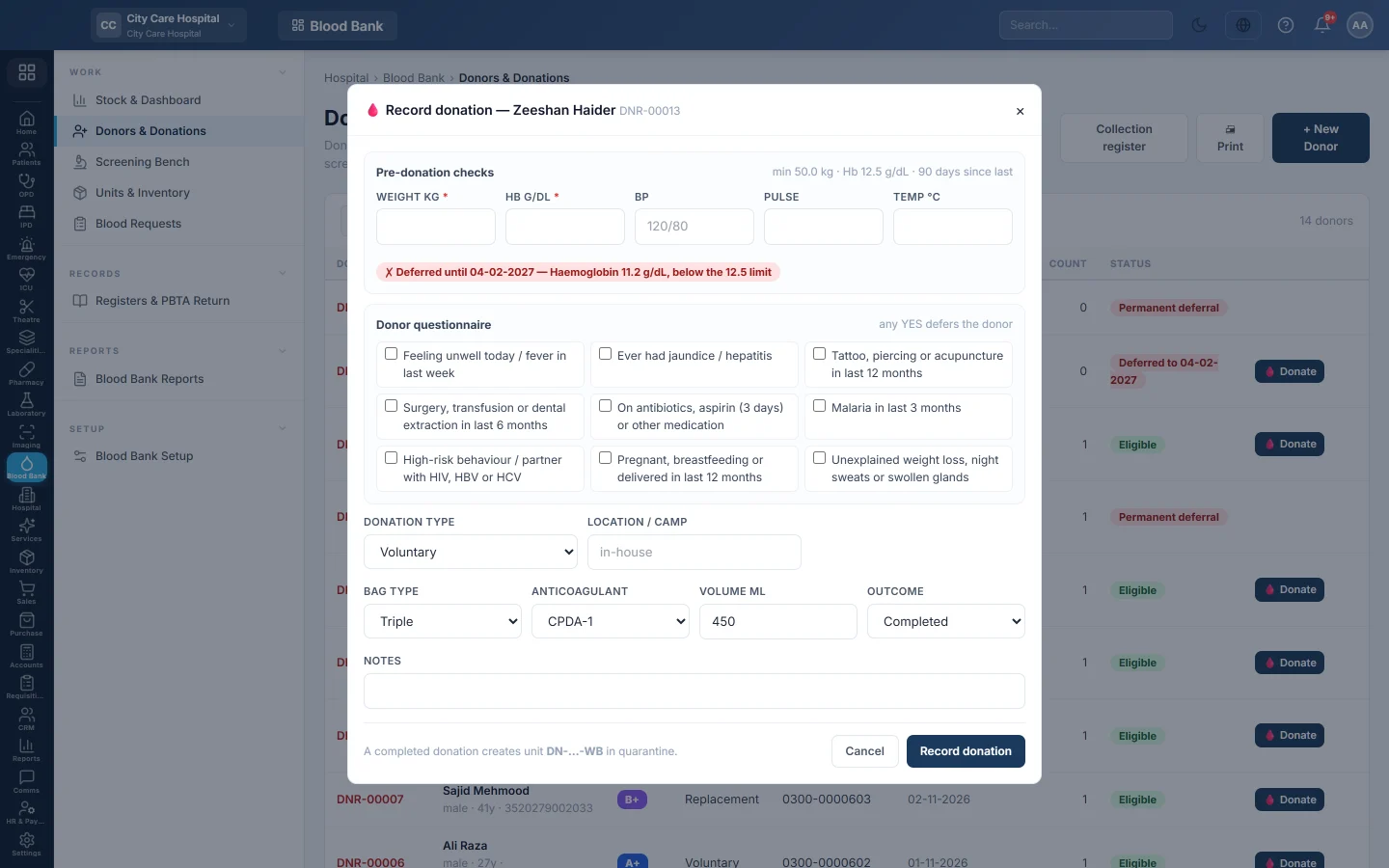
- Click 🩸 Donate on the donor's row.
- Under Pre-donation checks, enter Weight kg and Hb g/dL. Add BP, Pulse and Temp °C. The limits from your rules are shown above the fields.
- Read the result: ✓ Eligible, or the reasons the donor cannot donate.
- Go through the Donor questionnaire with the donor. Tick a box only when the answer is YES.
- Choose the Donation type. For Replacement (against a request), pick the request in Replacement for request.
- Type the Location / camp if the donation is outside the hospital.
- Check Bag type, Anticoagulant and Volume ml. The defaults are Triple, CPDA-1 and 450 ml.
- Leave Outcome as Completed. If collection stopped part way, choose Aborted and give the Abort reason.
- Click Record donation.
EloERP gives the donation a number such as DN-261104-003 and creates the unit DN-261104-003-WB in quarantine. A pending screening appears on the Screening Bench.
After the donation
- Click the donor and 🖨 Donor Card to give them a card with their donor number.
- A replacement donation adds one to the request's replacement count. With the waiver rule on, it removes one unit's charge from the patient's bill.
- An aborted donation is recorded but makes no unit and no screening.
Common questions
The form says the last donation was too recent. The donor gave blood within the minimum interval in your rules. Ask them to come back after that date.
Can I enter a donation made yesterday at a camp? The form records the current time. Enter camp donations as soon as the team returns, and type the camp in Location / camp.
The donor's group is unknown. That is fine. Screening sets the group and writes it to the donor record.
Why is the donation count not going up? Only completed donations count. Aborted ones do not.
Merci. Si vous avez encore besoin d’aide, écrivez à info@eloerp.net.