Blood Requests
Receive blood requests from the wards, ER, theatre and OPD, then group the sample, reserve and cross-match units, issue them, bill them and record the transfusion.
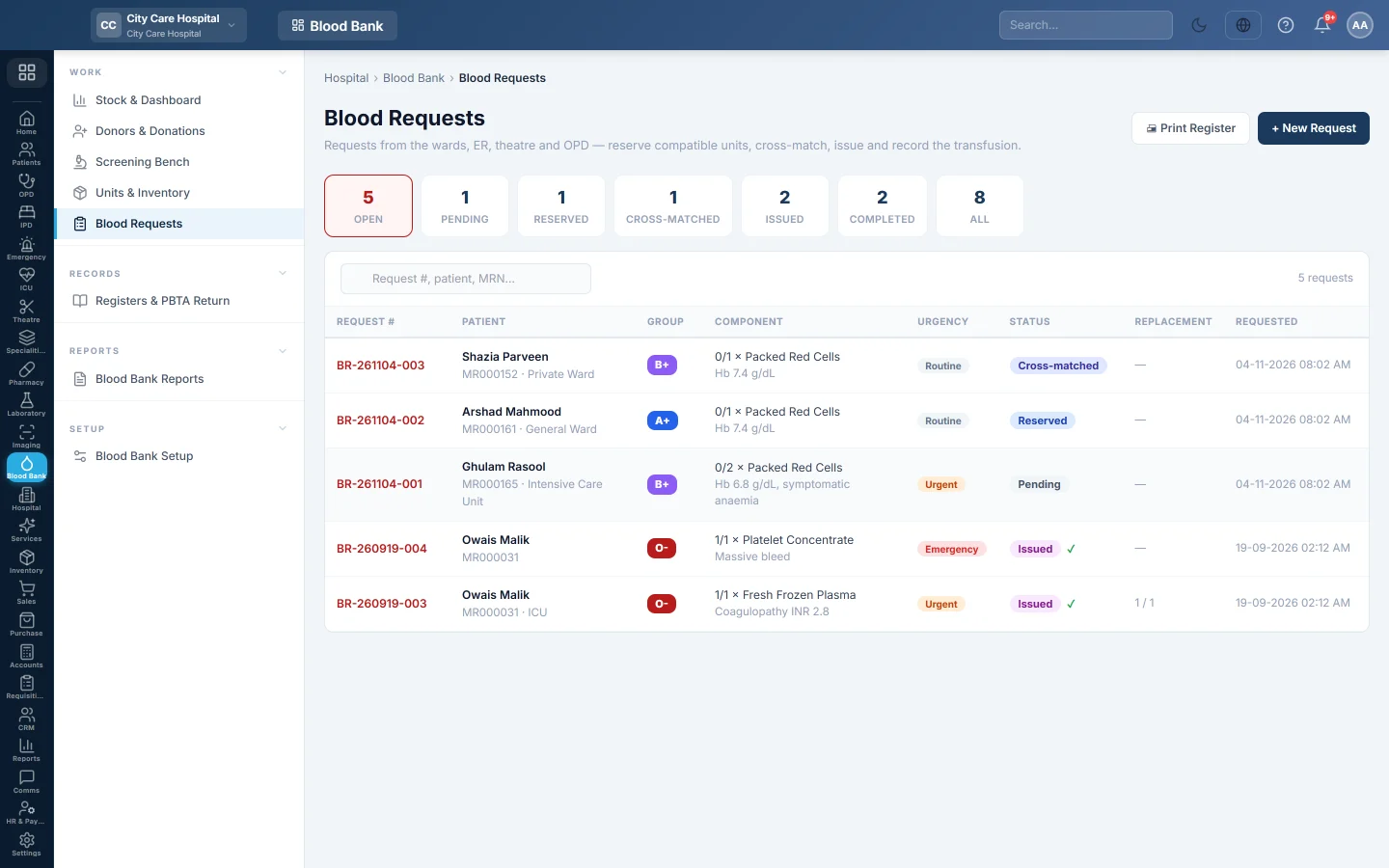
Blood Requests is where the blood bank works on each patient's request, from the sample to the transfusion. Every request has a number such as BR-261104-001 and its own page with units, cross-matches, issues and a timeline.
Before you begin
- Raising a request needs Raise Blood Requests. Reserving, cross-matching and issuing need Reserve, Cross-match & Issue Units. Billing needs Bill Blood Units. See Users & Roles.
- The patient must be registered in EloERP with an MRN. See Register Patient.
- Doctors and nurses can also click Request Blood on the admission chart, the ER visit or the OT case. Those requests land on this list.
Where to find it
Open Blood Bank → Work → Blood Requests.
Find a request
The counters at the top filter the list: Open, Pending, Reserved, Cross-matched, Issued, Completed and All. Open covers every request still being worked on, including those with units already issued. Search by request number, patient name or MRN.
The Component column shows units issued against units asked for, for example 1/2 × Packed Red Cells. Replacement shows donors provided against donors required.
Raise a request at the blood bank
- Click + New Request.
- Search for the Patient.
- Choose the Component, the number of Units and the Urgency: Routine, Urgent or Emergency (uncrossmatched allowed).
- Pick the Patient group (sample) if the sample is already grouped, the Requesting doctor and the Ward / unit.
- Optionally set the Source, the Replacement donors required and the Indication.
- Click Create request. The request page opens.
Work a request
On the request page:
- Click Record sample group and choose the group found on the pre-transfusion sample.
- Click Reserve compatible units and tick units. Only in-stock, unexpired, compatible units are listed, oldest expiry first.
- Click Cross-match on each reserved unit and save the result.
- Click Issue on a cross-matched unit and say who it goes to and who collected it.
- Click Record transfusion when the ward reports back.
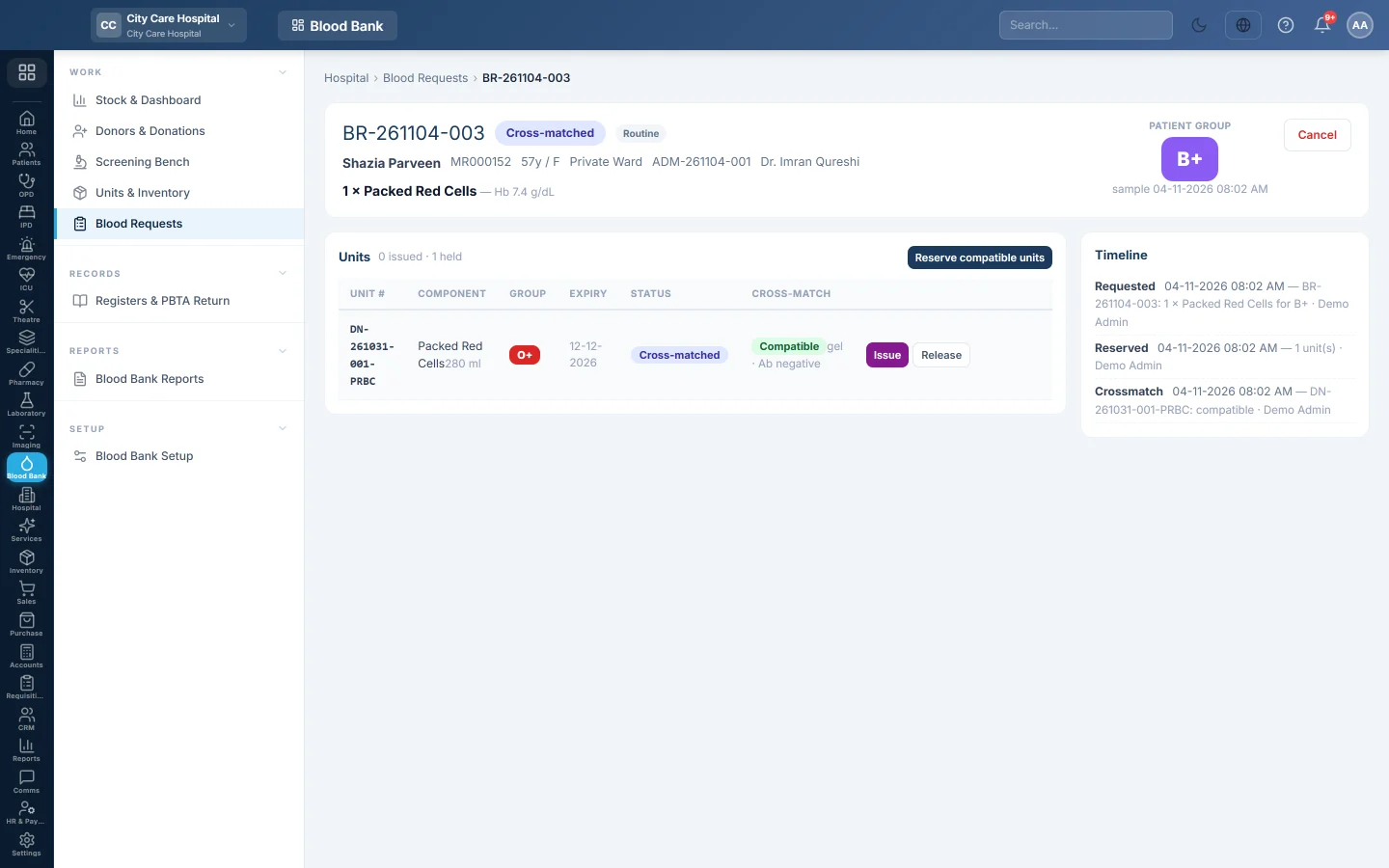
Step-by-step: Cross-match and issue blood and Record a transfusion and a reaction.
Bill the request
- Click 💵 Bill once units are issued.
- Check the units and their prices. Replacement donors waive units when your rules say so.
- Choose the Payment Method and any Discount.
- Click Collect & Bill. An 80 mm receipt prints.
Each unit is charged the patient's panel price for the component, when Price List & Tariffs has one under Blood Component (by name). Otherwise it takes the price on the unit, or the component's price in Blood Bank Setup.
When some units still have no price, tick give them free and bill the rest. When no unit has a price, the button reads Issue free and nothing is collected. The request then shows ✓ Issued free.
You need an open cash shift on the Cash Register to collect money. When replacement donors cover every unit, the button reads Mark waived and nothing is collected.
What happens in the books
Billing makes a hospital bill, listed on Hospital Bills, and posts a voucher. Cash, or the bank account of the payment method, is debited with the amount collected. Blood Bank Revenue is credited with the units' total, and a discount is debited to Discount Allowed. Waived units are not billed.
Cancel or release
- Release on a reserved or cross-matched unit puts it back in stock.
- Cancel on the request asks you to confirm, then returns all its reserved units to stock. A request with units issued cannot be cancelled.
Common questions
Reserve compatible units is greyed out. No sample group is recorded. Click Record sample group first.
No compatible units are listed. Nothing available of that component is compatible with the patient's group. Check quarantine on the Screening Bench.
When does a request become Completed? When the number of transfused units reaches the units requested.
The Bill shows "no price". The component has no price in Blood Bank Setup. Set the price under Components & prices, then bill again. Units issued earlier take the new price. To give the blood without charge, use Issue free.
Emergency release says the unit is held for another request. That unit is reserved for another patient. Pick another unit, or release it from that request first.
How do replacement donors reduce the bill? Each replacement donation recorded against the request waives one unit. This works when A replacement donor waives one unit charge is on in setup.
Merci. Si vous avez encore besoin d’aide, écrivez à info@eloerp.net.