Run a surgery case
Take a theatre case from pre-op to completion - WHO checklist, anaesthesia record, operative note, consumables and implants, recovery scoring, and billing the case to the patient's account.
The case page follows one operation through the theatre. Each step unlocks only when the safety steps before it are done.
Before you begin
- The case is scheduled on the OT Board. See Book an operation.
- Moving a case on and ticking the checklist need the OT operate permission. See Users & Roles.
Where to find it
Open Operation theatre → Work → OT Board and click the case.
The steps
The case moves in this order. The button at the top always shows the next step.
| Button | Status after | What must be done first |
|---|---|---|
| Send to Pre-op | Pre-op | Nothing. |
| Anaesthesia | Anaesthesia | The Sign In checklist. For a booked non-emergency case, fitness cleared and consent on record. |
| Start (Incision) | In Progress | The Time Out checklist. |
| To Recovery | Recovery | The Sign Out checklist. |
| Complete Case | Completed | The operative note signed, a lot number and UDI on every implant, and the theatre rules below. |
If a step is missing, a message says what to do first.
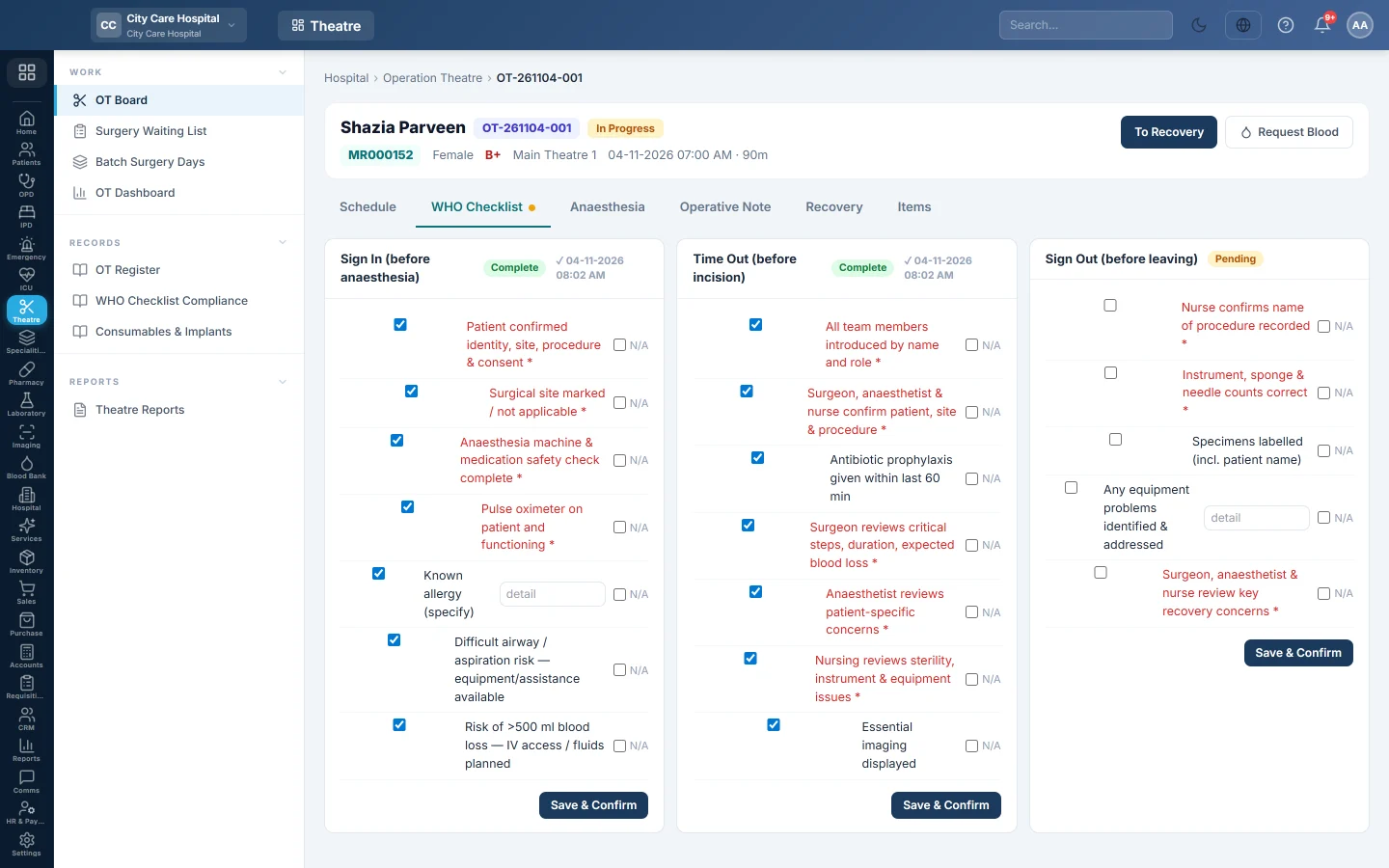
Do the WHO checklist
- Open WHO Checklist.
- Tick the items of Sign In (before anaesthesia) and click Save & Confirm.
- Do the same for Time Out (before incision) and Sign Out (before leaving) at their moments.
Each phase shows Complete and the time it was confirmed.
Keep the anaesthesia record
The Anaesthesia tab opens when the patient is sent to pre-op.
- Record the Technique, Induction time and the Airway (device, size, Cormack–Lehane, attempts, difficult airway).
- Add Intra-operative vitals with Reading now, the Drugs given, Fluids in, blood loss, urine and any Events.
- Click Save draft during the case, and Sign & lock at the end.
When Anaesthesia record required is on, the case cannot be completed until it is signed. Local anaesthesia cases are exempt.
Write the operative note
- Open Operative Note.
- Fill in the Post-op Diagnosis, Operation Performed, Findings, Incision / Approach and Closure.
- Record the Est. Blood Loss, Blood Transfused, Condition Leaving, Complications, Drains and Post-op Instructions.
- Tick Specimen sent to lab and Implants used if they apply.
- Click Sign & Lock.
Record consumables and implants
- Open Items and click Add item.
- Type the Item and choose the Type: Consumable, Implant, Drug or Equipment.
- For an implant, type the Lot, the UDI and the Expiry.
- Type the Qty and Price, and tick Billable if the patient pays for it.
Score recovery
The Recovery tab opens when the case moves to recovery.
- Click Observation now and score each Aldrete item 0, 1 or 2, with the pain score.
- Click Save observations. Repeat until the patient is ready.
- Under Discharge from recovery, choose the Destination: Ward, Intensive care or Home (day case), and the bed.
- Click Discharge from recovery.
The patient leaves recovery at an Aldrete score of 9 or more, or for intensive care. When Discharge from recovery required is on, the case cannot be completed before this.
Bill the case
- Type the Procedure / Theatre Fee.
- Click Bill to Patient Account. For a walk-in, the button is Open Day-Case & Bill and opens a day-case stay.
The fee and the billable items are added to the stay's account and settled at discharge. See Discharge a patient.
Cancel a case
Click Cancel Case, choose the Category, type the Reason and click Confirm Cancellation. A case cannot be cancelled once the incision has started.
Common questions
It says complete the Sign-In checklist before anaesthesia. Tick and confirm Sign In on the WHO Checklist tab first.
Anaesthesia is refused for fitness. The booking's pre-anaesthesia fitness is not cleared. Clear it on the Surgery Waiting List.
Complete Case says every implant needs a lot number and UDI. Fill in Lot and UDI for each implant on Items.
The patient needs blood. Click Request Blood on the case. See Blood Requests.
Merci. Si vous avez encore besoin d’aide, écrivez à info@eloerp.net.