Register a patient
Give a new patient an MR number, either with the full registration form or with the quick register in any patient box, and print their patient card.
Every patient needs an MR number (MRN) before they can get a token, a bill or a bed. You can register them on the full form, or with the quick register wherever you pick a patient.
Before you begin
- Your role needs the permission to register patients. See Users & Roles.
- Ask whether the patient has been here before, and search for them first. See Patients.
Where to find it
- The full form: Patients → Work → Register Patient.
- The quick register: the + button in any patient box, for example on Patient Queue, Appointments, the Billing Counter or Admissions.
Check the patient is not already registered
- Type the patient's phone number or CNIC in the patient box, or in the search on Patients.
- If they appear, pick them. Do not register them again.
Register a walk-in quickly
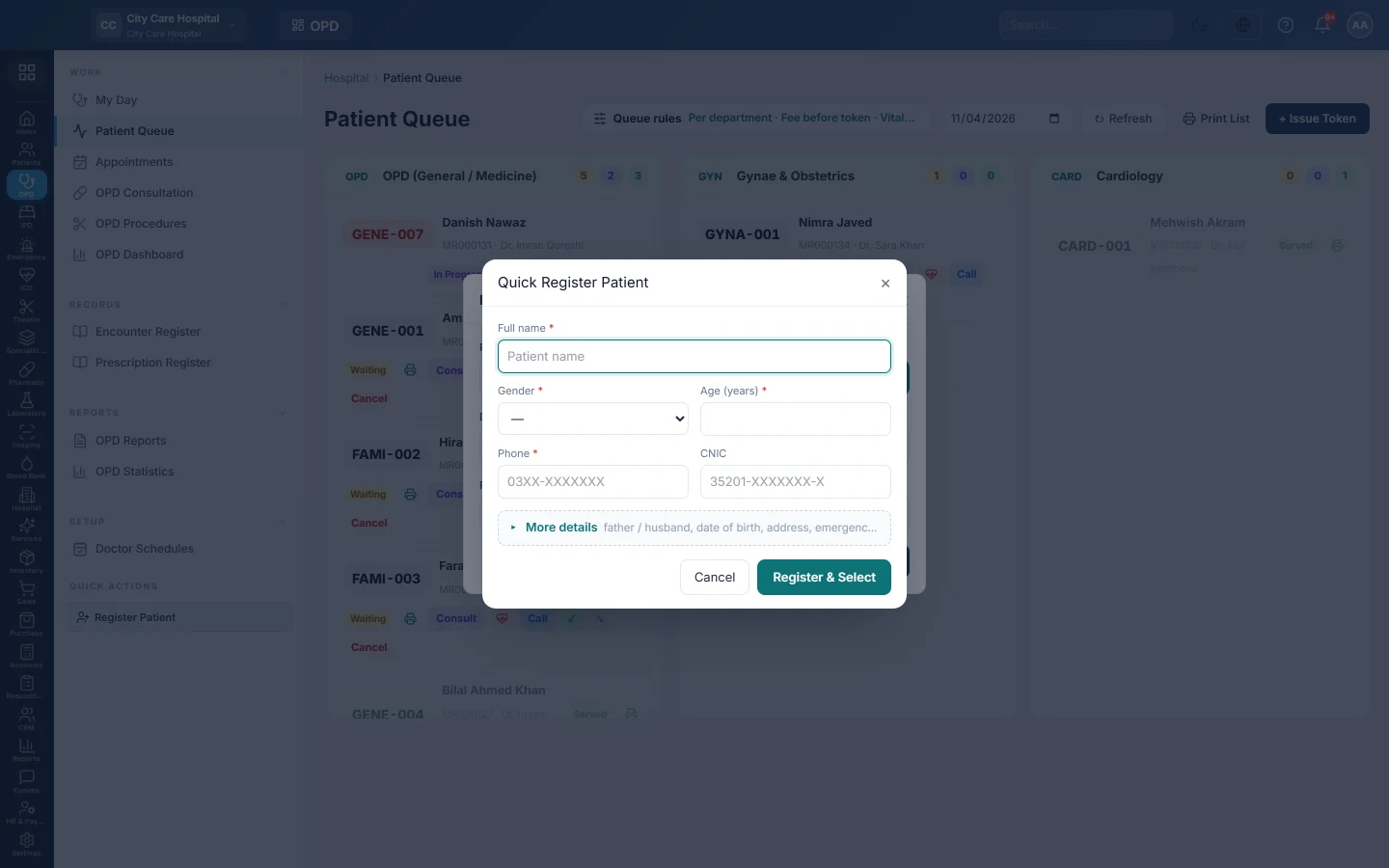
- In a patient box, click +, or click + Register new patient under the search results.
- In Quick Register Patient, fill in Full name, Gender, Age (years) and Phone. CNIC is optional.
- Click More details to add the father or husband's name, date of birth, blood group, address or an emergency contact.
- Click Register & Select.
The patient gets an MRN and is picked in the box straight away, so you can carry on with the token, bill or admission.
If the CNIC belongs to someone already registered, the window shows Already registered with their name and MRN. Click Select this patient to use that file.
Register on the full form
Use the full form when you need the payer (panel, insurance, scheme or welfare), next of kin or clinical alerts.
- Open Patients → Work → Register Patient.
- Fill in Full Name, Gender, Phone, and Date of Birth or Age (yrs).
- Fill in the other sections you need. See Register Patient for every field.
- Click Register Patient.
The patient file opens with the new MRN.
Print the patient card
- Open Patients → Work → Patients.
- Find the patient and click the printer button on their row.
The card prints on the 80 mm receipt printer. Ask the patient to bring it on every visit so the desk can find them by MRN.
What happens when you register
- EloERP gives the next MR number in sequence, such as MR000127.
- A matching customer account is opened in the patient's name, so their bills and payments can be tracked. It uses the MRN as its code.
- For a quick register, the patient's category is General (cash). Change the payer later with Edit on the patient file.
Common questions
The patient has no CNIC. Leave it empty. For a child, add the B-Form number instead.
I registered the same person twice. Use the older file from now on. Ask your administrator to archive the extra one.
Can I register a patient without a phone number? No. A contact number is required. Use a relative's number if the patient has none.
Next step after registering? Issue a token or book the visit. See Book an OPD visit and print the parchi.
Terima kasih. Jika masih butuh bantuan, kirim email ke info@eloerp.net.