Cancel a reservation or mark a no-show
Cancel a booking or mark a guest who did not arrive as a no-show, see the fee your policy charges, and waive it or post it to the folio.
When a guest cancels or does not arrive, the booking is cancelled or marked no-show. EloERP shows the fee your policy sets before anything happens, and you choose to waive it or charge it.
Before you begin
- Set your cancellation and no-show fees on Policies. Without a policy, no fee is due.
- An In-house guest cannot be cancelled; check them out instead.
- Your role has the reservation permissions. See Users & Roles.
Where to find it
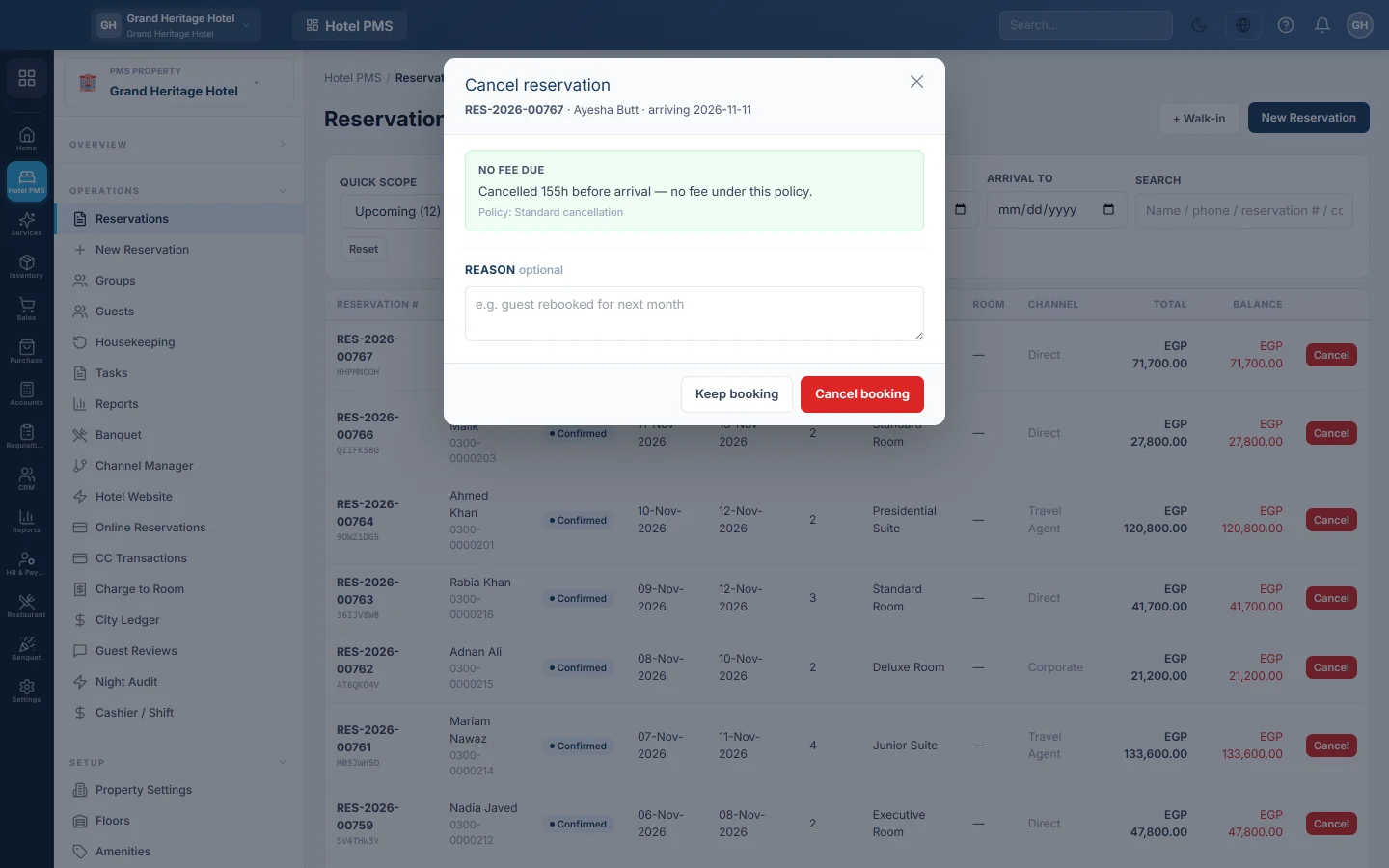
Open Hotel → Operations → Reservations. Use the Cancel button on the row, or open the booking and use Cancel or No-show at the top.
On the Front Desk (Tape Chart), click the bar and use Cancel or No-show in the side panel, or right-click a confirmed or tentative bar and pick Cancel. Every one of these opens the same window with the policy fee.
Cancel a booking
- Click Cancel on the booking.
- Read the box at the top: Policy fee due with the amount and reason, or No fee due.
- If a fee is due, pick Waive it or Charge it. For Charge it, you may lower the Amount to charge, but not raise it above the policy.
- Optionally type the Reason, for example guest rebooked for next month.
- Click Cancel booking. When you charge the fee, the button also shows the amount. Keep booking closes the window without cancelling.
The booking moves to Cancelled and its room is free again. A charged fee is posted to the booking's folio.
Mark a no-show
- Open the Confirmed booking that did not arrive.
- Click No-show.
- Read the no-show fee and pick Waive it or Charge it.
- Click Mark no-show.
A booking the guest cancelled online
When you let guests cancel in their online account, a booking can be cancelled without anyone at the desk. Its reason starts Cancelled online by the guest, and you get a bell notice, Booking … was cancelled online by the guest. No fee is charged and nothing is refunded. Open the booking and decide: post the fee as a folio charge, or refund what the guest paid. See Let guests see, pay and cancel their bookings online.
What happens in the books
Cancelling posts nothing by itself. A charged fee becomes a line on the folio. Settle the folio as usual so the fee reaches your accounts, see Check out and settle a folio. Any deposit the guest paid stays on the folio until you settle or refund it.
Common questions
The window says No cancellation policy is set for this property. Add one on Policies.
Can I undo a cancellation? No. Make a new booking for the guest.
The guest paid a deposit and gets it back. Open the folio, click Refund and pay back the credit. See Check out and settle a folio.
Which bookings can be cancelled? Enquiry, Waitlist, Tentative and Confirmed bookings. Only Confirmed bookings can be marked no-show.
Terima kasih. Jika masih butuh bantuan, kirim email ke info@eloerp.net.