Check out and settle a folio
Take the guest's final payment, settle each folio to cash, card or the company account, check the guest out, and re-open a settled folio when a correction is needed.
At departure you take the guest's payment, settle the folio and check the guest out. Settling posts the bill to your accounts; checking out frees the room and sends it to housekeeping as dirty.
Before you begin
- The guest is In-house.
- Your payment methods are set up, see Payment Methods. For a company that pays later, the company is a customer with a ledger.
- Your role has the folio payment, settle and check-out permissions. See Users & Roles.
Where to find it
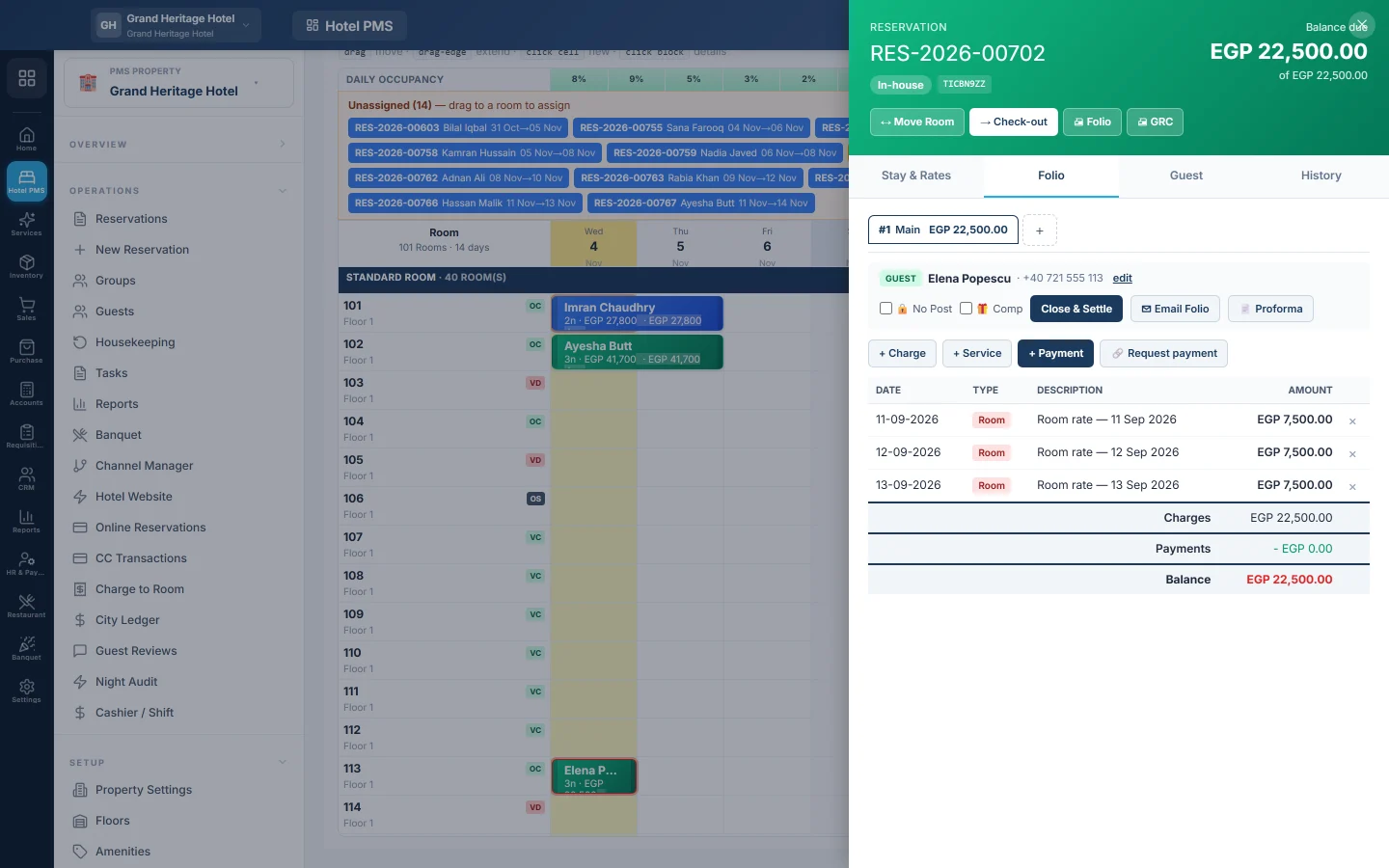
On the Front Desk (Tape Chart), click the guest's bar and open the Folio tab. On the reservation page, click Folios & settlement… in the folio card; it opens the same panel on its Folio tab. Expected departures on Reservations lists today's leavers.
Take the payment
- Print or email the bill first if the guest wants to check it: Proforma prints the open bill, ✉ Email Folio sends it.
- Click + Payment.
- Pick the Method, for example cash or card, and enter the Amount. Add a Reference (optional), such as the card slip number.
- For foreign cash, tick Guest is paying in foreign cash and enter the Foreign amount. See Exchange Rates.
- Click Record.
Settle the folio
- With the folio picked, click Close & Settle.
- Read the message and click Close folio.
If money is still owed, the message says the balance will be posted as AR to the folio's owner. Use this for a company that pays later; the amount then shows on City Ledger. Settle each folio of the stay the same way.
Check the guest out
- Click Check-out.
- If a balance is still due, you are asked Check out anyway?. Click Check out anyway only when the balance is billed to a company or a manager agrees.
The bar turns grey (Checked out) and the room becomes Vacant Dirty for housekeeping.
Give back a credit balance
When the guest paid more than the bill, the folio shows a credit. Click Refund, pick the Method, enter the Amount and click Refund. The money is paid out of the guest's advance deposit.
Re-open a settled folio
- Open the stay and pick the settled folio.
- Click Reverse Settlement.
- Type a reason of at least five characters. It is kept on the reversal voucher with your name.
- Click Reverse. The folio is open again; correct it and settle it again.
This needs the Manage Folio permission, or Re-open & Correct a Closed Folio for stays that have checked out.
What happens in the books
Each payment is debited to the cash, card or bank account of its payment method and credited to Guest Advance Deposits when you record it.
Settling a folio posts one voucher. Guest Advance Deposits is debited with the payments, and the owner's ledger is debited with any balance billed to them. On the credit side, charges the night audit already counted clear the Guest Ledger (In-House) account; charges not yet audited go to Room Revenue, F&B Revenue, Other Income and Sales Tax Payable. A booking from an online channel also posts its commission as an expense owed to the channel.
A complimentary folio posts no voucher. Reverse Settlement posts the opposite voucher.
Common questions
Close & Settle is missing. The folio has no charges, or it is already settled.
Check-out says a balance is due after I settled to the company. The stay still owes that amount; it now sits with the company. Click Check out anyway.
The guest left without paying. Check them out with Check out anyway, then settle the folio to the guest or company so the debt is on their ledger.
A payment was recorded twice. On an open folio, click × on the extra payment. A payment that belongs to a closed cashier shift cannot be removed until the shift is corrected.
Where do I see today's money? On Cashier / Shift.
Close & Settle said "Unbalanced voucher" on a bill with a discount. This is fixed. A discount line, such as a card promotion, a rate reduction or loyalty points, can make one revenue line of the bill negative. The settlement now books it as a debit to that revenue account, so the folio settles and the guest can check out. Try again.
Can the guest pay part of the bill with loyalty points? Yes, when you switch it on. See Use a guest's loyalty points on their bill.
谢谢。 如果仍需帮助,请发邮件至 info@eloerp.net。