Reservations
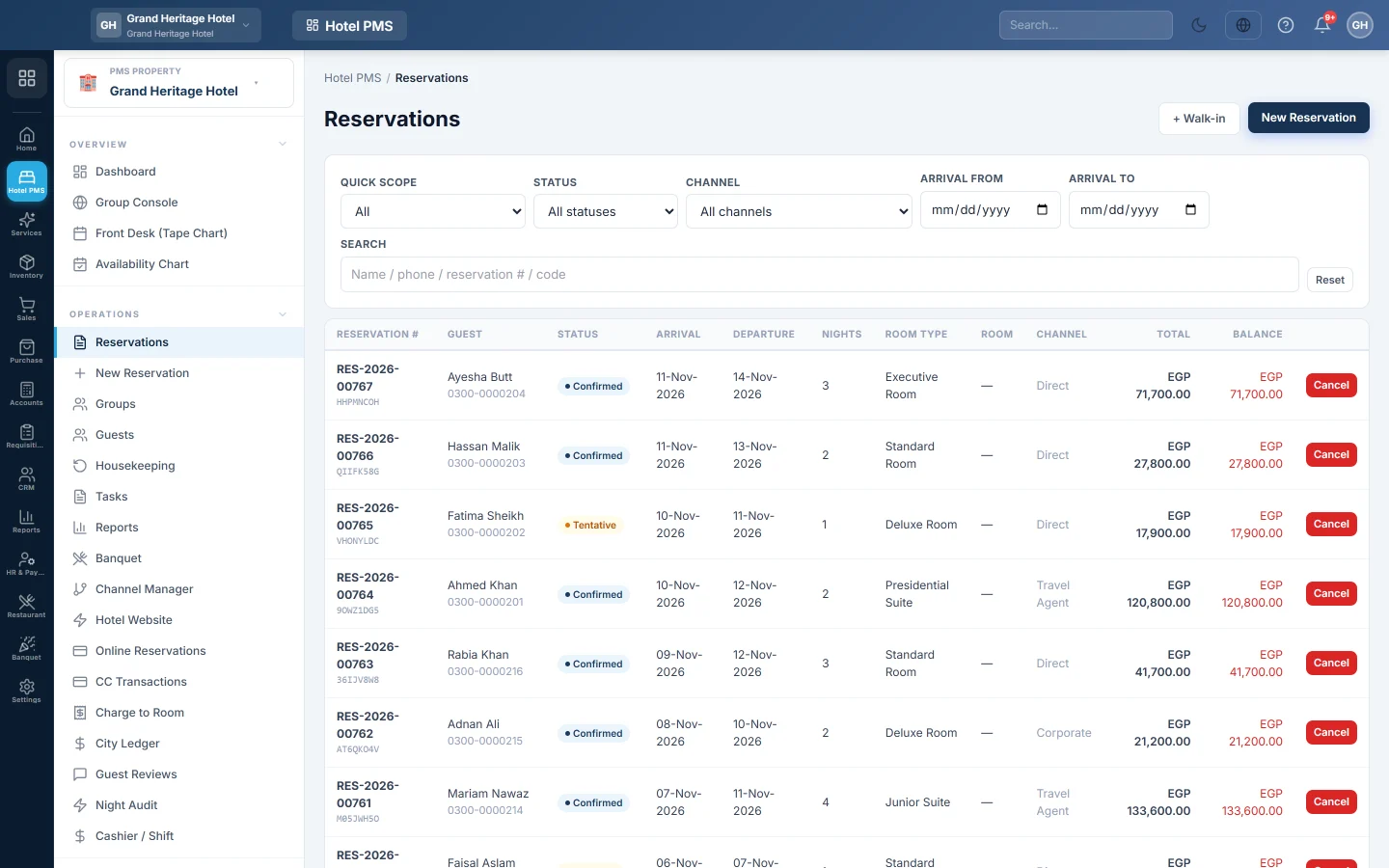
The list of every booking, with quick lists for today's arrivals, departures and in-house guests, filters by status, channel and date, and the way into each booking.
Reservations lists every booking of the hotel. The front desk uses it to see today's arrivals and departures, find a booking by name or number, and open it.
Before you begin
- Your role needs the reservations permissions. See Users & Roles.
- The list shows the hotel picked in the PMS Property box in the side menu.
Where to find it
Open Hotel → Operations → Reservations.
Find a booking
- Search: type a name, phone, reservation number or confirmation code.
- Quick scope: pick a ready-made list. The number after each one is how many bookings it holds today.
- Expected arrivals and Expected departures: the shift's to-do lists; they shrink as guests check in or out.
- Arrived today, Departed today, In-house, Upcoming and VIPs.
- Pick-ups today, Drop-offs today, Meal plans and Newspapers: today's service lists, when your hotel uses those fields.
- No-show and Cancelled.
- Status, Channel, Arrival from and Arrival to narrow the list further. Reset clears every filter.
Click a row to open the booking.
Read the list
| Column | What it shows |
|---|---|
| Reservation # | The booking number, with the confirmation code under it. |
| Guest | The main guest and their phone. no profile means a name was taken but no guest record is linked. |
| Status | Enquiry, Waitlist, Tentative, Confirmed, In-house, Checked out, Cancelled or No-show. |
| Arrival, Departure, Nights | The stay. |
| Room Type, Room | What was booked and the room assigned, or —. |
| Channel | The online channel, or the source such as direct or walk-in. |
| Total, Balance | The booking total and what is still owed; red when money is due. |
Add a booking
- Click + New Reservation for the full booking form. See New Reservation.
- Click + Walk-in for a guest standing at the desk.
Cancel a booking
Click Cancel on the row. A window shows the fee your cancellation policy charges and lets you waive or charge it. See Cancel a reservation or mark a no-show.
Common questions
Why is a booking missing? Check the Quick scope and Status filters, and the hotel in the PMS Property box. Click Reset to see everything.
What is the difference between Expected arrivals and Arrived today? Expected arrivals are guests still to come today. Arrived today are the ones who have checked in.
Can I see bookings from an online channel only? Yes. Pick the channel under Channel.
How do I print the arrivals list? Use the arrival and departure reports, see Arrivals / Departures.
Thank you. If you still need help, write to info@eloerp.net.