Tips & Service Charge
Add a service charge to restaurant bills, record tips at the till, and pay each day's tip and service-charge pool out to staff in cash or through payroll.
A service charge is a percentage EloERP adds to restaurant bills for your staff. Tips are recorded on the bill at the till. Both collect in a daily pool that you share out to staff on this screen.
Before you begin
- Tips must be switched on for your company. Your service provider turns on Tips. Until then this menu item is hidden and no service charge is added.
- Your role needs Manage Tips & Service Charge. See Users & Roles.
- To pay a pool out in cash, you need an open shift on the till. See Open and close a shift.
- Staff you pay must be users of your company. See Add users and give them roles.
- To pay through payroll, each of them must also be an employee in HR, linked to their user. See Employees.
Where to find it
Open Restaurant → Restaurant → Tips & Service Charge. The page has three tabs: Pool, By Staff and Settings.
Set the service charge
- Click Settings.
- Tick Enable service charge.
- Type the Rate (%), for example 5.
- Under Applies to, choose Dine-in only or All order types.
- Click Save. Saved. appears.
The rate is for the whole company. On the till in restaurant mode, the bill shows a Service Charge line with the rate. It is worked out on the bill after discounts and before tax, and no tax is charged on it. The QR menu shows it to guests too.
A bill charged to a hotel room gets no service charge.
Record a tip at the till
- On the bill, type the amount in the Tip box.
- Pick the tip type: Cash, Card or Room.
- Complete the sale.
- A Card or Room tip is added to the bill total. The guest pays it with the bill and it goes into the pool.
- A Cash tip is handed straight to the waiter. It is only recorded on the bill, for the By Staff report. It does not go into the pool.
The tip and the service charge are credited to the waiter on the order, or to the salesman when there is no waiter.
Pay out a day's pool
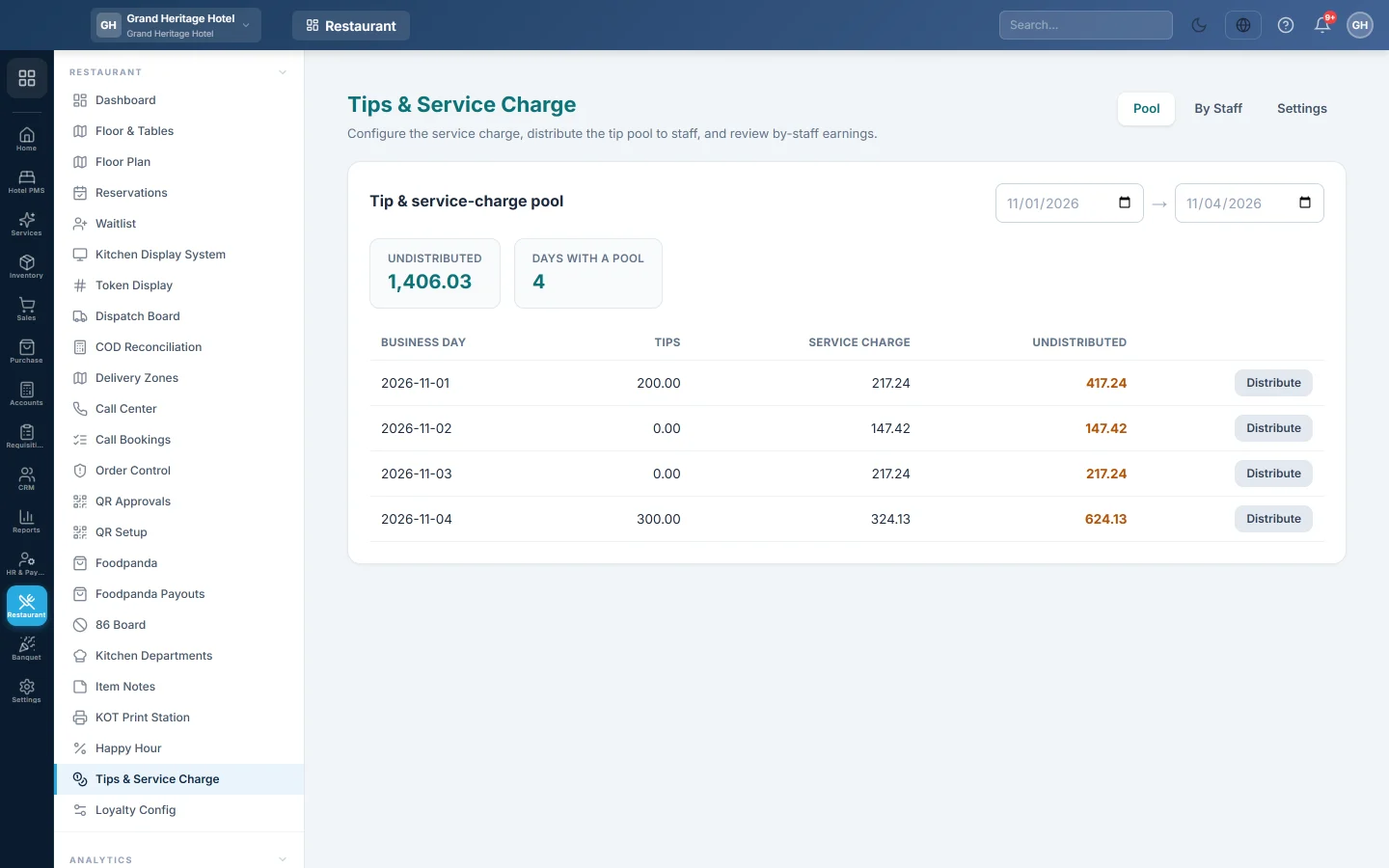
The Pool tab lists each business day with its Tips, Service charge and Undistributed amount. Undistributed at the top is the total still owed to staff in the dates you picked.
- Set the dates at the top right.
- Click Distribute on the day.
- Pick a staff member in Add staff… and click Add. Repeat for everyone who shares the pool.
- Type each person's amount, or click Even split to share it equally.
- Check that Allocated equals the pool total. It turns red until it does.
- Choose Pay cash from drawer or Add to payroll.
- Click Distribute with the amount on it.
The day then shows ✓ done, and each payment is listed under Recent payouts with its reference and method. A day is always paid out in full; you cannot pay part of it.
See tips by staff
Click By Staff and set the dates. Each staff member has their Card tip, Service charge, Cash tip and Total, with a total row at the bottom.
What happens in the books
When a bill with a service charge or a card or room tip is paid, the sale posts as usual. A second voucher then moves those amounts out of sales:
- Sales Revenue is debited with the service charge and the tip.
- Service Charge Payable is credited with the service charge, and Tips Payable with the tip.
EloERP creates these two liability accounts the first time they are needed. A cash tip posts nothing.
When you distribute a pool:
- Tips Payable and Service Charge Payable are debited with the day's amounts.
- Cash in Hand is credited for a cash payout, or Salary Expense for a payroll payout. The payroll run then books the bonus as salary expense and salaries payable, so the expense nets to nil and the money is owed once, through payroll.
A cash payout is also recorded as cash out on your open shift, so the drawer count at the end of the shift still matches.
If a bill is cancelled before its day is paid out, its tip and service charge leave the pool again. Once the day is paid out, they are not reversed by themselves; ask your accountant to correct it with a journal voucher.
Common questions
The bill shows no service charge. Check that Enable service charge is ticked and the rate is above 0. With Dine-in only, takeaway and delivery bills get none. A bill charged to a room gets none either.
Distribute says "Open a cash register before paying the tip pool out in cash." You chose Pay cash from drawer without an open shift. Open your shift on the till first, or choose Add to payroll.
Distribute says someone is not set up as an employee in HR. Add to payroll needs an HR employee record linked to each user in the list. Link them in Employees, or pay that day in cash.
Why is a cash tip not in the pool? The waiter already has the money. It is recorded for the report only.
Can I pay out several days at once? No. Distribute each day on its own.
Where is the waiter's share in the reports? See the Tips column in Waiter Performance on Reports.
Merci. Si vous avez encore besoin d’aide, écrivez à info@eloerp.net.