Policies
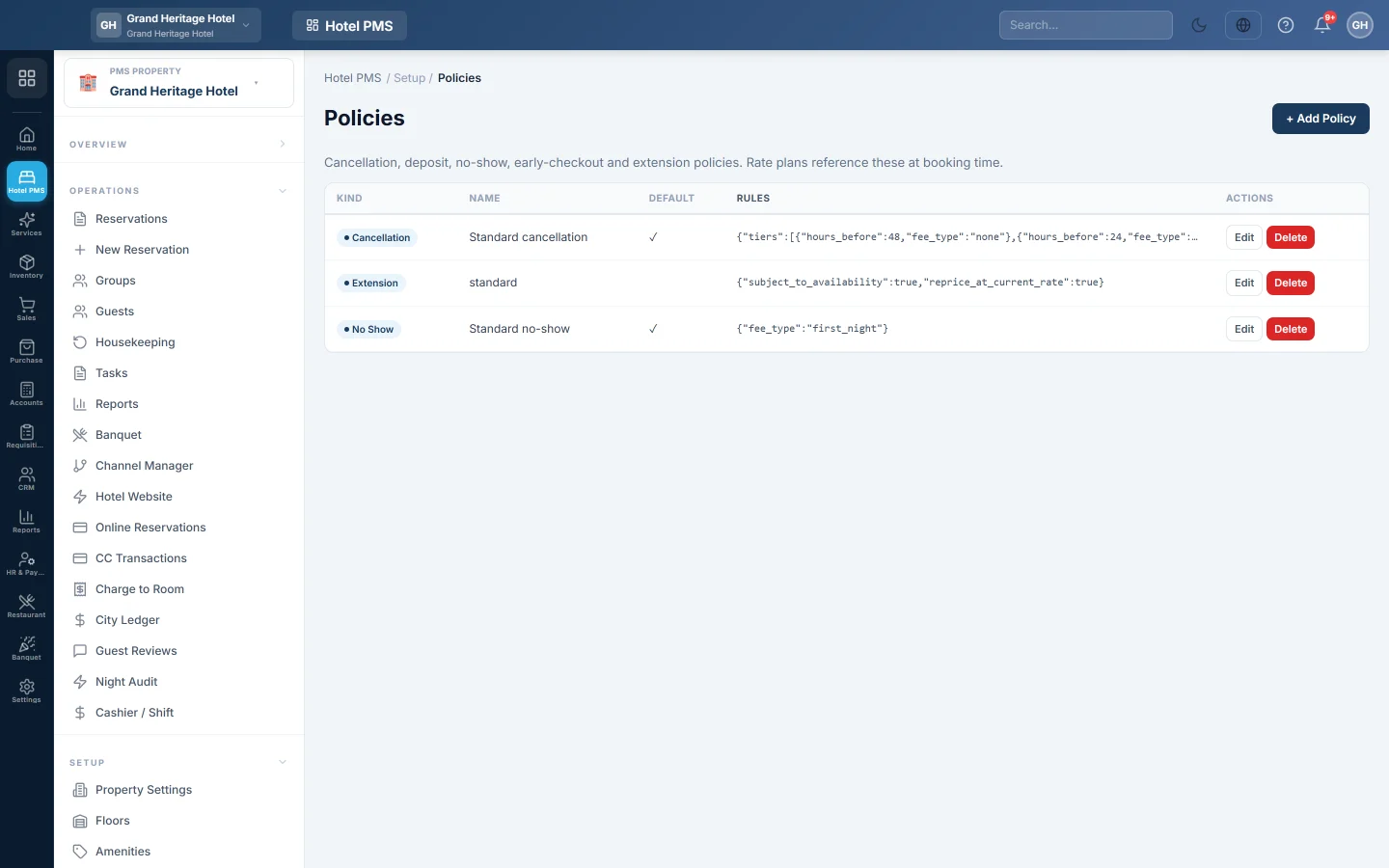
Set the cancellation and no-show fees the front desk is shown when a booking is cancelled or the guest does not arrive.
Policies hold your hotel's rules for fees, such as how much a guest pays for a late cancellation or a no-show. When the desk cancels a booking or marks a no-show, EloERP works out the fee from the policy and shows it before anything is posted.
Before you begin
- Policies belong to the hotel picked in the PMS Property box in the side menu.
- Your role needs the policies permissions. See Users & Roles.
Where to find it
Open Hotel → Setup → Policies.
Add a cancellation policy
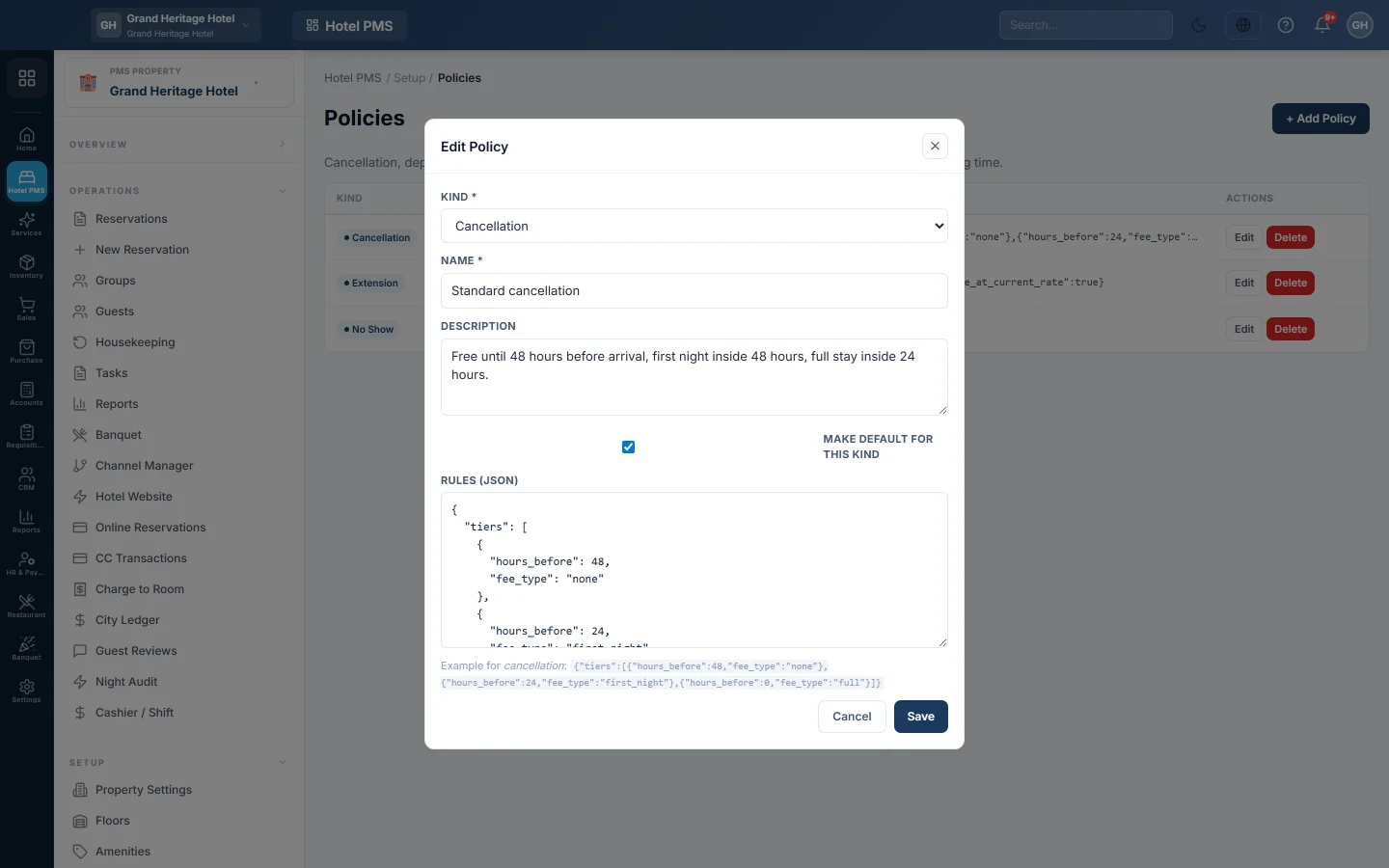
- Click + Add Policy.
- Under Kind, pick Cancellation. The Rules (JSON) box fills with an example.
- Enter a Name, for example Standard Cancellation.
- Add a Description in plain words; it is for your staff.
- Tick Make default for this kind so this policy is the one used.
- Edit the Rules (JSON). Each tier gives the hours before arrival and the fee from that point on.
- Click Save.
The example rules mean: free until 48 hours before arrival, one night's charge from 48 to 24 hours, and the full room total from 24 hours or after arrival.
{"tiers":[{"hours_before":48,"fee_type":"none"},{"hours_before":24,"fee_type":"first_night"},{"hours_before":0,"fee_type":"full"}]}
Fee types you can use
| fee_type | The fee is |
|---|---|
| none | nothing |
| first_night | the price of the first night |
| full | the whole room total of the stay |
| percent | a share of the room total; add "value": 50 for 50% |
| amount | a fixed amount; add "value": 2000 for Rs 2,000 |
Fees are worked out on the room total only, not on taxes or extras already posted.
Add a no-show policy
- Click + Add Policy and pick No-show under Kind.
- Enter a Name and tick Make default for this kind.
- Keep or change the rule, for example
{"fee_type":"first_night"}. - Click Save.
How the desk uses it
When the desk clicks cancel or no-show on a reservation, a window shows Policy fee due with the amount and the reason, or No fee due. Waive it is picked by default. The desk can pick Charge it and lower the Amount to charge, but not raise it above the policy. A charged fee is posted to the guest's folio.
What guests are shown
Your default Cancellation policy is also written out in plain words for guests: in the booking wizard of your Hotel Website and on the booking in their online account. For example, the example rules above read Free cancellation up to 48 hours before arrival. If you cancel between 48 hours and 24 hours before arrival, the first night is charged. If you cancel less than 24 hours before arrival, the full room total is charged.
When you allow guests to cancel online, they are charged nothing there: they see the fee, and your staff decide. See Let guests see, pay and cancel their bookings online.
Common questions
The window says No cancellation policy is set for this property. Add a cancellation policy here and tick Make default for this kind.
I have two cancellation policies. Which one counts? The one ticked as default. Without a default, the oldest active one.
Save says Invalid JSON in Rules. Check the brackets, quotes and commas in the rules box. Copy the example above and change only the numbers.
Does a rate plan pick its own policy? No. One default policy of each kind applies to the whole hotel. For what guests are shown, a rate plan with Refundable unticked is always non-refundable, and a hotel with no cancellation policy shows the rate plan's Cancellation hours instead. See Rate Plans.
Where do I cancel a booking? See Cancel a reservation or mark a no-show.
Obrigado. Se ainda precisar de ajuda, escreva para info@eloerp.net.