VAT Return (VAT-201)
Prepares the figures for the Saudi VAT-201 return for a month or quarter (output VAT on sales, input VAT on purchases and the net VAT due) for review before you file.
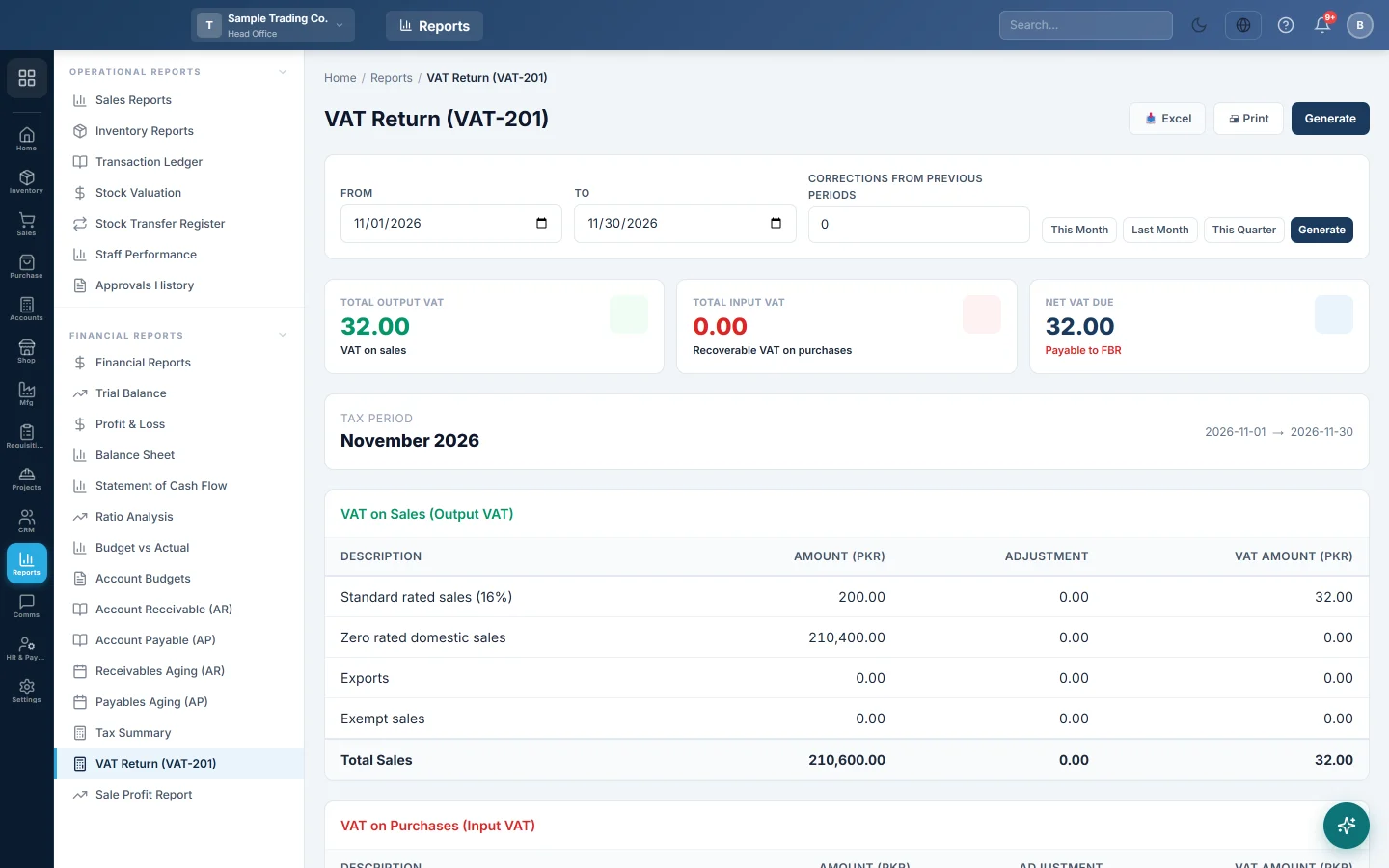
The VAT Return screen lays out your sales and purchases the way the Saudi VAT-201 form asks for them, and works out the VAT you owe for the period. Use it to prepare and check your figures, then file them on the ZATCA Fatoora portal.
Before you begin
- Your role needs View Saudi VAT-201 Return (ZATCA) under Settings → Users & Roles.
- Your VAT must be set up as a tax. See Tax Config.
- To report a sale as exempt, give the line a tax whose name contains Exempt.
- To report a sale as an export, fill in the Country of the customer. A blank country counts as a domestic sale.
- The figures are labelled SAR and 15%, the Saudi rate. They are taken from your documents in your company's currency.
Where to find it
Open Reports → Financial Reports → VAT Return (VAT-201).
Prepare a return
- Click This Month, Last Month or This Quarter, or set From and To yourself. The screen opens on the current month.
- If you are correcting an earlier return, type the amount in Corrections from Previous Periods. Use a minus sign to reduce the VAT due.
- Click Generate.
The Tax Period banner names the period, for example October 2026 or Q4 2026, with the exact dates beside it.
Read the return
VAT on Sales (Output VAT) splits your sales into four lines, each with its Amount (SAR) and VAT Amount (SAR):
| Line | Which sales go here |
|---|---|
| Standard rated sales (15%) | Any line with VAT, and every line of an invoice that carries VAT on the whole bill. |
| Zero rated domestic sales | Lines with no VAT, sold to a customer in your own country. |
| Exports | Lines with no VAT, sold to a customer whose country is another country. |
| Exempt sales | Lines with no VAT whose tax is named Exempt. |
VAT on Purchases (Input VAT) has one line, Standard rated purchases (15%): the purchase lines that carried VAT, which you may reclaim.
The last box works out the Net VAT Due: output VAT, minus input VAT, plus your corrections. The card at the top says Payable to ZATCA when the figure is positive and Refundable / carried forward when it is negative.
How the figures are worked out
- Confirmed, partly paid and paid sale and purchase invoices dated in the period are included. Drafts and cancelled invoices are not.
- Amounts are after the invoice discount, and exclude the VAT itself.
- Confirmed sale returns in the period come off the sales lines; confirmed purchase returns come off the purchases line.
- The Adjustment column is always 0.00. Enter adjustments as Corrections from Previous Periods.
- At head office the return covers every branch. In other branches it covers that branch only.
Print or export
Click Print for a one-page portrait printout or Excel for a spreadsheet. Both carry the tax period and every line of the return.
Common questions
Output VAT is lower than my Tax Summary. Check for sale returns in the period: they reduce the VAT here. Also check invoices still in draft, which are not counted. Compare with the Tax Summary.
A local sale shows under Exports. The customer's Country is set to another country. Correct it on the customer and click Generate again.
My exempt sales show as zero rated. The line's tax is not named as exempt. Create a tax with Exempt in its name and use it on those products.
Can I file a quarterly return? Yes. Click This Quarter, or set From to the first day and To to the last day of the quarter.
Why is a purchase missing from Input VAT? Only purchase lines that carried VAT are counted. A bill entered without VAT gives nothing to reclaim.
شكرًا لك. إذا كنت لا تزال بحاجة إلى مساعدة، راسلنا على info@eloerp.net.