Departments
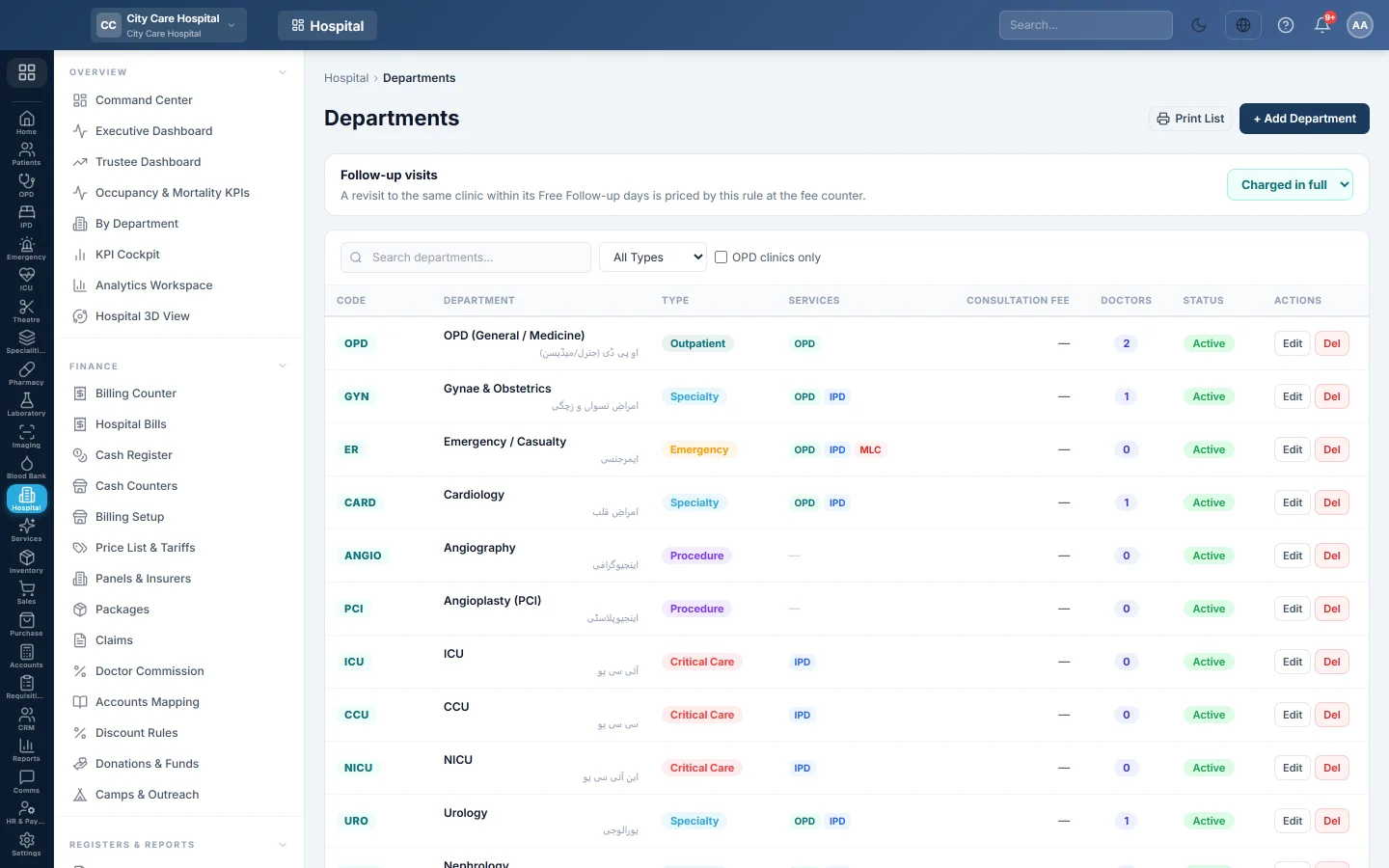
The hospital's clinical departments and OPD clinics, with their code, type, default consultation fee, free follow-up days, daily limit, revenue ledger and room.
Departments are the hospital's clinics and services, such as Medicine, Cardiology or Emergency. Each one has a short code that bills, tokens and reports use, a type, and the services it runs: an OPD clinic, inpatient beds or medico-legal cases.
Before you begin
- You need the HIMS departments create or edit right.
- EloERP adds the usual hospital departments when the hospital system is installed. Edit them rather than adding duplicates.
Where to find it
Open Hospital → Setup → Departments.
Set the follow-up rule
The Follow-up visits box at the top is one rule for every clinic. A revisit to the same clinic within its Free Follow-up (days) is priced by this rule at the fee counter:
- Free: no fee for the follow-up.
- Discounted: type the percent off.
- Charged in full: the follow-up pays the normal fee.
The rule saves as soon as you change it.
Add a department
- Click + Add Department.
- Type a Code, for example CARD, and choose the Type: Outpatient, Specialty, Critical Care, Procedure, Surgical, Emergency or Day-care.
- Type the Name (English) and, if you print in Urdu, the Name (Urdu).
- Type the Default Consultation Fee and the Free Follow-up (days).
- Tick what the department does: Runs OPD clinic, Has inpatient beds (IPD), Requires MLC (Emergency).
- For an OPD clinic, optionally type a Daily limit (patients).
- Optionally pick a Revenue ledger. Empty uses the hospital default in Accounts Mapping.
- Optionally pick a Room, printed on the token and receipt. See Rooms.
- Set the Sort Order for lists and keep Active ticked.
- Click Save.
Which fee is charged
The department's fee is the fallback. A row on Price List & Tariffs wins, then the doctor's fee for this clinic on Doctors, then the Default Consultation Fee.
Daily limit
The Daily limit (patients) is the most patients the clinic takes in a day. Bookings always count. Walk-ins count only when the queue rules say daily limits count all patients. See Patient Queue.
Find, change or remove a department
Search by name or code, filter by type, or tick OPD clinics only. Click Edit to change one, or Del to delete it. The printer button prints the list.
A department with doctors assigned cannot be deleted. Untick Active instead.
Common questions
The department does not appear at the counter. Tick Runs OPD clinic and Active, and assign at least one doctor.
What is Specialty Module for? It links the department to a specialty screen, such as dialysis or chemotherapy. Leave it empty for an ordinary clinic.
Why does the Doctors column show 0? No active doctor is assigned to this clinic. Assign them on the doctor's Clinic Assignments.
Are these the same as the departments in HR? No. These are the hospital's clinical departments; HR keeps its own department list.
Terima kasih. Jika masih butuh bantuan, kirim email ke info@eloerp.net.