Price List & Tariffs
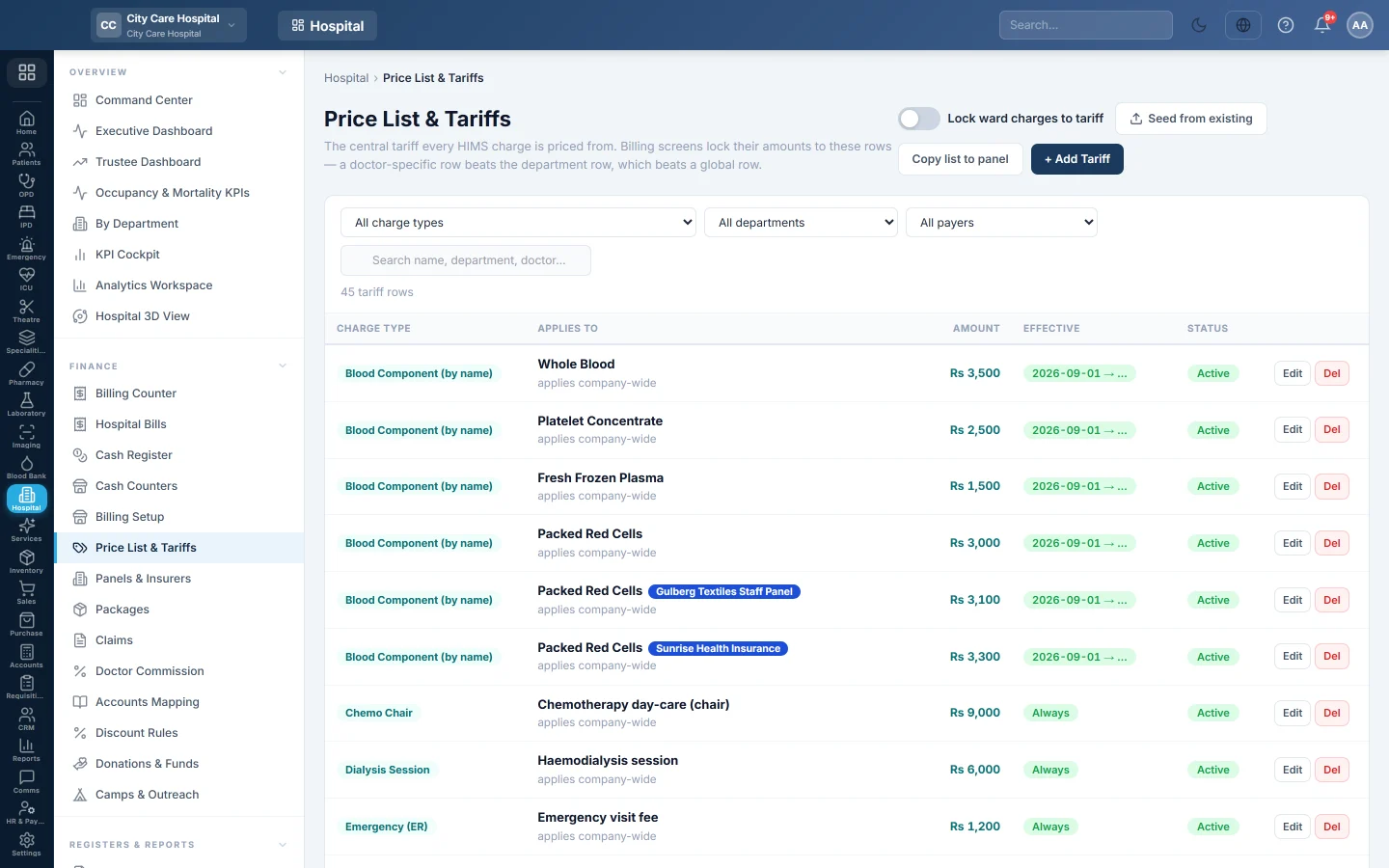
The hospital's central tariff. Every consultation, procedure, theatre, ward and day-care charge is priced from these rows, by department, doctor, service and payer.
Price List & Tariffs is where the hospital sets its prices. The billing screens lock their amounts to these rows, so a cashier cannot type a different price. The most specific row wins: a doctor's row beats the department's row, which beats a global row.
Before you begin
- You need the HIMS pricing manage right to add or change rows.
- Departments and doctors exist. See Departments and Doctors.
- For panel prices, the panels exist. See Panels & Insurers.
Where to find it
Open Hospital → Finance → Price List & Tariffs.
Start from your current prices
When the list is empty, click Seed from existing. EloERP copies the fees already on your departments, doctors and services into tariff rows. Check them afterwards.
Add a tariff row
- Click + Add Tariff.
- Choose the Charge Type, for example OPD Consultation, Procedure / Service, Operation Theatre or Bed / Day.
- Choose the Department, or Any / global. A consultation row needs a department.
- To price one doctor differently, choose the Doctor.
- To price one service from the catalogue, choose the Service.
- In Payer, keep Everyone (general price), or choose a payer type or one panel.
- Type a Name / label, for example Theatre fee — minor OT, and the Amount.
- Optionally set Effective from and Effective to for a price that starts or ends on a date.
- Keep Active ticked and click Save Tariff.
Which price is used
For each charge, EloERP looks for active rows inside their dates and picks the most specific:
- a row for the patient's own panel, then for their payer type, then the general price;
- then doctor, then service, then department, then a global row;
- then a branch row over a company-wide row, and the latest start date.
When no row matches a consultation, the doctor's clinic fee or the department's default fee is used.
Give a panel its own prices
- Click Copy list to panel.
- Choose the Panel / insurer.
- In Adjust by %, type the change, for example −10 for 10% below the general price.
- Optionally limit it to one Charge type.
- Click Copy prices.
Prices the panel already has are kept.
Lock ward charges
Turn on Lock ward charges to tariff to make ward staff pick ward charges from this list. Typing a rate then needs the override tariff permission.
Find and change prices
Filter by charge type, department or payer, or search by name, department or doctor. Click Edit to change a row, or Del to remove it. The Effective column shows whether a row is current, future or ended.
Common questions
The fee box on Hospital Bills is locked. A tariff row prices that consultation. Change the row here.
A doctor charges more than the department. Add an OPD Consultation row with that department and doctor.
How do I raise prices from next month? Edit the old row's Effective to to the last day of this month, then add a new row starting on the 1st.
Where are lab test and scan prices? The general prices are in the lab's Test Catalog and the Imaging Catalogue. To give a panel its own price, add a row here with Laboratory Test (by name) or Imaging Exam (by name), with the test or exam name as its Name / label.
Can a panel pay its own price for blood? Yes. Add a Blood Component (by name) row for that panel, with the component name as its Name / label, for example Packed Red Cells. Other patients pay the price in Blood Bank Setup.
Gracias. Si todavía necesita ayuda, escriba a info@eloerp.net.