Imaging Dashboard
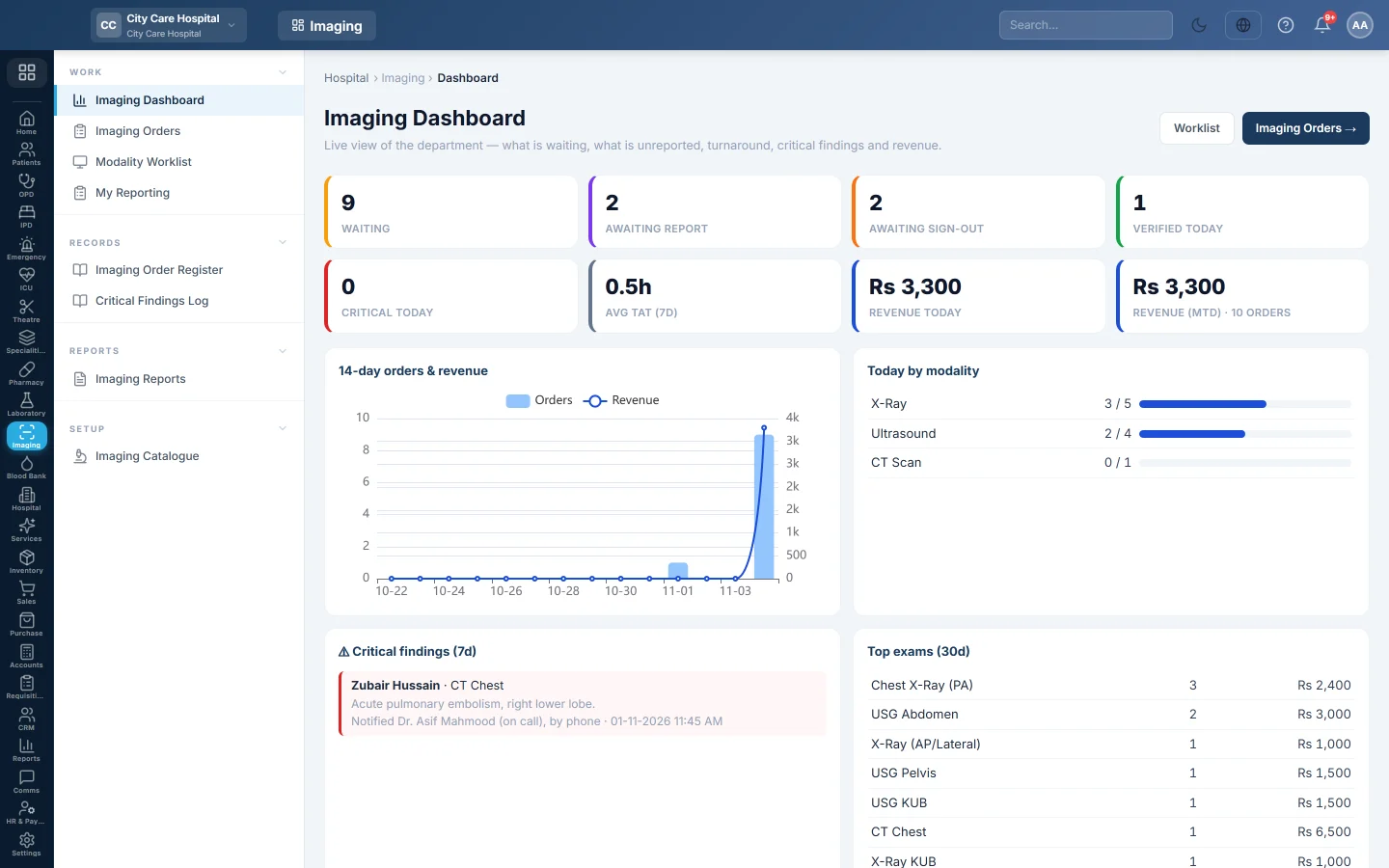
A live view of the imaging department for the radiology manager, showing exams waiting, reports to write and sign, turnaround, critical findings and revenue.
The Imaging Dashboard shows what the imaging department has to do right now and how it did this week. Radiology managers and senior radiographers start their shift here.
Before you begin
- Your hospital has the imaging department switched on. Your service provider turns it on as Radiology / Imaging (RIS).
- Your role needs View Radiology / Imaging or any other imaging permission. See Users & Roles.
- The exams come from the Imaging Catalogue.
Where to find it
Open Imaging → Work → Imaging Dashboard.
Read the tiles
| Tile | What it counts |
|---|---|
| Waiting | Exams not yet performed: waiting, scheduled or arrived. Click it to open the Modality Worklist. |
| Awaiting report | Exams performed but with no report saved yet. Click it to open Imaging Orders at To Report. |
| Awaiting sign-out | Exams with a draft report that a radiologist has not signed. Click it to open Imaging Orders at To Verify. |
| Verified today | Reports signed today. |
| Critical today | Reports signed today with a critical finding. |
| Avg TAT (7d) | The average hours from order to signed report over the last 7 days. |
| Revenue today | Imaging billed today, at the imaging counter and at the Billing Counter. |
| Revenue (MTD) | Imaging billed this month, at both counters, and the number of orders this month. |
Cancelled exams are left out of every count.
Read the panels
- 14-day orders & revenue shows orders per day as bars and imaging revenue as a line.
- Today by modality shows, for each machine, how many of today's exams are done out of the total.
- Critical findings (7d) lists each critical report with the patient, exam, impression and who was told. Notification not recorded means nobody was named. Click a row to open the order.
- Top exams (30d) lists the most ordered exams with their count and value.
- Recent orders shows the last 12 orders. Click a row to open it.
The Worklist and Imaging Orders → buttons at the top open those screens.
Common questions
Why is Revenue today lower than what the counter took? The tile counts scans billed on an imaging order and scans paid at the Billing Counter, net of discount. Scans charged to a ward or ER bill are counted when that bill is settled.
What counts as turnaround? The time from when the order was created to when the radiologist signed the report. Each exam's target is set in the Imaging Catalogue; see the on-time rate in Imaging Reports.
A critical finding shows "Notification not recorded". The report was saved as critical but has not been signed yet. Signing a critical report asks who was told. See Report and sign a scan.
Where is the full list of orders? On Imaging Orders.
Vielen Dank. Wenn Sie weitere Hilfe brauchen, schreiben Sie an info@eloerp.net.