Antenatal & Maternity
Register a pregnancy, record antenatal visits and tetanus doses, record the delivery, create the baby's file and bill antenatal and delivery charges.
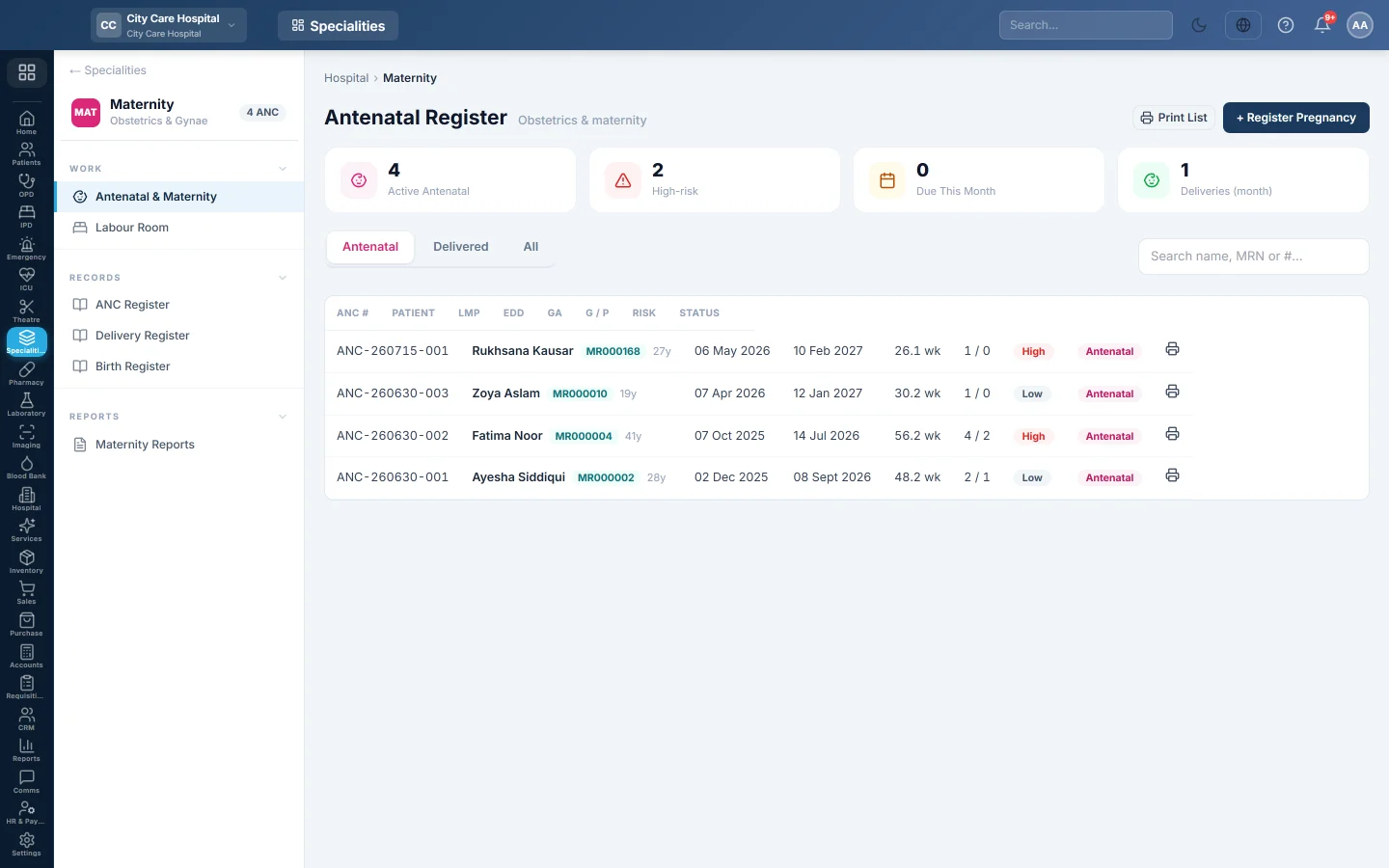
Antenatal & Maternity is the antenatal register. Each pregnancy has its own record, from registration and antenatal visits to the delivery and the baby's file.
Before you begin
- The Maternity department is switched on for your hospital, and the obstetricians exist. See Doctors.
- The mother is registered. See Register Patient.
- Antenatal visit and delivery prices are set in the price list. See Price List & Tariffs.
- Your role needs Manage Antenatal / Deliveries; taking payment needs the billing permission.
Where to find it
Open Specialities → Maternity → Work → Antenatal & Maternity.
Read the register
The tiles count Active Antenatal, High-risk, Due This Month and Deliveries (month). Filter by Antenatal, Delivered or All, or search by name, MRN or number. Each row shows the ANC number, LMP, EDD, gestational age, risk and status. Click a row to open the pregnancy.
Register a pregnancy
- Click + Register Pregnancy.
- Pick the Patient and type the LMP (last period). The EDD is worked out for you.
- Type the Gravida, Para, Abortions and Living.
- Type the Husband Name and pick the Blood Group.
- Choose the Risk Level and type any Risk Factors, for example previous LSCS.
- Click Register.
Record an antenatal visit
- On the pregnancy, click + Add Visit.
- Type the Weight, BP, Fundal Height and Fetal Heart Rate, and pick the Presentation.
- Record Urine Albumin, Urine Sugar, fetal movements and oedema.
- Note the Complaints, Advice and Ultrasound findings.
- Pick the Tetanus dose given today, if any, and set the Next Visit.
- Click Save Visit.
The pregnancy shows the ANC contacts (WHO 8) done so far and the tetanus toxoid course. Click Collect on a visit to take its payment.
Record the delivery
- On the pregnancy, click Record Delivery.
- Set the Date / Time and the Mode: SVD, LSCS, Assisted, Vacuum, Forceps or Breech.
- Pick who it was Conducted by and the Place: Labour Room or Theatre. A caesarean is tied to an OT case.
- Pick the Outcome, the Baby Sex and type the Birth Weight.
- Record the Blood Loss, Episiotomy, Perineal Tear, Complications and notes.
- Click Record Delivery.
Then click Create baby's file to register the newborn as a patient, and Admit baby to NICU if the baby needs it. Collect Charge takes the delivery payment.
Common questions
The EDD is wrong. It is worked out from the LMP. Check the LMP date.
Collect says no price is configured. Add the antenatal visit or delivery price to the price list first.
Where are the registers for the health department? See ANC Register, Delivery Register and Birth Register.
谢谢。 如果仍需帮助,请发邮件至 info@eloerp.net。