Book an OPD visit and print the parchi
Get a patient from the front desk to the doctor - take the consultation fee, issue the token and print the parchi, or turn a booked appointment into a token.
A patient sees an OPD doctor with a token. The parchi is the slip that carries the token number, the doctor and the room. How you issue it depends on when your hospital takes the consultation fee.
Before you begin
- The patient is registered. See Register a patient.
- Doctors have consultation fees on Price List & Tariffs, and clinic hours on Doctor Schedules.
- To take money, your cash shift is open. See Cash Register.
- Check Consultation fee under Queue rules on Patient Queue: Before token, After consult, At checkout or Free OPD.
Where to find it
- Fee before the token: the Billing Counter.
- Fee after the consult, at checkout, or free OPD: Outpatients (OPD) → Work → Patient Queue.
- Booked patients: Outpatients (OPD) → Work → Appointments.
Walk-in patient, fee before the token
This is the usual counter flow, and the default.
- Open the Billing Counter.
- Find the patient in Patient, or click + to register them.
- In Search any service — stitching, CBC, x-ray, doctor…, type the doctor's name and add their consultation.
- Check the price. A follow-up within the department's days may be priced lower by policy.
- Click Collect.
- Choose the Payment method and type the Cash received.
- Click Collect Rs … & print.
The receipt prints with a WHERE TO GO NEXT box: the doctor, the token number and the room. This is the patient's parchi. The patient joins the doctor's queue at once.
Walk-in patient, fee later or free OPD
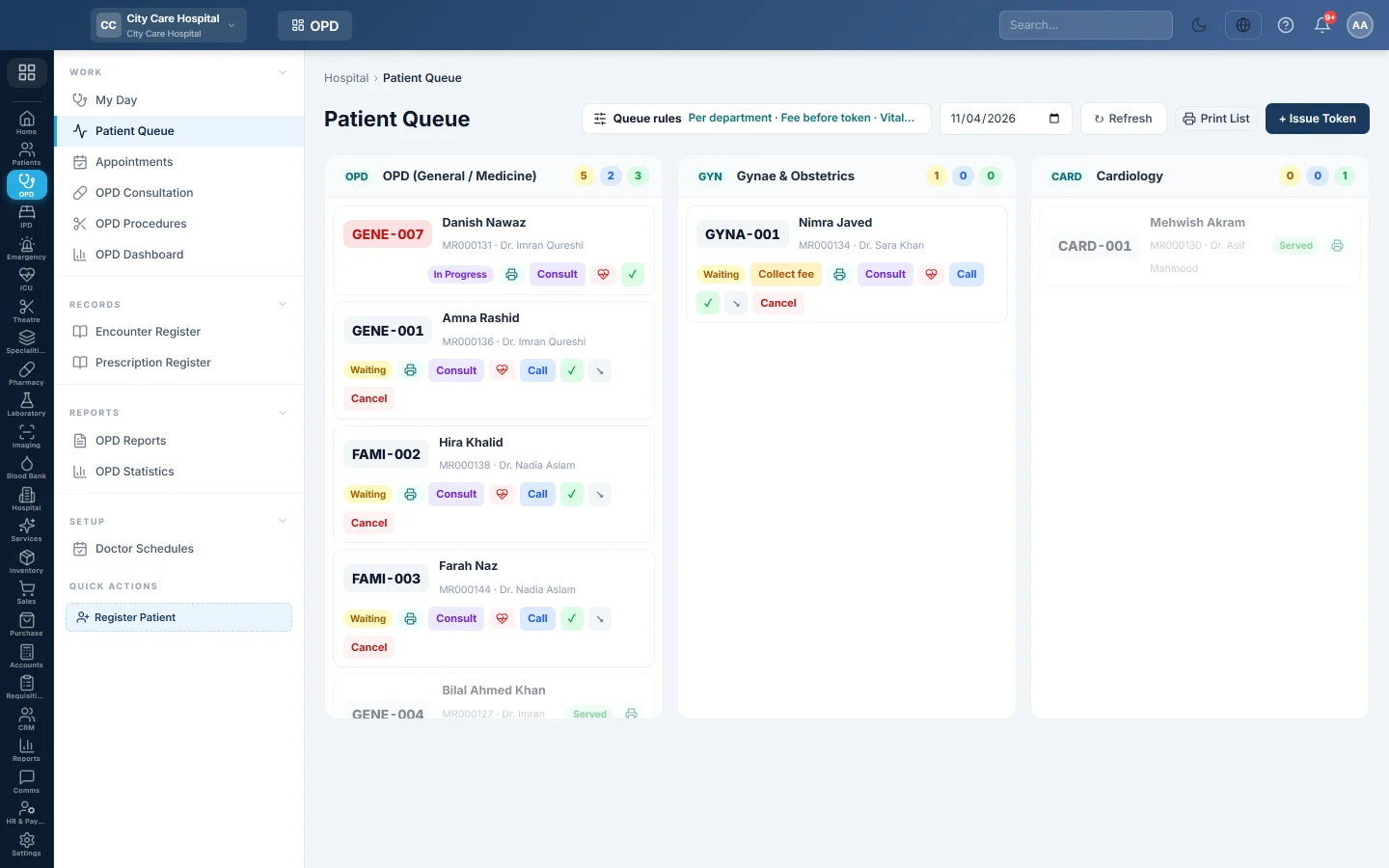
- Open Outpatients (OPD) → Work → Patient Queue.
- Click + Issue Token.
- Find the patient, choose the Department and the Doctor, and set the Priority.
- Click Issue Token.
- Click the printer on the new token card to print the token slip.
With After consult, the token shows Collect fee after the doctor signs. Click it to take the fee; the token is served when the fee is paid.
You can also issue a token here under Before token. It then shows Collect fee (or Fee due without the billing permission) until the counter takes the fee, and the doctor can still see the patient.
Booked patient
- Open Outpatients (OPD) → Work → Appointments.
- Find today's appointment.
- Click Arrive → Token. The message shows the token number and visit number.
- Print the parchi from the token card on Patient Queue.
If the fee is taken before the token, the message adds that the fee is due at the counter and the token shows Fee due. Take it at the Billing Counter or with Collect fee on the token; the doctor can see the patient meanwhile.
Record vitals before the doctor
- On the token card, click the heart button.
- Enter the readings in Record Vitals.
- Click Save Vitals.
When vitals are Mandatory, the doctor cannot start until this is done.
Common questions
The token number is the same for two doctors. Numbering is Per doctor. Give each doctor a token prefix on Doctors.
It says token issue is closed. The cutoff time under Queue rules has passed. Only booked and urgent patients get a token now.
The patient wants to leave before being seen. Click Cancel on the token and give a reason. If the rules say Refund the fee, the fee bill is voided and the money is paid back from your shift.
How do I reprint a parchi? Click the printer on the token card, or reprint the receipt from the patient file's Billing tab.
شكرًا لك. إذا كنت لا تزال بحاجة إلى مساعدة، راسلنا على info@eloerp.net.