Patient Queue
The OPD token board - issue tokens, call and serve patients, record vitals before the doctor, collect fees and set the queue rules for the hospital.
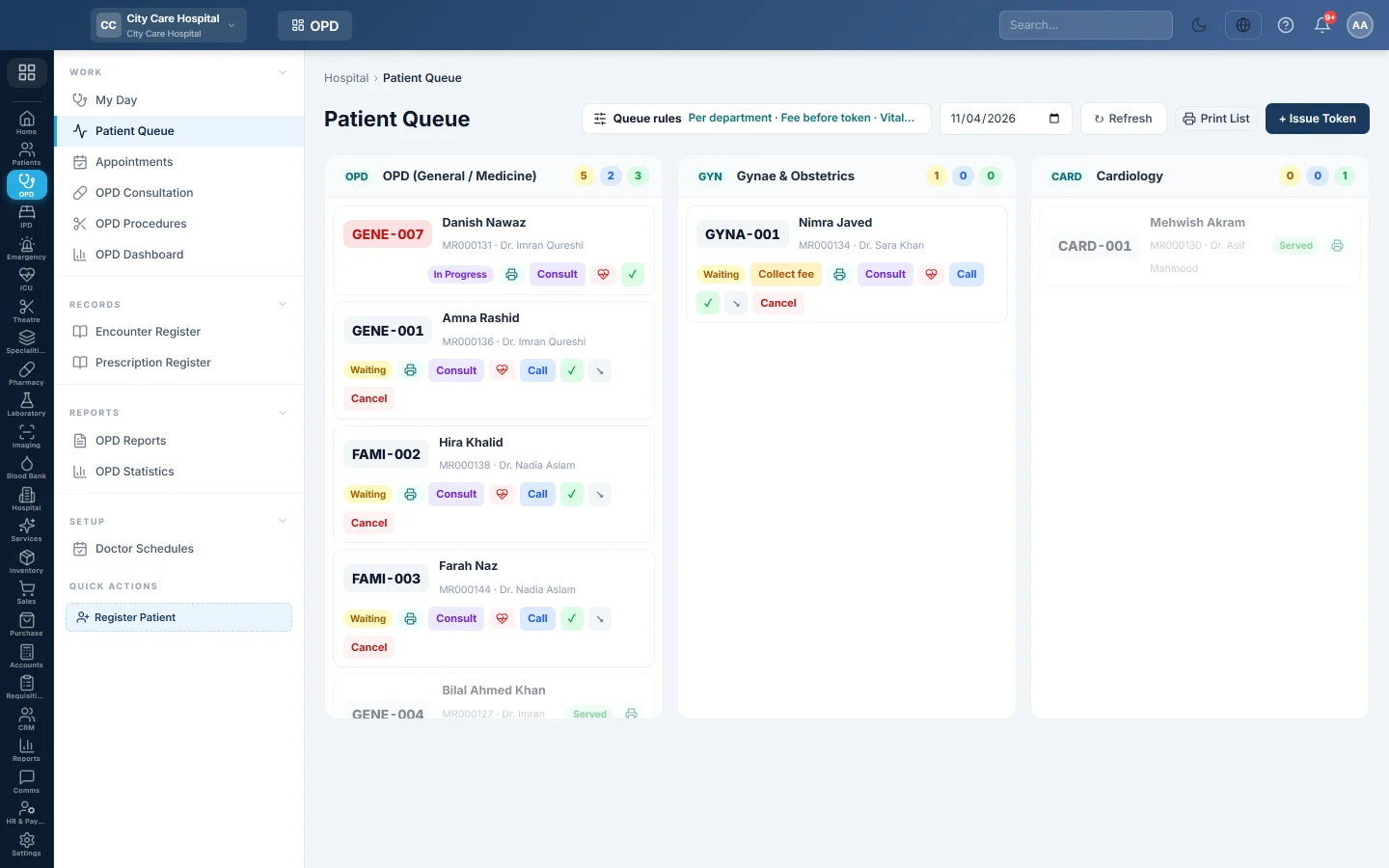
Patient Queue is the OPD token board. Each clinic has a column of tokens for the day. The desk issues tokens, records vitals and calls patients, and doctors start consultations from here.
Before you begin
- Departments and doctors exist. See Departments and Doctors.
- Issuing and moving tokens needs the queue manage permission. Changing the queue rules needs the hospital settings permission. See Users & Roles.
- When the fee is taken before the token (the default), patients usually get their token at the Billing Counter. See Book an OPD visit and print the parchi.
Where to find it
Open Outpatients (OPD) → Work → Patient Queue.
Issue a token at the desk
- Click + Issue Token.
- Find the patient in Patient, or register them with +.
- Choose the Department and, optionally, the Doctor.
- Choose the Priority: Normal or Urgent.
- Click Issue Token.
- Click the printer on the token card to print the token slip.
Under the Before token rule, a token issued here is unpaid. It shows Collect fee (or Fee due if your role cannot bill) until the counter takes the fee. The doctor can still see the patient.
Move a patient through the queue
Each token card shows the token number, patient, MRN, doctor and room, with buttons for the next step:
| Button | What it does |
|---|---|
| Call | Calls a waiting patient. |
| Heart button | Opens Record Vitals: weight, height, temperature, pulse, respiration, SpO₂, BP and blood sugar. The doctor sees them in the consultation. |
| Consult | Opens OPD Consultation for this patient and token. |
| ✓ | Serves the token without a consultation. |
| ↘ | Skips the token. |
| Cancel | The patient is leaving. Give a Reason. Depending on the rules, the paid fee is refunded from your open cash shift or kept. |
| No-show | For a booked patient who did not come. Marks the appointment no-show. |
| Collect fee | Appears while the consultation fee is unpaid, and opens the bill to collect it. Without the billing permission the token shows Fee due instead. With After consult or At checkout, the token cannot be served until the fee is paid. |
The column header counts waiting, called and served tokens. Pick another date at the top to see an earlier day.
Set the queue rules
Click Queue rules to see how your hospital runs its OPD. The button also shows a short summary of the current rules.
| Rule | Choices |
|---|---|
| Token numbering | Per department, Per doctor or Hospital-wide. |
| Consultation fee | Before token, After consult, At checkout or Free OPD. With Before token, paying at the counter issues the token; a desk or Arrive → Token token shows Fee due until the fee is collected. |
| Vitals before the doctor | Optional, Mandatory or Off. |
| Walk-ins and appointments | Both, Walk-ins only or Appointments only. With Both, set Places kept for walk-ins per doctor per day. |
| Women's and men's queues | One queue, or Separate with their own numbers (F001, M001) and lanes. |
| Doctors see their clinic's queue | Yes shows clinic tokens on every doctor's My Day; Own tokens only does not. |
| Tell patients they are called | Off, Screen, SMS or Both. |
| Cancelled tokens | Refund the fee or Keep the fee. |
| Online booking | Off or On, with the booking key for your website. The patient portal's booking page also needs it on, see Book an appointment online. |
| Patient portal | Off or On, with the portal address. When on, What patients can do in the portal lists one switch per feature, each off until you turn it on. See Patient portal: what patients can do. |
| Internal referrals | Free, New token or Charged. See Referrals. |
| Daily limits count | Bookings only or All patients. |
| Token issue closes at | A time after which walk-in tokens stop. Booked and urgent patients still get one. |
With a waiting-room screen on, Waiting-room screens lists a link per clinic to open on the TV. The screen shows token numbers only, never names.
Common questions
It says Token issue closed. The cutoff time has passed. Only booked patients and urgent cases can get a token now. Change the time under Queue rules if needed.
It says the hospital sees patients by appointment only. Walk-ins and appointments is set to Appointments only. Book the patient on Appointments, then use Arrive → Token.
The Consult button is missing on a token. Vitals are mandatory and not recorded yet, the token is served or skipped, or your role cannot create consultations.
A token says Fee due but the rule is Before token. The token was issued at the desk or from an appointment, not by paying at the counter. Click Collect fee, or send the patient to the Billing Counter. The doctor can consult in the meantime.
How do I print the day's queue? Click the print button next to Refresh.
Why do two doctors' tokens have the same number? Numbering is Per doctor. Give each doctor a token prefix on Doctors, or switch to Per department.
Teşekkür ederiz. Hâlâ yardıma ihtiyacınız varsa info@eloerp.net adresine yazın.