Patients
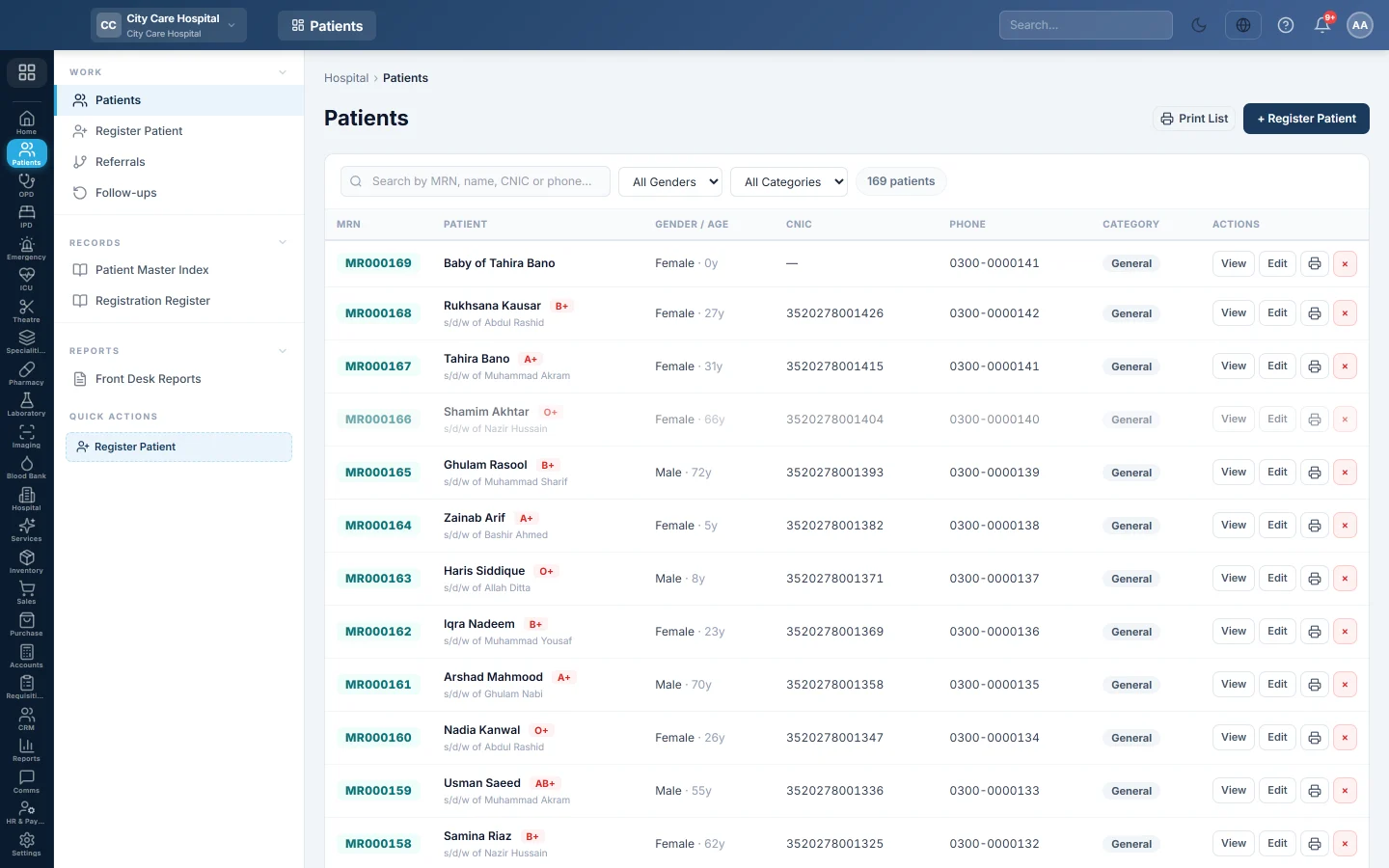
The hospital's patient register. Find any patient by MR number, name, CNIC or phone, open their file, edit their details or print their patient card.
Patients lists everyone registered at the hospital, each with their MR number (MRN). The front desk uses it to find a returning patient, open their file and print their patient card.
Before you begin
- Your role needs the patient view permission. Registering, editing and archiving each need their own permission. See Users & Roles.
- If patients come under a panel, insurer or scheme, set those up first. See Panels & Insurers.
Where to find it
Open Patients → Work → Patients.
Find a patient
- Type in Search by MRN, name, CNIC or phone…. The list filters as you type, and an exact MRN, CNIC or phone match comes first.
- Narrow the list with All Genders or All Categories (General, Panel, Corporate, Charity).
- Click View to open the patient file.
The chip next to the filters shows how many patients match. A VIP badge and the blood group appear next to the name. A deceased patient's row is greyed out.
Read the patient file
View opens the patient file. It shows:
- The header with MRN, gender, age, blood group, payer and category. A mother's file links to her babies, and a baby's file links to the mother.
- A red banner with the patient's active alerts, such as allergies or infection risks.
- Demographics, Contact, Next of Kin, and the Outstanding Balance under Account.
- Totals for Consultations, Last visit, Total billed and Outstanding.
- The tabs All Activity (every visit, admission, procedure and bill), Encounters, Billing and Vitals.
From the file you can:
- Click + New Visit to book an appointment for this patient. See Appointments.
- Click Medical Record to print the patient's full record.
- Click View or Print on a consultation to open or print its prescription.
- Click the printer on a bill in Billing to reprint its receipt.
- Click Access log to see who opened this record. This button needs the hospital settings permission.

Edit a patient
- Click Edit on the row or on the patient file.
- Change the details. The form is the same as Register Patient.
- Click Update Patient.
Print a patient card
Click the printer button on the row. The card prints on an 80 mm receipt printer with the MRN, name, father or husband's name, age, gender, phone, CNIC, blood group and category.
To print the whole list, click the print button at the top. It prints the Patient Register as filtered on screen.
Archive a patient
- Click × on the row.
- Confirm Archive patient.
The patient leaves the list, but their history is kept. You cannot archive a patient who is still admitted; discharge them first.
Common questions
A patient says they registered before, but I cannot find them. Search by phone or CNIC instead of name, since names are often spelled differently. Check that All Genders and All Categories are not narrowing the list.
Why is the CNIC masked? Your role does not have the permission to see full CNICs. Ask your administrator if you need it.
How is the MRN made? EloERP gives each new patient the next number in sequence, such as MR000127. A number is never reused.
Where do I see what a patient owes? On the patient file, under Account and in the Outstanding total. The Billing tab lists each bill and what was paid.
Can I delete a patient for good? No. × archives the patient so their medical and billing history is kept.
Gracias. Si todavía necesita ayuda, escriba a info@eloerp.net.