Referrals
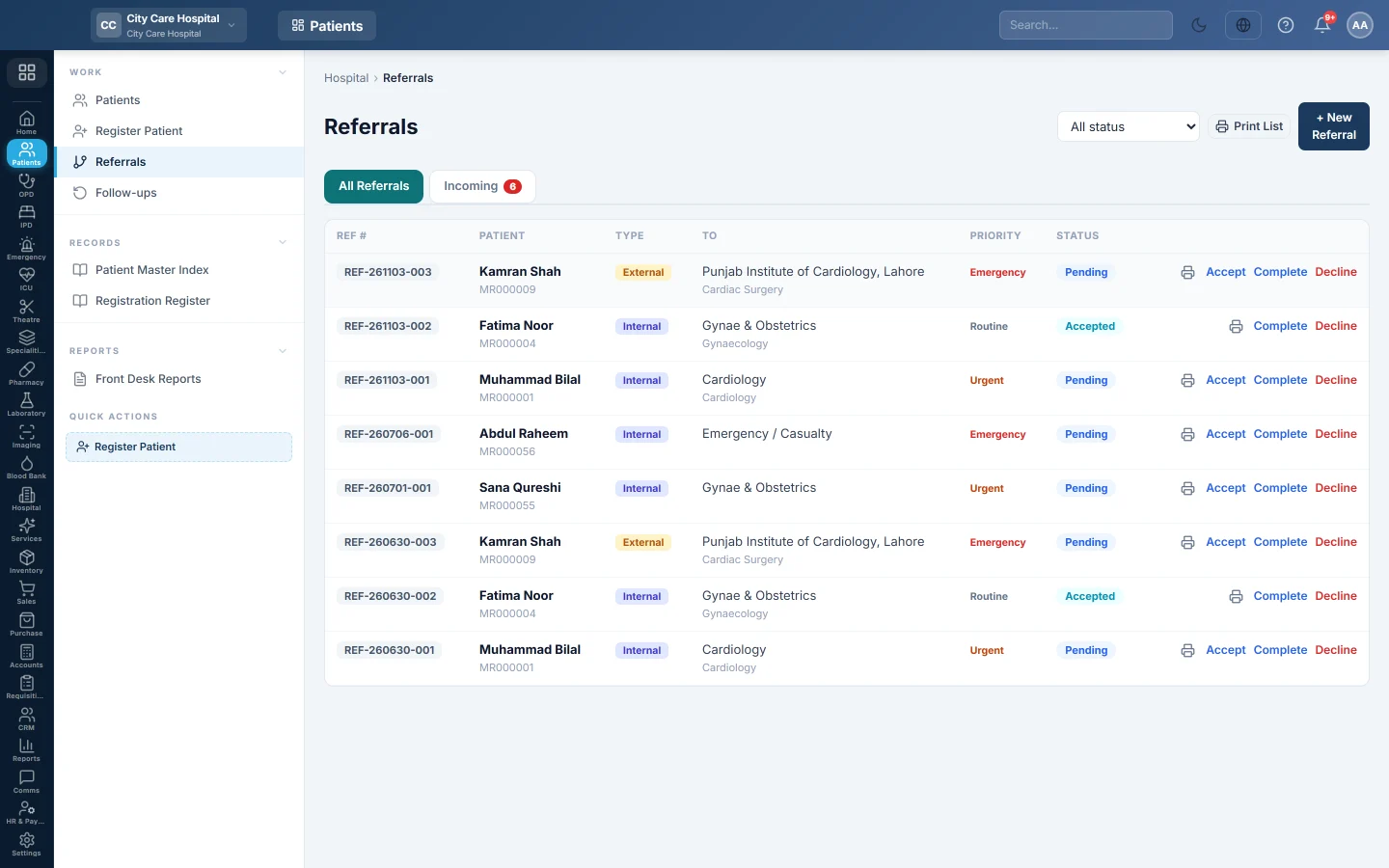
Refer a patient to another clinic inside the hospital or to an outside facility, and let the receiving clinic accept the referral and see the patient.
Referrals sends a patient from one clinic to another, or out to another facility. The receiving clinic sees internal referrals in its Incoming list and can open a consultation straight from it.
Before you begin
- Your role needs the referral view permission. Creating, accepting and closing referrals needs the manage permission. See Users & Roles.
- For internal referrals, the departments and doctors exist. See Departments and Doctors.
- What accepting an internal referral does (a new token, a fee or nothing) is set under Queue rules on Patient Queue.
Where to find it
Open Patients → Work → Referrals. A doctor can also refer from the consultation screen. See OPD Consultation.
Refer a patient
- Click + New Referral.
- Find the patient in Patient. The + button registers a new patient.
- Choose Internal or External.
- For internal, pick To Department and, optionally, To Doctor. For external, type the External facility.
- Optionally fill in Specialty.
- Choose the Priority: Routine, Urgent or Emergency.
- Type the Reason.
- Click Create Referral.
Click the printer on the row to print the referral slip for the patient to carry.
Receive a referral
- Open the Incoming tab. The count shows how many referrals are waiting.
- Read the card: who referred the patient, the complaint, the diagnosis and the instructions. View Rx opens the referring doctor's prescription.
- Click Accept, or go straight to Open Consultation →.
Open Consultation → accepts a pending referral and opens the consultation for that patient in the receiving department.
When accepting gives a token, a message shows the token number. If the clinic charges for referrals, it also says the consultation fee is due at the counter.
Close a referral
On the All Referrals tab, use the links on a pending or accepted referral:
- Accept: the receiving side has taken the patient.
- Complete: the patient was seen.
- Decline: the referral will not go ahead.
A completed, declined or cancelled referral cannot change again. Use All status to filter the list.
Common questions
The referred patient did not appear in the receiving clinic's queue. The internal referral rule is Free, so accepting adds no token. Issue a token at the desk, or change the rule on Patient Queue.
Why does the Incoming tab show only some referrals? It lists internal referrals waiting for a department. External referrals only appear on All Referrals.
Can I print a list of referrals? Yes. The print button at the top prints the Referrals Register as filtered. For a dated register, see Front Desk Reports.
A referral was made by mistake. Click Decline on it so it leaves the receiving clinic's list.
Gracias. Si todavía necesita ayuda, escriba a info@eloerp.net.