Statements
Post the cash-on-delivery money couriers pay you and the payouts card and wallet gateways send, see marketplace settlements, and track the withholding tax deducted from you.
Statements is where the money from your online orders comes home. When a courier pays you the cash it collected, or a gateway pays out card payments, you post it here. The bank goes up, the courier's or gateway's balance comes down and the invoices are settled.
Before you begin
- Your couriers are set up on Courier Accounts and your COD orders were dispatched with them, so each order has a sale invoice. See Dispatch.
- Your bank account exists in Bank Accounts. Without one, the money is posted to cash.
- Viewing needs View Reconciliation. Posting and voiding need Perform Reconciliation. See Users & Roles.
Where to find it
Open Online shop → Money → Statements. The page has four tabs: Courier Remittances, Gateway Payouts, Marketplace Settlements and Tax & Withholding.
Courier Remittances
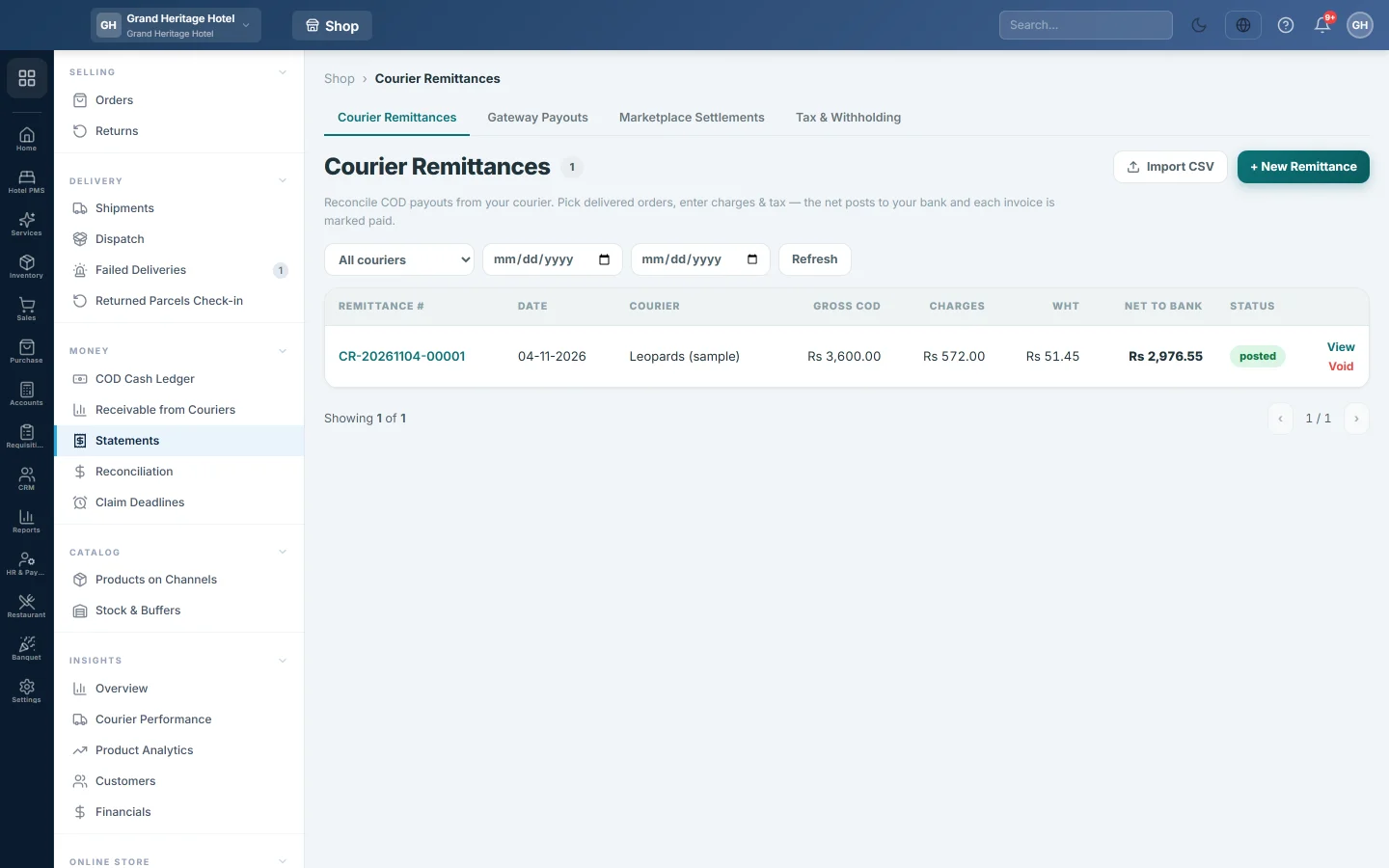
The register lists every remittance with its Remittance #, Date, Courier, Gross COD, Charges, WHT, Net to Bank and Status. Filter by courier and date at the top.
Post a remittance by hand
Use this when the courier sends a payment slip or an email listing the parcels.
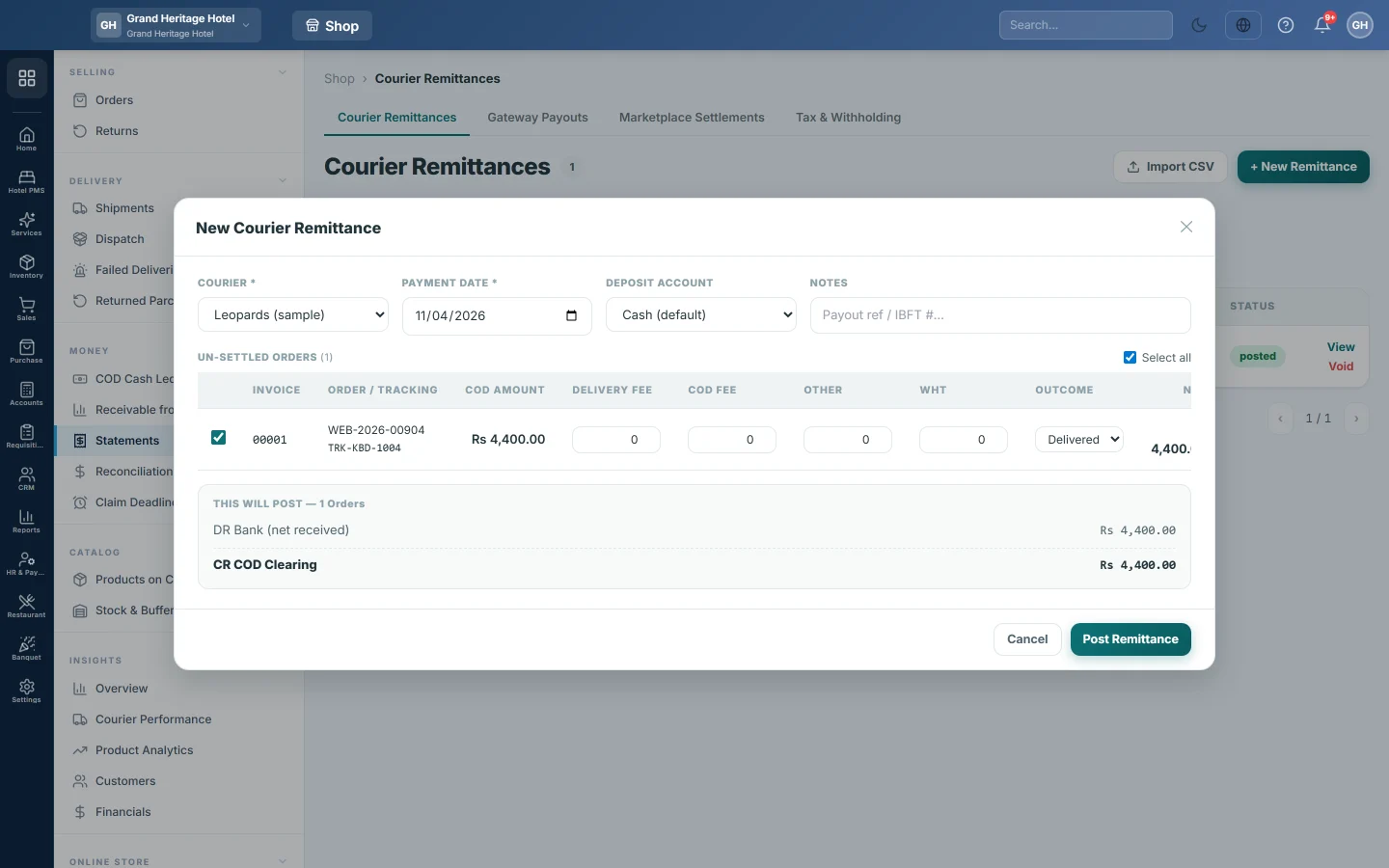
- Click + New Remittance.
- Choose the COURIER. Its delivered orders that are not yet settled load under UN-SETTLED ORDERS.
- Set the PAYMENT DATE, the day the money reached you.
- Choose the DEPOSIT ACCOUNT the courier paid into. Cash (default) posts it to cash.
- Type the transfer reference in NOTES, for example the IBFT number.
- Untick any order the courier has not paid for yet.
- For each order, type the Delivery Fee, COD Fee, Other charges and WHT the courier kept. Net updates as you type.
- For a parcel that came back, set Outcome to RTO. No cash is counted for it.
- Check the THIS WILL POST box, then click Post Remittance.
Import the courier's statement
Most couriers send a settlement file. Click Import CSV to match it against your orders instead of typing each line. Each line is matched to the exact CN, among that courier's parcels only. See Match a courier COD statement for the steps.
Check or void a remittance
Click the remittance number or View to see WHAT THIS POSTED and every order on it with its outcome.
Click Void to undo a remittance posted by mistake. EloERP reverses its voucher, takes the payments off the invoices and frees the orders, so they are offered again under UN-SETTLED ORDERS.
Gateway Payouts
A payout is a batch of prepaid orders a gateway, such as card or wallet, has settled into your bank. The register shows Payout #, Gateway, Date, Gross, Fees, Refunds, Chargebacks, Net to bank and Status. Filter by gateway, status and date.
Build a payout from orders
- Click Build from orders.
- Choose the GATEWAY. Its prepaid orders not yet paid out load, all ticked.
- Choose the BANK ACCOUNT the money reached, or leave Default bank ledger.
- Set the PAYOUT DATE.
- Untick orders that are not in this payout.
- Correct Gross, Fee, Refund and Chargeback on each order to match the gateway's report.
- Check THIS WILL POST, then click Post payout.
Import the gateway's settlement file
- Click Import settlement file.
- Choose the GATEWAY and the FILE (CSV or XLSX).
- Click Match against orders. Each line is matched to an order by its transaction ID or order number.
- Click Post the {n} matched rows. Rows marked amount mismatch or unmatched are not posted.
To undo a payout, open it and click Void this payout, then give a reason.
Marketplace Settlements
This tab shows, for marketplace channels such as Daraz, what each order earned after the marketplace's fees. It covers the last 90 days by default; change the dates at the top.
The boxes show Gross GMV, Marketplace fees, Net payout, COGS and Contribution. By marketplace splits them per channel, and Order-level settlement lists each order. Orders that lost money are highlighted.
Fees here are the gateway fee and funded discount recorded on each order. Nothing is posted from this tab.
Tax & Withholding
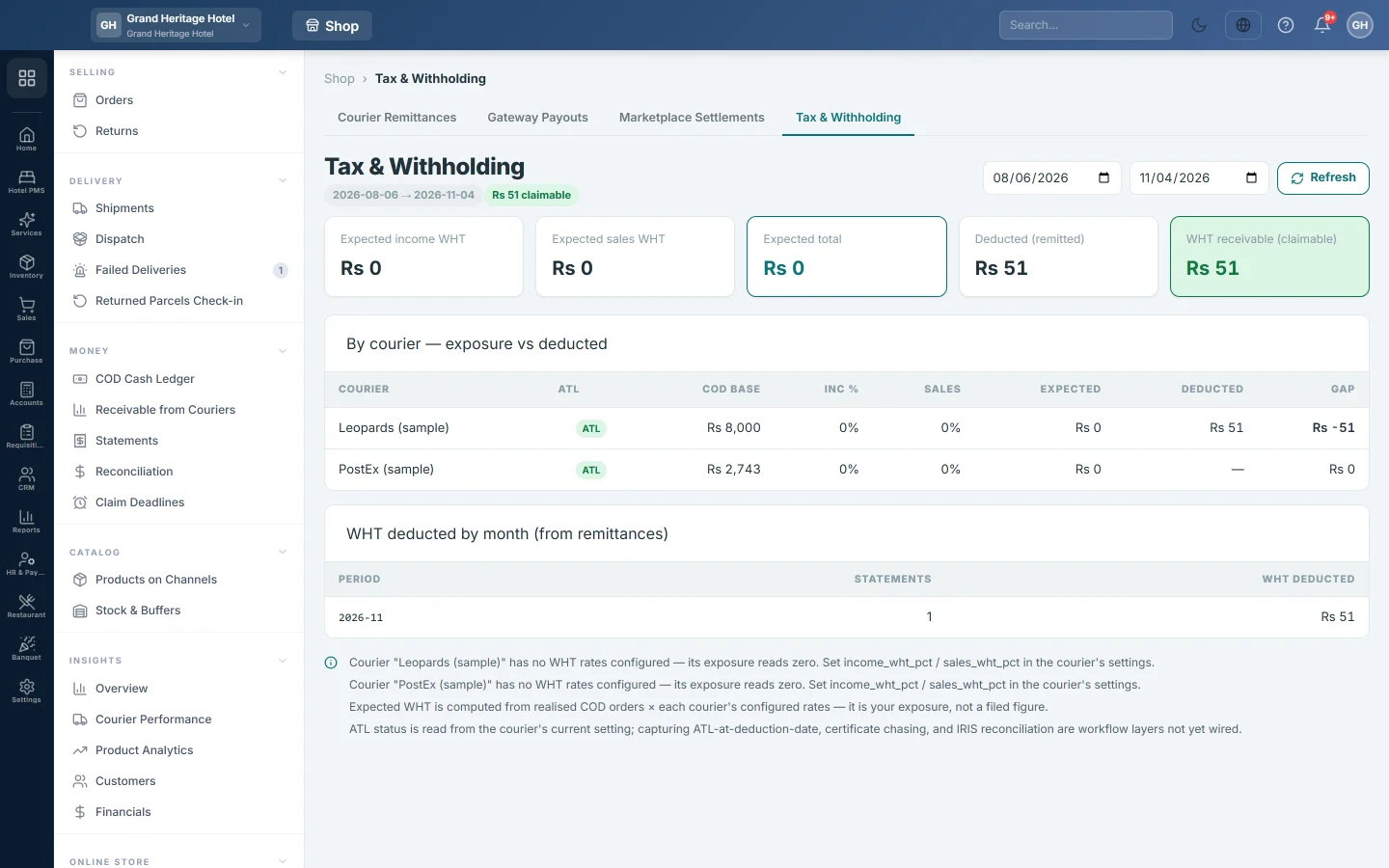
Couriers deduct income tax and sales tax from the cash they remit. That tax is a credit you can claim. This tab shows it for the dates you pick.
- Expected income WHT and Expected sales WHT: worked out from your shipped COD orders and each courier's withholding rates. Expected total adds them.
- Deducted (remitted): the withholding couriers actually took, from your posted remittances.
- WHT receivable (claimable): the balance of your WHT Receivable account.
By courier — exposure vs deducted compares each courier's Expected and Deducted, with the Gap. ATL shows whether you are on the active taxpayer list for that courier; income tax doubles when you are not. WHT deducted by month (from remittances) lists the deductions per month.
What happens in the books
Posting a courier remittance makes one voucher:
- Your bank account, or cash, is debited with the Net to Bank.
- The courier's Delivery Charges expense account is debited with the delivery fee, COD fee and other charges.
- WHT Receivable is debited with the withholding tax.
- The courier's COD Clearing account is credited with the gross COD of the delivered parcels.
Each delivered order's invoice is marked paid, or part paid, with the cash the courier collected. A delivered line also sends the customer the paid and delivered messages, when those notifications are on; an RTO line sends nothing. For an RTO line, a separate return voucher reverses the sale: Sales Returns and tax are debited, the courier's COD Clearing is credited, and the goods go back into stock at cost.
Posting a gateway payout debits the bank with the net, the gateway's Fees account with the fees, Ecommerce Refunds with refunds and Gateway Chargebacks with chargebacks. The gateway's Clearing account is credited with the gross.
Voiding either one posts a mirror voucher dated the day you void it.
Common questions
An order is missing from UN-SETTLED ORDERS. Only COD orders with a sale invoice, sent with that courier and not yet on a live remittance, are listed. A voided remittance frees its orders, except its RTO lines. Check the order's courier on Orders.
The courier paid less than the COD. What do I do? Enter what they kept in the fee and tax columns. If they short-paid without reason, post what arrived and log a claim on Claim Deadlines.
A remittance went to Cash, not the bank. You left DEPOSIT ACCOUNT on Cash (default). Void it and post it again with the bank account.
Tax & Withholding shows zero expected tax. The courier has no withholding rates set. Expected figures stay at zero until they are, but Deducted (remitted) still shows what couriers took.
Marketplace Settlements says no marketplace is connected. Add the marketplace under Channels. The same message shows when it has no orders in your dates.
How do I see the money in the bank statement? The net posts to the bank account you chose, so it appears in Bank Reconciliation.
Спасибо. Если помощь всё ещё нужна, напишите на info@eloerp.net.