Dashboard
See today's order work queue, sales, returns, money held by couriers and courier performance for all your online channels on one page.
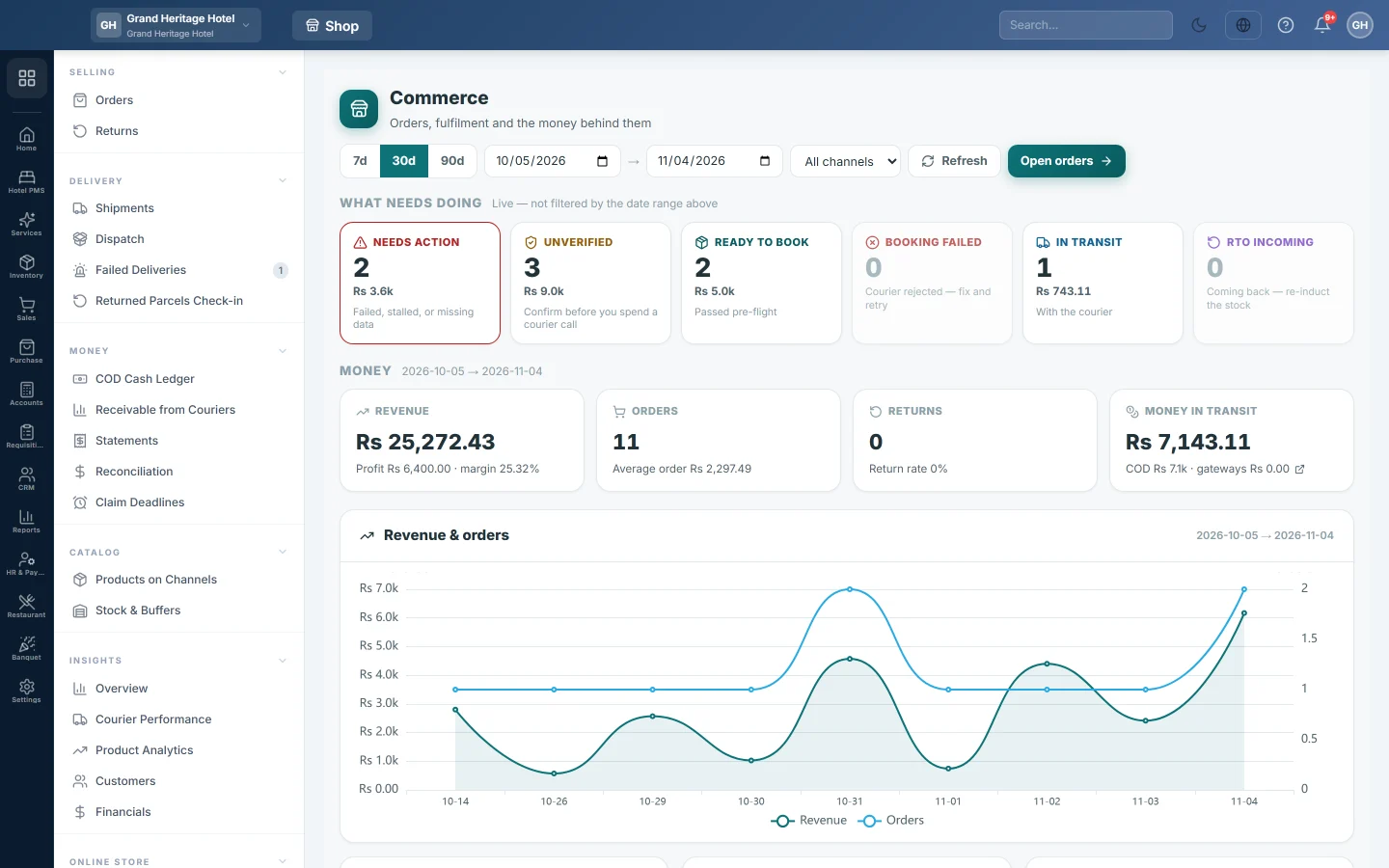
The online shop dashboard is the first page of the module. The top half shows the orders that need work right now; the bottom half shows sales, money and courier results for the dates you pick.
Before you begin
- At least one sales channel is connected, such as your online store, Shopify or WooCommerce. See Channels. Orders you type in yourself also count.
- Courier figures appear once you book parcels with a courier. See Courier Accounts.
- Your role needs the permission to view the online shop dashboard. See Users & Roles.
Where to find it
Open Online shop → Selling → Dashboard.
Read the work queue
The What needs doing row is live. It is not filtered by the date range, because an order stuck since last month still needs work today. It refreshes on its own every minute and a half.
| Card | What it counts |
|---|---|
| Needs action | Failed, stalled or incomplete orders: a rejected courier booking, a parcel with no courier movement for 4 days, a delivered order still unpaid, an incomplete address or a missing weight. |
| Unverified | New orders nobody has confirmed yet. Confirm them before you pay for a courier booking. |
| Ready to book | Verified orders waiting for a courier. |
| Booking failed | Orders the courier rejected. Fix the field and book again. |
| In transit | Parcels with the courier. |
| RTO incoming | Parcels coming back to you undelivered. |
Each card shows the number of orders and their value. Click a card to open Orders on the matching tab.
Choose the dates and channel
- Click 7d, 30d or 90d, or type your own dates in the two date boxes.
- Pick a channel in All channels to see one store only.
- Click Refresh to load the figures again.
The date range and channel change the Money cards and the charts below them.
Read the money and charts
- Revenue shows sales, with profit and margin under it. Orders shows the order count and the average order value. Returns shows the count and the return rate.
- Money in transit is cash on delivery still with couriers plus card and wallet payments still with payment gateways. Click it to open Receivable from Couriers.
- Revenue & orders is a daily line chart. Order status, Revenue by channel and How customers paid break the period down.
- Courier scorecard ranks couriers by delivery rate and RTO rate. A courier with too few settled parcels shows too few settled to rate instead of a rate.
- COD aging at couriers shows cash on delivery each courier still owes you, by age: 0–7, 8–15, 16–30 and 30+ days.
- Fulfilment funnel shows how many orders were placed, confirmed, dispatched and delivered.
- Best sellers, Recent activity and Connected channels close the page. Click an activity line to open that order.
Common questions
All the cards show 0. Either nothing is waiting, in which case the page says so, or no channel is connected yet. Click Connect a channel at the bottom of the page.
Why does the dashboard not match my date range? The What needs doing cards always show open work, whatever the dates. Only the money cards and charts follow the range.
What is RTO? Return to origin: the courier could not deliver the parcel and is bringing it back. See Returned Parcels Check-in.
A courier has a grey rate. It has too few delivered or returned parcels in the period for the rate to mean anything.
Where do I start my day? Click Open orders, then work through Needs action, Unverified and Ready to book in that order.
Teşekkür ederiz. Hâlâ yardıma ihtiyacınız varsa info@eloerp.net adresine yazın.