Shipments
Follow every courier consignment from booking to delivery or return, see each courier's delivery and return rate, and track or cancel a booking.
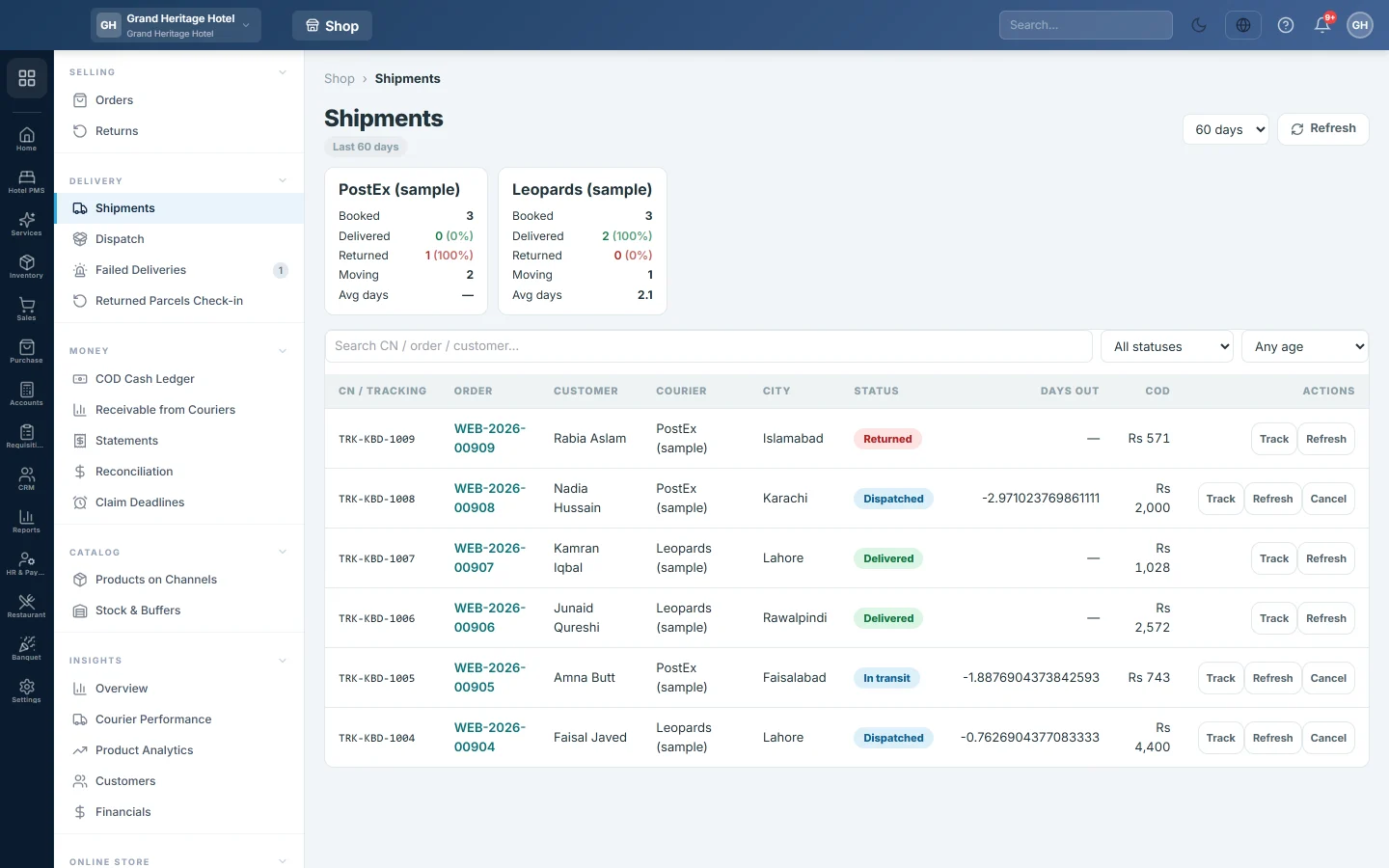
Shipments lists every parcel you have booked with a courier, with its tracking number (CN), live status and how many days it has been out. The tiles at the top compare your couriers.
Before you begin
- At least one courier is set up on Courier Accounts.
- Orders appear here once they are booked with a courier. See Turn an online order into an invoice.
Where to find it
Open Online shop → Delivery → Shipments.
Read the courier tiles
Each tile is one courier over the period you picked (30 days, 60 days or 90 days):
| Line | What it shows |
|---|---|
| Booked | Parcels booked with this courier. |
| Delivered | Parcels delivered, with the delivery rate. |
| Returned | Parcels that came back, with the return rate. |
| Moving | Parcels still on the way. |
| Avg days | Average days from booking to delivery. |
Click a tile to show only that courier's parcels. Click it again to show all.
Find a parcel
- Search by CN, order number or customer, and press Enter.
- All statuses narrows the list to one courier status, such as In transit, Out for delivery, 2nd attempt or Return in transit.
- Stuck > 3 days, Stuck > 5 days or Stuck > 7 days finds parcels that have been out too long. Rows out more than five days are tinted.
- A ⚠ next to the status means the courier's last reply was an error. Point at it to read the message.
- Clear resets the filters.
Track a parcel
- Click Track on the row. Live Tracking opens with every courier update and how it arrived.
- Click Refresh from courier to pull the latest status now. Carrier page opens the courier's own tracking page.
The Refresh button on the row pulls the latest status without opening the log. EloERP also checks statuses on its own and takes courier updates when the courier sends them.
Cancel a booking
Use this when a parcel will not ship, for example the customer cancelled before pickup.
- Click Cancel on the row.
- Type a Reason (optional).
- Click Cancel booking.
The order goes back to Ready to Book on Dispatch, so you can book it again. Cancel is not offered once a parcel is delivered, returned or cancelled.
Common questions
A parcel shows the same status for days. Click Refresh. If it still has not moved, contact the courier, or log a claim on Claim Deadlines.
A delivery failed. Where do I decide what to do? On Failed Deliveries.
Why is a courier's return rate high? Compare couriers and cities on Courier Performance, and route cities to the better courier with Courier Rules.
I shipped part of an order. Where is its invoice? A part shipment posts no invoice. The invoice, for the whole order, is posted with the shipment that completes it. Until then the order's timeline reads Part shipment — invoice waits for the rest of the order.
Where is the money the courier collected? COD that couriers still owe you is on Receivable from Couriers.
Teşekkür ederiz. Hâlâ yardıma ihtiyacınız varsa info@eloerp.net adresine yazın.