Account Summary
Each account's opening balance, movement in the period and closing balance, grouped by account group with subtotals.
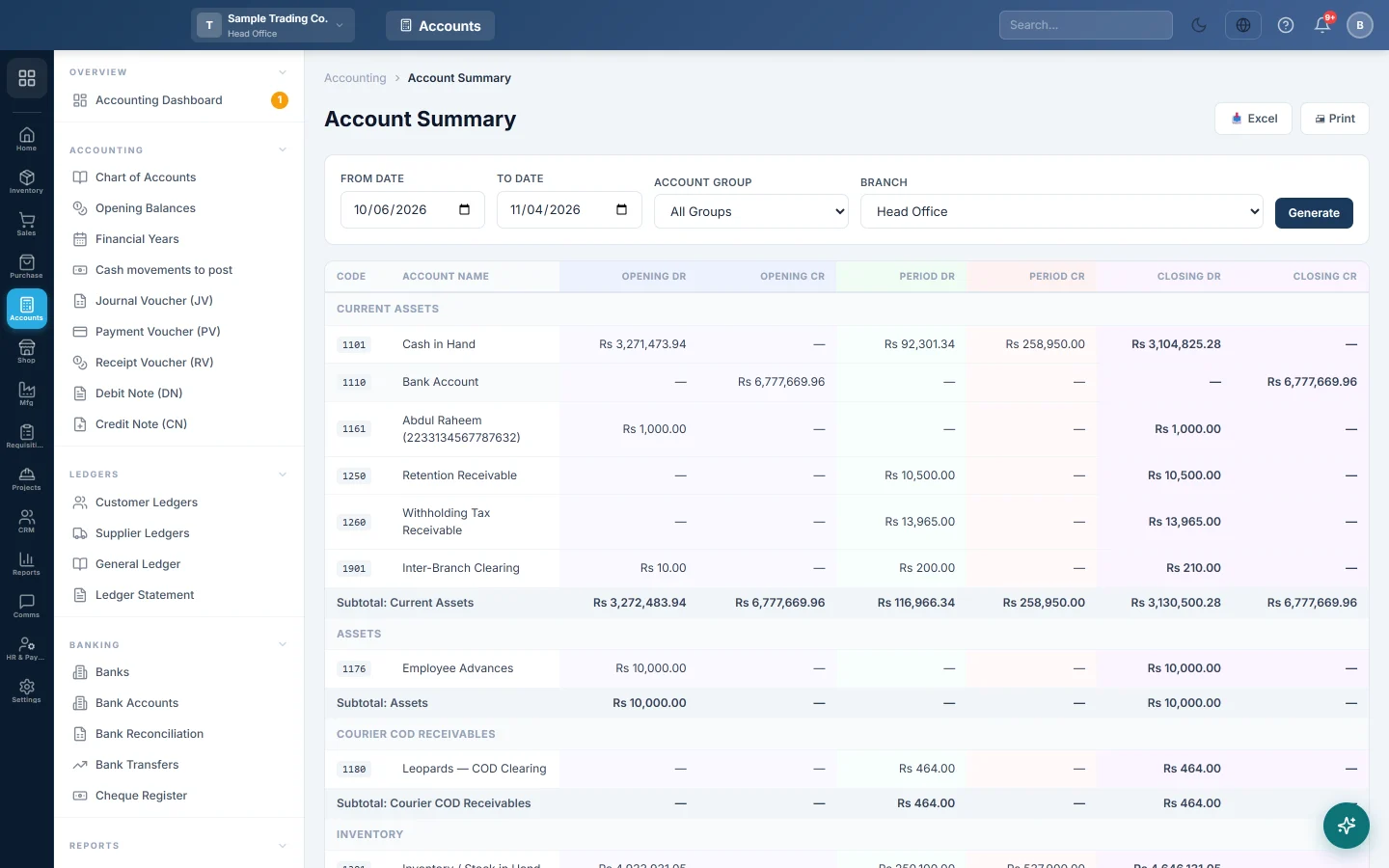
The Account Summary shows every account that has a balance or movement: what it opened with, what moved in the period, and what it closed at. Accounts are grouped by account group, with a subtotal for each, so it reads like a detailed trial balance.
Before you begin
- The Account Summary is part of your subscription plan's full financial accounting. If the menu item is missing, your plan does not include it.
- Your role needs the View Account Summary permission, set under Users & Roles.
Where to find it
Open Accounting → Reports → Account Summary.
Run the summary
- Set From Date and To Date. The page opens in your company's default report range and loads by itself.
- Optionally pick one Account Group, such as your expenses group, to see only its accounts.
- Click Generate.
Use Print or Excel to keep a copy.
How to read it
Each account has six figures:
| Column | What it means |
|---|---|
| Opening Dr / Opening Cr | The balance before the From Date, including any opening balance on the account. Only one side has a figure. |
| Period Dr / Period Cr | Everything debited and credited between the two dates. |
| Closing Dr / Closing Cr | Opening plus the period's debits, minus its credits. |
For example, an electricity expense account:
| Account Name | Opening Dr | Period Dr | Period Cr | Closing Dr |
|---|---|---|---|---|
| Electricity | 18,000 | 6,500 | 500 | 24,000 |
It had Rs 18,000 of expense before the period, Rs 6,500 was paid this month and a Rs 500 refund was credited, so it closes at Rs 24,000.
Each group ends with a Subtotal line. The GRAND TOTAL at the foot adds every account. Accounts with no balance and no movement are left out.
Common questions
Closing Dr and Closing Cr totals are not equal. Usually the report is filtered to one Account Group, or you are signed in to a branch whose vouchers have lines in another branch. With all groups, every posted voucher balances, so the closing totals match. If they still differ, run the Trial Balance for the same dates and compare.
Income and expense accounts have big opening balances. Their opening is everything since you started, unless the financial year was closed. Set From Date to the first day of your financial year, or close the old year, to start them from zero.
An account is missing. Inactive accounts are not shown, and neither are accounts with no balance and no movement.
I see only my branch's figures. The summary covers the branch you are signed in to. Switch branch in the top bar to see another.
How is it different from the Trial Balance? The Trial Balance shows closing balances. The Account Summary also splits out the opening and the period's movement for each account.
A figure looks wrong. How do I check it? Open the account in the Ledger Statement for the same dates. Its opening, debits, credits and closing should match this row.
Спасибо. Если помощь всё ещё нужна, напишите на info@eloerp.net.