Area-wise Customers
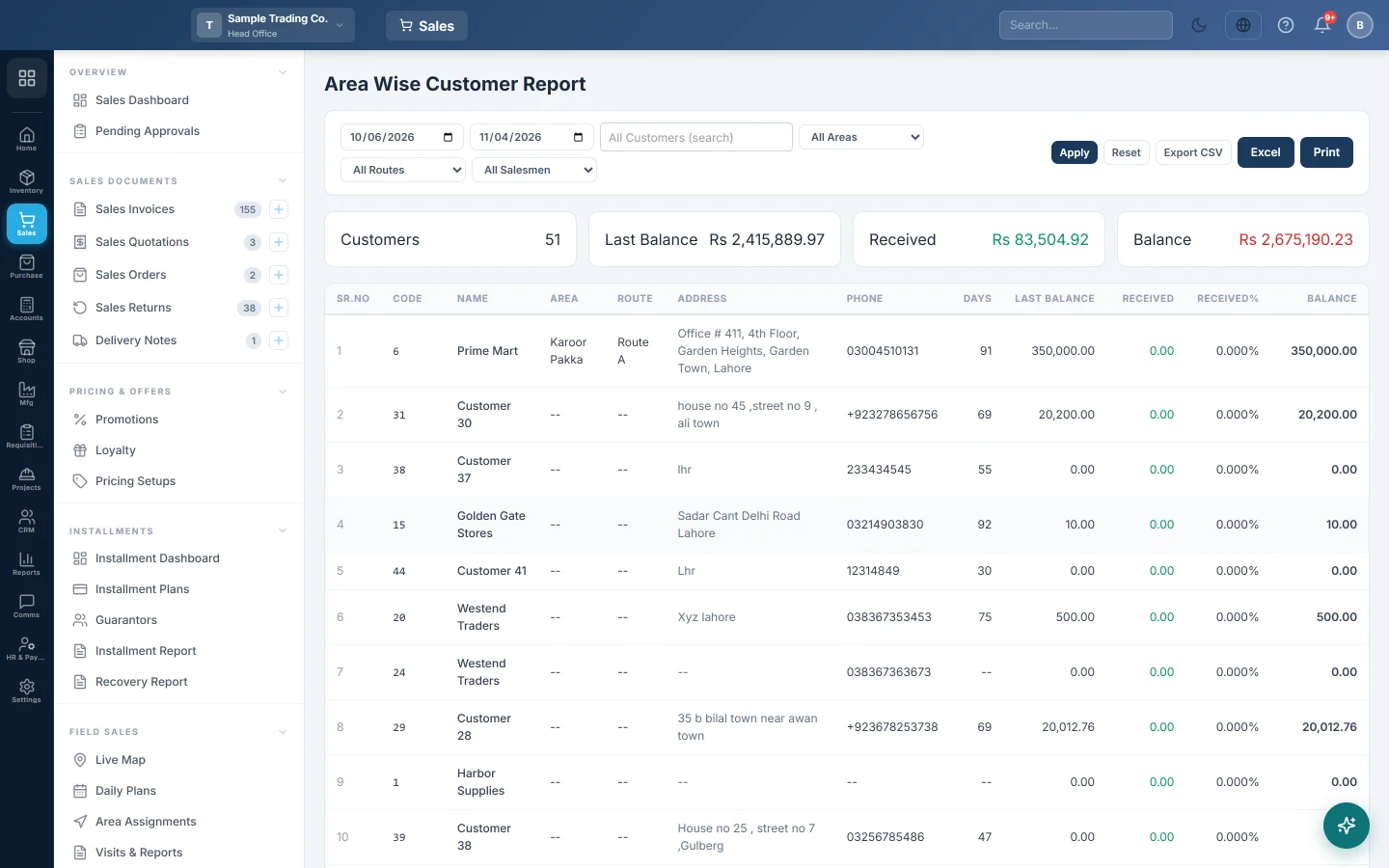
Customers by area and route with the balance they carried in, what they paid in the period, the percentage recovered and what they owe now.
The Area Wise Customer Report lists your customers with their area and route, what they owed at the start of the period, what they paid during it and what they owe now. Distributors use it to plan recovery rounds and to check each route's collection.
Before you begin
- Set up your areas and routes, then give each customer an area and a route. See Areas & Routes and All Customers.
- Your role needs View Sale Invoice Report. Your administrator sets this in Users & Roles.
- The report covers customers of the whole company, not one branch.
Where to find it
Open Sales → Reports → Area-wise Customers.
Run the report
The report opens for your company's default date range and loads by itself.
- Set the from and to dates.
- Pick All Areas or one area, and All Routes or one route.
- Pick a salesman in All Salesmen to see only customers that salesman has sold to. This box shows only when salesmen are set up.
- To check one customer, type the name in All Customers (search).
- Click Apply. Reset puts the filters back.
Read the figures
Each row shows Sr.No, Code, Name, Area, Route, Address, Phone, then:
| Column | What it means |
|---|---|
| Days | Days since the customer's last invoice, counted to today. |
| Last balance | What the customer owed just before the From date. |
| Received | Payments received from the customer between the two dates. |
| Received% | Received ÷ (Last balance + Received) × 100. |
| Balance | What the customer owes now. |
Balance is worked out as the customer's opening balance, plus all confirmed invoices, less all payments received. The cards and the TOTALS row add up Last balance, Received and Balance for every customer in the list.
A worked example: Ali Traders owed Rs 50,000 on 1 March. In March they paid Rs 30,000 and bought Rs 20,000 more.
| Amount | |
|---|---|
| Last balance | Rs 50,000 |
| Received | Rs 30,000 |
| Received% | 30,000 ÷ 80,000 = 37.5% |
| Balance | 50,000 + 20,000 − 30,000 = Rs 40,000 |
Export or print
Click Export CSV, Excel or Print. The files list the customers without the area and route columns, so filter by one area or route first if you hand the list to a salesman.
Common questions
Why is the Balance the same whatever To date I pick? Balance is always today's balance. Keep To on today: invoices and payments after the To date are otherwise counted in Last balance as well.
Why does a customer's Balance differ from the Customer Ledger? This report counts invoices, payments and the opening balance only. Sale returns and credit notes are not taken off here. The Customer Ledgers show every entry.
Why is a customer with no area in the list? With All Areas, every customer is listed, including those with no area. Their Area shows "--". Give them an area on the customer form.
What does Days tell me? How long since the customer last bought. A high number with a balance owed is a recovery to chase.
How do I see what each salesman collected? Pick the salesman in All Salesmen. Note that Received counts all the customer's payments, whoever collected them.
Thank you. If you still need help, write to info@eloerp.net.