Serial Trace (Police)
For each serialised unit, who you bought it from and who you sold it to, with phone, CNIC, address and documents, for police and registration records.
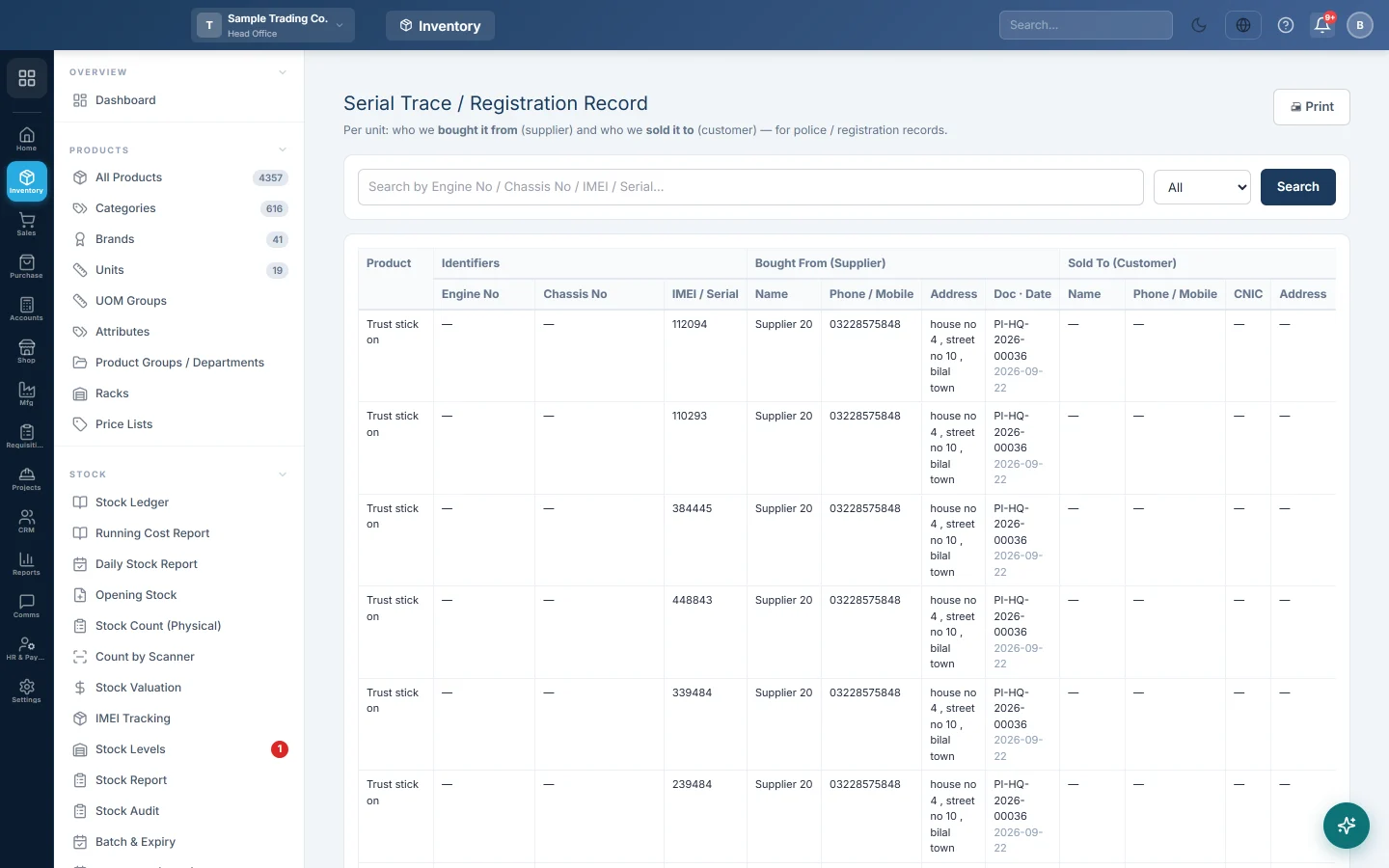
Serial Trace answers the question police and registration offices ask: who did you buy this unit from, and who did you sell it to? Search an engine, chassis, IMEI or serial number and get the supplier and customer details on one line, ready to print.
Before you begin
- Track the product by unit: tick Track Engine No, Track Chassis No or Enable IMEI on the product. See Serial / IMEI Stock.
- Enter the units with ⛓ Serials on the purchase invoice or GRN, and pick them on the sales invoice.
- Fill in phone, mobile, CNIC and address on your suppliers and customers. The trace shows what the records hold.
Where to find it
Open Inventory → Stock → Serial Trace (Police). The page heading reads Serial Trace / Registration Record.
Trace a unit
- Type the engine, chassis, IMEI or serial number in the search box. Part of the number is enough.
- Press Enter or click Search.
- To narrow the list, choose Sold, In stock or Delivered.
- Read the line across:
- Identifiers: Engine No, Chassis No and IMEI / Serial.
- Bought From (Supplier): Name, Phone / Mobile, Address and the purchase Doc · Date.
- Sold To (Customer): Name, Phone / Mobile, CNIC, Address and the sale Doc · Date.
- Click Print. The search bar is left off the printout.
Common questions
The customer columns are empty. The unit has not been sold yet, or it was sold without picking the unit on the invoice.
The CNIC is blank. The customer record has no CNIC. Add it on the customer and the trace picks it up.
Can I trace all units sold this month? Choose Sold and leave the search empty. The list shows the latest 2,000 units, newest first.
What is the difference from Serial / IMEI Stock? Serial / IMEI Stock is for stock checks; this report adds contact details for official records.
Obrigado. Se ainda precisar de ajuda, escreva para info@eloerp.net.