Units
Set up the units of measure (piece, box, kg, litre) that products are bought, stocked and sold in, and how many decimals each unit allows.
Units are the measures your products are counted in: Piece, Box, Kilogram, Litre. Each product has a unit, and the unit decides how many decimals a quantity can have.
Before you begin
- Your role needs permission to view units, and to create, edit or delete them. See Users & Roles.
- The default number of quantity decimals for your branch is set in Settings → General → Numbers.
Where to find it
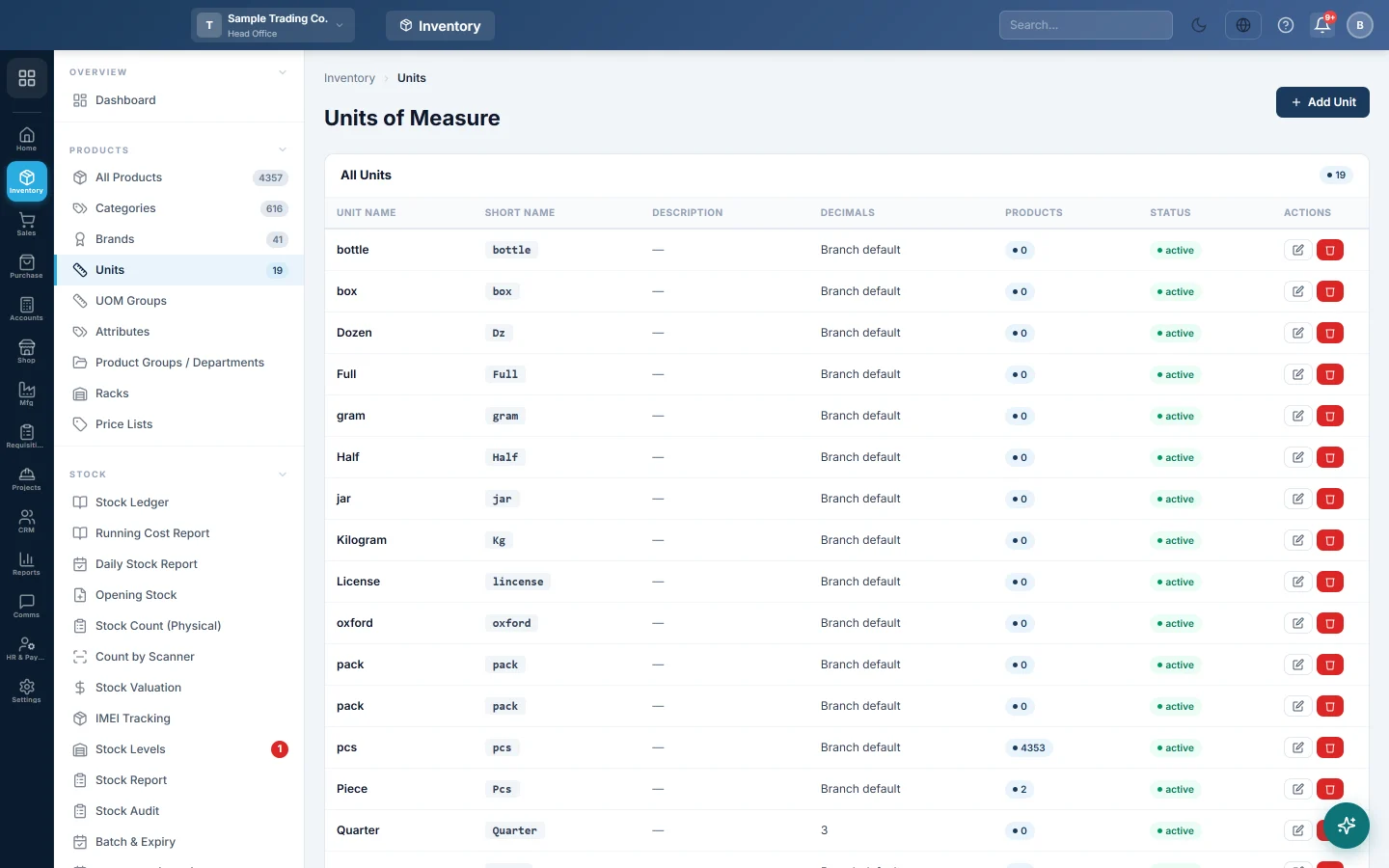
Open Inventory → Products → Units. The page is titled Units of Measure.
The list shows each Unit Name, Short Name, Description, Decimals, the number of Products that use it, and its Status.
Add a unit
- Click Add Unit.
- Type the Unit Name, for example Kilogram.
- Type the Short Name, for example kg. This is what shows next to quantities.
- Add a Description if you want one.
- Choose Quantity decimals:
- Branch default (Settings → General → Numbers) follows your branch setting.
- 0 — whole numbers only (Pcs, Box) for goods that are never split.
- 2 (Metre) or 3 (Kg, Litre) for goods sold by length, weight or volume.
- Leave Status on Active.
- Click Save Unit.
Add a common unit in one click
- Scroll to the Common Units panel below the list.
- Click a unit, for example Kilogram (kg). The form opens with the name and short name filled in.
- Set Quantity decimals and click Save Unit.
Edit a unit
- Click the pencil button on the unit's row.
- Change the fields you need.
- Click Save Unit.
Delete a unit
- Click the red bin button on the unit's row.
- Click Delete in the confirmation box.
The delete button is greyed out while products use the unit. A unit used in a product's multi-unit pricing cannot be deleted either.
Common questions
What is the difference between Units and UOM Groups? A unit is one measure, such as Piece or Carton. A UOM group links several units with a conversion, such as 1 Carton = 24 Pieces, for products you buy in one unit and sell in another.
Why are quantities rounded to whole numbers? The product's unit is probably set to 0 decimals. Change Quantity decimals on the unit, or pick a unit that allows decimals.
What does "Branch default" in the Decimals column mean? The unit has no decimals of its own and follows the quantity decimals in Settings → General → Numbers.
Why is the delete button greyed out? Products still use this unit. The Products column shows how many.
Vielen Dank. Wenn Sie weitere Hilfe brauchen, schreiben Sie an info@eloerp.net.