Financials
See the project's profit and loss by cost bucket, budget against actual, the forecast to complete, cash in and out, what the client owes and what you owe, and the ledger behind every figure.
The Financials tab is the project's own profit and loss. It shows revenue and cost by bucket, the forecast to completion, and cash. It also shows what is owed both ways, and every ledger row behind the figures.
Before you begin
- Your role needs View Project Financials. Edit Project Cost-to-Complete Forecast lets you set your own cost to complete. Recompute Project Cost Ledger lets you click Bring up to date. See Users & Roles.
- The budget comes from the rate split (material, labour, equipment, overhead) on each BOQ line.
Where to find it
Open Projects → Projects → All Projects, click the project, then open the Financials tab.
Check the ledger is up to date
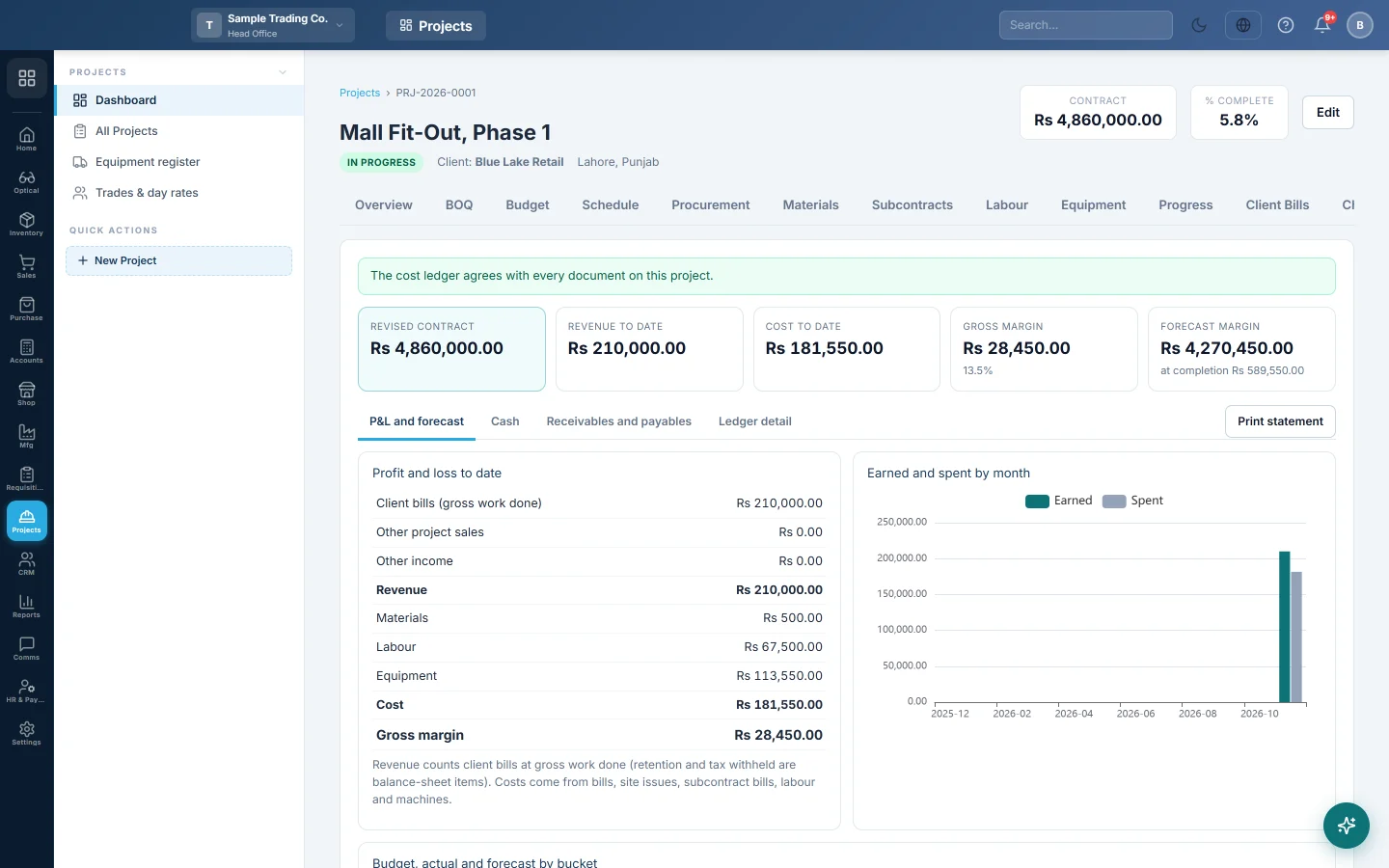
The banner at the top says whether the project's cost ledger agrees with its documents. If rows differ, the figures are not final. Click Bring up to date to correct the ledger.
Read the headline figures
- Revised contract: the contract value with approved change orders.
- Revenue to date and Cost to date.
- Gross margin: revenue less cost, with its %.
- Forecast margin: revised contract less the estimate at completion.
Read the P&L and forecast
- Open P&L and forecast.
- Profit and loss to date lists revenue by source and cost by bucket.
- Earned and spent by month charts the last 12 months.
- Budget, actual and forecast by bucket shows, for each bucket, Budget, Actual, Committed, To complete, At completion and Variance.
The buckets are Materials, Labour, Equipment, Subcontracts, Site overheads and expenses and Other.
How cost to complete is worked out
- Once daily progress reports record quantities: the BOQ quantity not yet done × that bucket's rate.
- Before that: the BOQ quantity × (100% − the project's % complete) × that bucket's rate.
- Subcontracts: the awarded subcontract values less what is already billed.
- It is never less than what is already committed in that bucket.
At completion is actual plus to complete. Variance is budget less at completion; a negative figure is an overrun.
Set your own cost to complete
- Click the To complete figure of a bucket.
- Type the amount in Cost to complete for that bucket.
- Type the reason in Why (optional).
- Click Save.
Your figure shows in blue with its reason. Clear the amount and save to go back to the estimate.
See cash, receivables and payables
- Cash: Received, Paid out and Net cash, with a chart by month. It counts receipts and payments against the project's invoices, subcontract-bill and daily-wage payments, and vouchers tagged to the project.
- Receivables and payables, Client: billed, received and Due from the client, with retention, advances and tax withheld. Age of what is due splits the amount due by age.
- Receivables and payables, Subcontractors and suppliers: subcontract bills, paid and due, with retention, advances and tax withheld. Supplier bills still due shows what suppliers are owed.
Look at the ledger rows
- Open Ledger detail.
- Pick the Side (Cost, Revenue or Commitment), the Bucket, and the From and To dates.
- Click Show. Click a document number to open it.
- Click Export to Excel (CSV) to download the rows.
Click Print statement for a one-page project financial statement.
Where the figures come from
This tab posts nothing. It reads the project's cost ledger, which follows the documents tagged to the project:
- Revenue: certified client bills at gross work done, other project sale invoices, and income on project vouchers. Retention and tax withheld are balance-sheet items, not lost revenue.
- Cost: posted purchase invoices, goods received not yet invoiced, site issues and certified subcontract bills. Approved labour sheets, owned machines' approved logs and expenses on project vouchers count too.
- Commitment: open purchase orders, the unbilled part of awarded subcontracts, contractor gangs' man-days and hired machines' hours not yet billed.
Common questions
Why is a purchase missing from cost? The Project field was empty on it, or it is still a draft. Edit the document and pick the project.
Why is Budget empty for Labour or Equipment? The BOQ lines have no labour or equipment rate in their rate split.
Does a payment to a supplier add to cost? No. The bill counted when it was posted. Paying it only moves cash.
Why does the forecast change after a daily report? Approved reports lower the quantity left to do, so the cost to complete falls.
شكرًا لك. إذا كنت لا تزال بحاجة إلى مساعدة، راسلنا على info@eloerp.net.