Separate Whole Blood into components
Split a Whole Blood unit into packed red cells, plasma, platelets or cryoprecipitate, each with its own unit number, expiry and storage.
After centrifuging a Whole Blood bag, record each component you made. EloERP gives every component its own unit number, expiry and storage place, and marks the Whole Blood unit Processed.
Before you begin
- Your role needs Prepare Components, Move & Discard Units. See Users & Roles.
- The components, shelf lives and storage temperatures are set in Blood Bank Setup, along with your fridges, freezers and agitators.
Where to find it
Open Blood Bank → Work → Units & Inventory.
Separate the unit
- Find the Whole Blood unit, for example by searching its donation number.
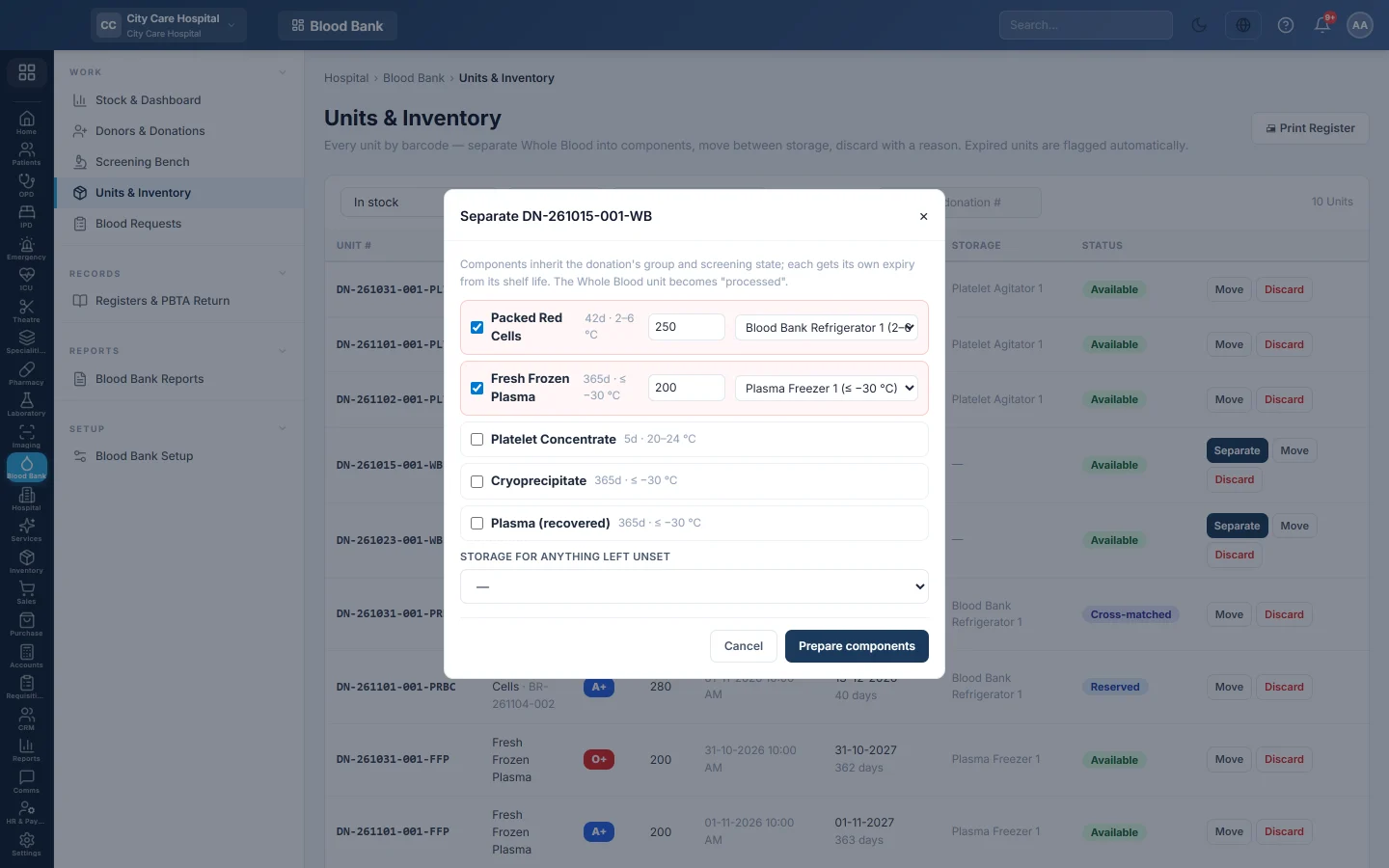
- Click Separate. It shows for Whole Blood that is in quarantine or available.
- Tick each component you made. Packed Red Cells and Fresh Frozen Plasma start ticked.
- Type the volume in ml next to each one.
- Check the storage list next to each component. EloERP picks the appliance whose temperature matches the component.
- Optionally choose Storage for anything left unset.
- Click Prepare components.
What you get
- One unit per component, numbered with the donation number and the component code, for example DN-261104-003-FFP.
- Each component keeps the donation's group and screening state. Separating before screening is fine: the components stay in quarantine and are released or discarded together.
- Each expiry is the collection time plus the component's shelf life, for example 5 days for platelets.
- Each unit carries the component's price for billing.
Common questions
I made a component by mistake. Discard it on Units & Inventory with the reason other and a remark.
Can I separate the same Whole Blood twice? No. The Whole Blood unit becomes Processed at once, and the Separate button disappears. Tick every component you made the first time.
The storage list is empty. No active storage units exist. Add them on the Storage units tab in Blood Bank Setup.
谢谢。 如果仍需帮助,请发邮件至 info@eloerp.net。