Receive and treat an emergency patient
An emergency visit end to end - register the arrival, triage, treat and order, bill, then admit, discharge, refer or record a death with the disposition.
This is the whole emergency visit: from the patient coming through the door to leaving the department.
Before you begin
- Your role can register and treat emergency patients, and bill if you take money. See Users & Roles.
- ER fees and procedures are on the price list. See Price List & Tariffs.
- To collect money, your cash shift is open. See Cash Register.
Where to find it
Open Emergency → Work → ER Board.
Register and triage
- Click + Register Arrival, find or register the patient, choose the Mode of Arrival, and type the Presenting Complaint.
- Tick Medico-legal case (MLC) if it is a police case.
- Click Register.
- Click Triage on the row, choose the Acuity Level and enter the vitals.
- Click Save Triage.
For an unconscious or unknown patient, see An unidentified patient on ER Board.
Treat the patient
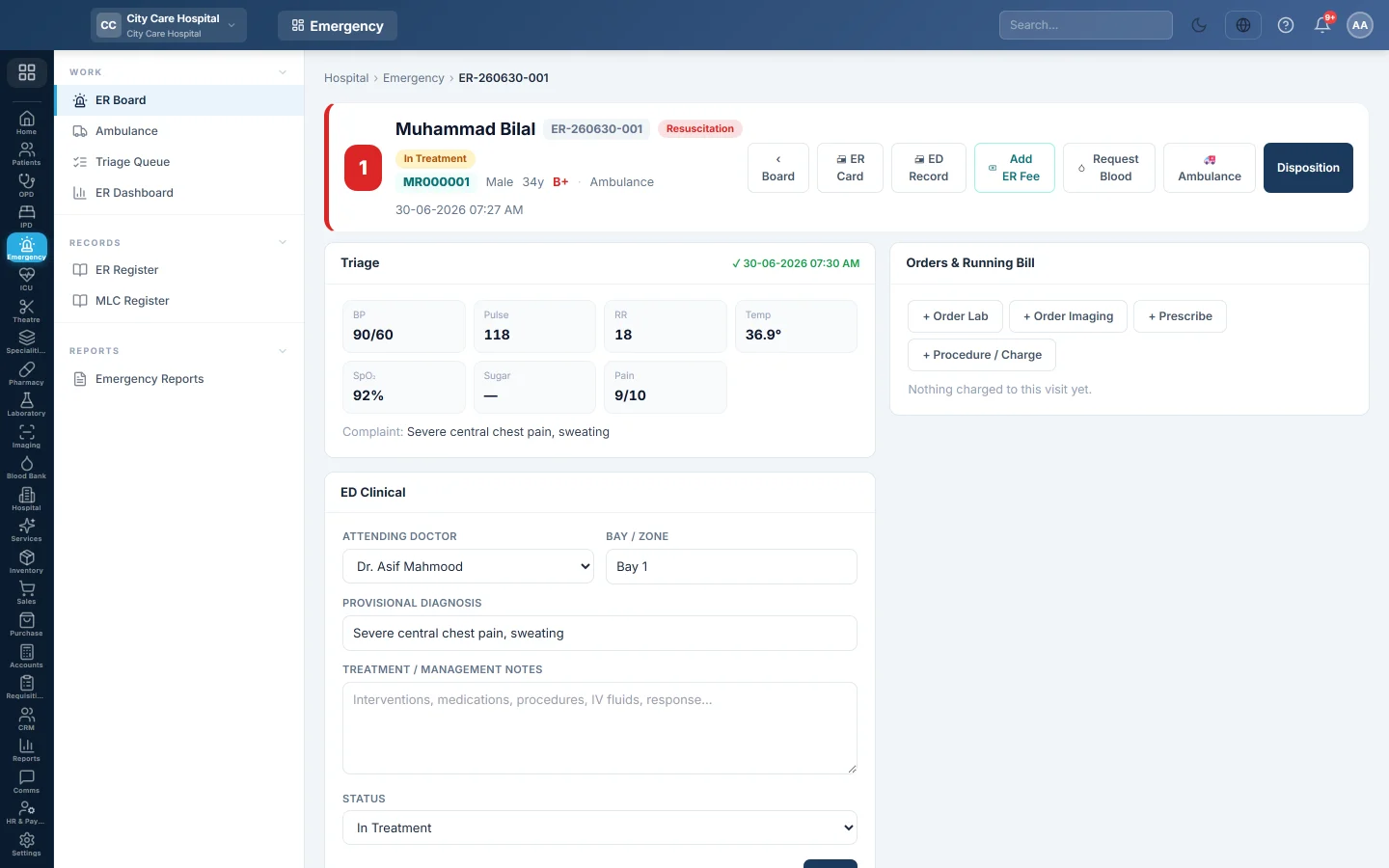
- Click the row to open the visit.
- Under ED Clinical, choose the Attending Doctor and the Bay / Zone, for example Resus-1.
- Type the Provisional Diagnosis and the Treatment / Management Notes.
- Set the Status: Triaged, In Treatment or Observation.
- Click Save.
The Allergies box warns of known allergies. ER Card and ED Record print the visit.
Order and charge
Under Orders & Running Bill:
- Order Lab and Order Imaging send tests with a Priority and clinical notes.
- Prescribe orders medicines from the pharmacy catalogue.
- Procedure / Charge adds a priced service from the price list.
- Add ER Fee at the top adds the emergency fee.
Each item shows on the running bill. Due now shows what to collect; click Collect, choose the payment method and click Collect & Bill.
Request Blood asks the blood bank for units. See Blood Requests.
Decide where the patient goes
- Click Disposition.
- Choose Admit, Discharge, Refer, LAMA, DAMA, Absconded, Expired or Brought Dead.
- For Admit, choose the Ward and Bed. Leave them empty to record the admit decision; the patient stays on the board as awaiting bed.
- For Refer, type where in Referred To.
- For a death, tick the confirmation. It records a statutory death entry and cannot be undone.
- When discharging, referring or LAMA with charges, settle the ER bill in the box shown.
- Add Notes and click Confirm Disposition.
Admitting moves the ER charges to the admission, to be settled at discharge, and opens the inpatient chart. A death goes to Deaths & Mortuary.
Identify an unknown patient
When an unidentified patient is known:
- Open their visit. It shows Unidentified patient.
- Find the patient's own file, and type How identified, for example relative confirmed, CNIC.
- Click Merge into this file.
The visit and every charge, order and note move to the real file. This needs the merge permission.
Common questions
The admitted patient is still on the board. No bed was chosen, so the patient is awaiting a bed. Open Disposition again and assign a ward and bed.
Add ER Fee is missing. The fee is already on the bill, or your role cannot bill.
The patient left without paying. Record LAMA or Absconded. Unpaid charges stay on the visit's bill.
谢谢。 如果仍需帮助,请发邮件至 info@eloerp.net。