ER Board
The emergency department's live board - register arrivals, triage them by acuity, and open each visit to treat, order, bill, record an MLC and decide where the patient goes.
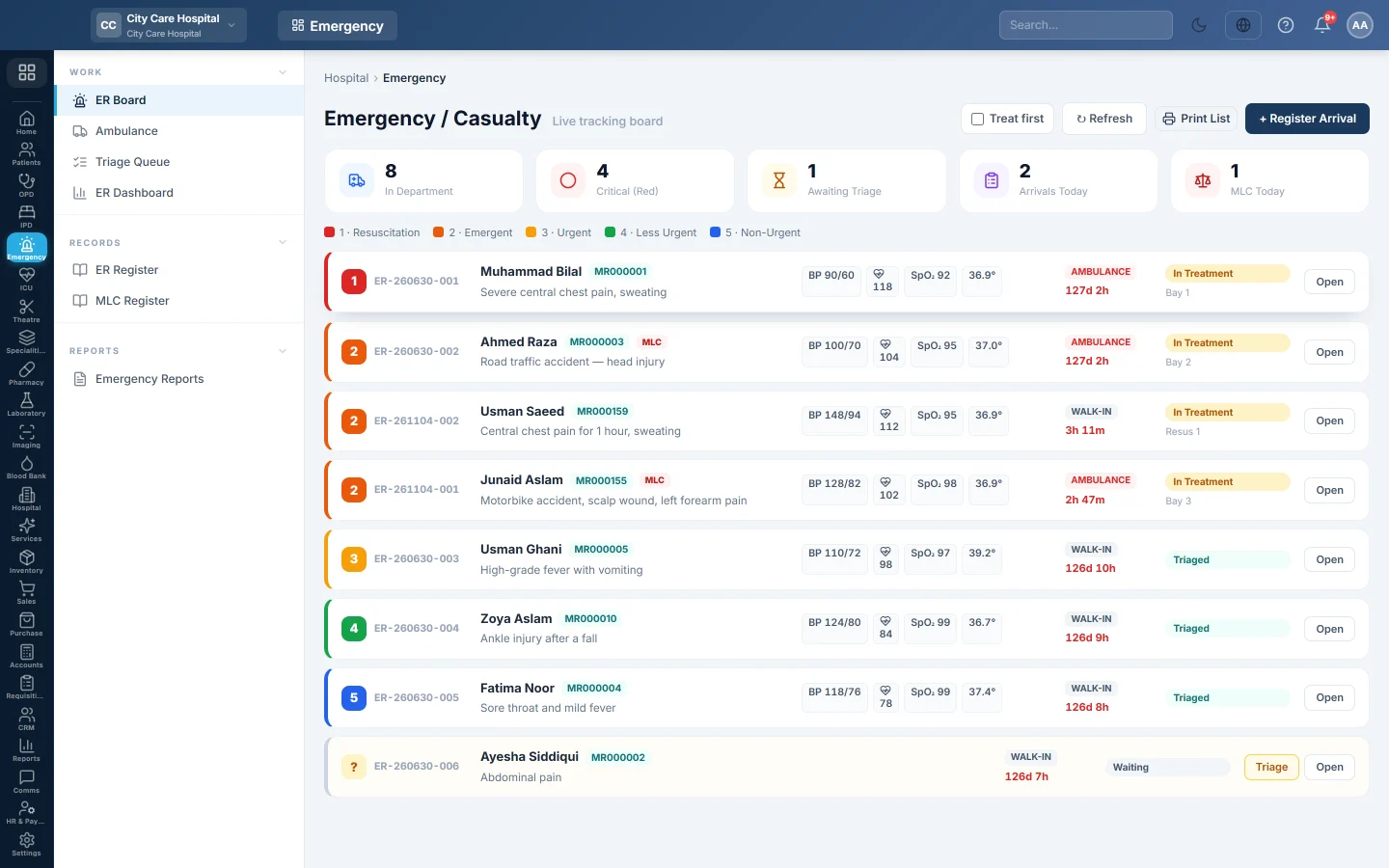
The ER Board is the live list of patients in the emergency department. Each row is coloured by triage level, and shows the complaint, the latest vitals, the arrival mode and how long the patient has waited.
Before you begin
- Registering and triaging need the emergency manage or appointment create permission. Billing needs the billing permission. See Users & Roles.
- Doctors exist for the Attending Doctor. See Doctors.
Where to find it
Open Emergency → Work → ER Board. The page is titled Emergency / Casualty.
Read the board
The tiles show In Department, Critical (Red), Awaiting Triage, Arrivals Today and MLC Today.
The legend shows the five triage levels: 1 · Resuscitation, 2 · Emergent, 3 · Urgent, 4 · Less Urgent and 5 · Non-Urgent. An untriaged row shows ?. The wait turns red after 30 minutes.
Register an arrival
- Click + Register Arrival.
- Find the patient in Patient, or click + to register them.
- Choose the Mode of Arrival: Walk-in, Ambulance, Referral or Police.
- Type who Brought By, for example a relative's name.
- Type the Presenting Complaint.
- Tick Medico-legal case (MLC) for an accident, assault, poisoning or other police case.
- Click Register.
An unidentified patient
When Treat first is ticked at the top, the register window has Unidentified — treat first, identify later. Tick it and record the Gender (as seen) and Approx. age. The patient is registered as unknown and can be merged into their own file once identified.
Treat first needs the hospital settings permission to change.
Triage a patient
- Click Triage on the row.
- Choose the Acuity Level, 1 to 5.
- Enter the vitals: temperature, pulse, respiration, BP, SpO₂, sugar and pain score.
- Click Save Triage.
The row takes the level's colour and moves up the board by acuity.
Open a visit
Click a row, or Open, to work on the visit: clinical notes, orders, the running bill, the MLC and the disposition. See Receive and triage an emergency patient.
Common questions
The board shows a patient from days ago. The visit was never closed. Open it and record the Disposition.
The Register Arrival button is missing. Your role cannot register patients in the emergency.
How do I see who is waiting longest? Use the Triage Queue, which sorts untriaged arrivals first and flags waits past each level's target.
How do I print the board? Click the print button next to Refresh.
谢谢。 如果仍需帮助,请发邮件至 info@eloerp.net。