Work in the inpatient chart
The inpatient chart - admission assessment, progress notes, vitals, doctor's orders for medicines, tests, diet and nursing care, and the medication administration record (MAR).
The inpatient chart is the patient's record for the stay. Doctors write progress notes and orders, and nurses record vitals and give medicines from the MAR.
Before you begin
- The patient is admitted. See Admit a patient.
- Medicines ordered from the pharmacy catalogue are dispensed and charged to the stay. See Dispensing & Stock.
Where to find it
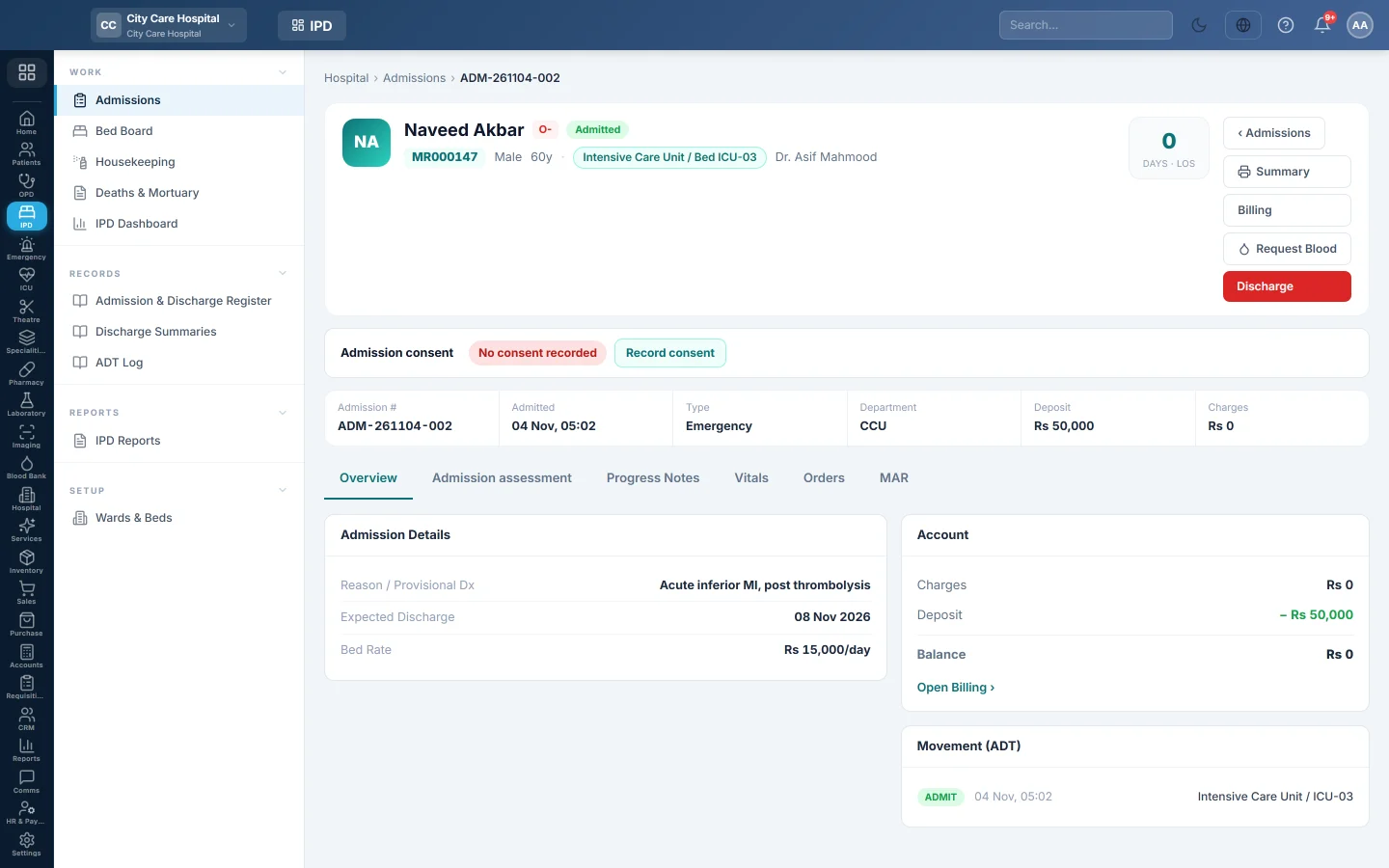
Open Inpatients (IPD) → Work → Admissions and click Chart on the patient, or click the patient's name.
The top of the chart
The header shows the bed, the days in hospital and the admission details: Admission #, Admitted, Type, Department, Deposit and Charges. The buttons are Summary (print), Billing, Request Blood and Discharge.
Under it, record the patient's Admission consent.
Record the admission assessment
When the hospital requires it, the chart shows Nursing admission assessment due.
- Click Record it now, or the Admission assessment tab.
- Record allergies, the fall-risk (Morse) answers, belongings and the first vitals.
- Save it.
The tab then shows the fall score, and the bed shows it on Bed Board.
Write a progress note
- Open Progress Notes.
- Under New Progress Note, choose the kind: Progress, Round, Nursing or Procedure.
- Fill in Subjective, Objective, Assessment and Plan.
- Click Add Note.
Record vitals
- Open Vitals.
- Under Record Vitals, enter temperature, pulse, respiration, BP, SpO₂, sugar and weight.
- Click Record.
Trends draws each reading over the stay, and Readings lists them by time.
Order medicines, tests and care
- Open Orders and click New Order.
- Choose the Order Type: Medication, Lab Investigation, Radiology, Diet, Nursing Care or Procedure.
- For a medicine, search the Drug in the pharmacy catalogue and fill in Dose, Route, Frequency, Duration (days) and Quantity to dispense. Tick PRN (as needed) if it is given only when needed.
- For tests, pick the Tests or Examinations.
- Choose the Priority, Routine or Urgent, and add Instructions.
- Click Add Order.
Click Done on an order that is finished, or Stop to end it.
Give medicines from the MAR
- Open MAR. Each active medicine order is listed.
- At each dose, click Give, Hold or Refused.
The MAR keeps who gave what and when. A medicine order must exist first; the MAR is empty until one is added on Orders.
Common questions
Who can see the charges? Users with billing access. Click Billing to see the stay's charges, deposits and balance.
The patient moved to the ICU. Transfer them to an ICU bed. Their chart then also opens on the ICU / CCU / NICU Board.
Where are operations shown? The Operations tab appears when the patient has a theatre case. See OT Board.
Can I print the chart? Summary prints the admission summary. The full discharge summary prints from the discharge page.
Thank you. If you still need help, write to info@eloerp.net.