Admit a patient
Admit a patient to a ward bed - from a doctor's advice or directly - with the admitting doctor, the advance deposit, an optional package, the admission slip and consent.
Admitting gives the patient an admission number and a bed, and starts the stay's account. You usually admit from a doctor's advice, so most of the form is already filled in.
Before you begin
- The patient is registered. See Register a patient.
- Wards and beds exist, with daily rates. See Wards & Beds.
- Your role needs the admit permission. See Users & Roles.
- To take a deposit, your cash shift is open. See Cash Register.
Where to find it
Open Inpatients (IPD) → Work → Admissions. You can also click a free bed on Bed Board.
Admit from a doctor's advice
When a doctor clicks Admit in OPD Consultation, the patient appears under Advised for admission.
- Find the patient under Advised for admission.
- Click Admit. The form says Filled from the consultant's advice.
- Check the department, ward and deposit, then carry on from step 4 below.
If the patient is not here yet, click Reserve bed to hold a bed until they arrive.
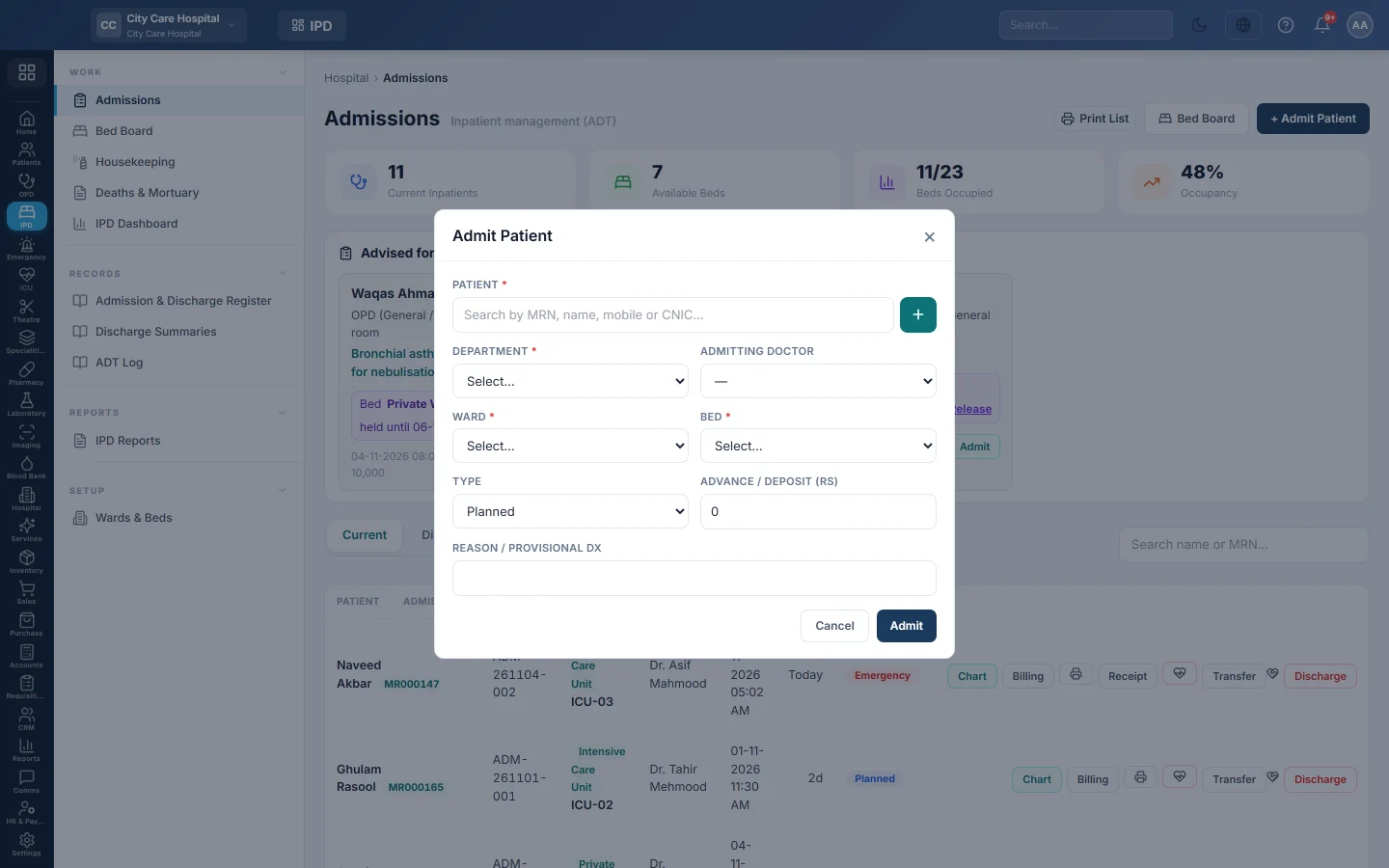
Admit a patient
- Click + Admit Patient.
- Find the patient in Patient. The + button registers a new patient.
- Choose the Department and the Admitting Doctor.
- Choose the Ward. The list shows how many beds are free.
- Choose the Bed. Each bed shows its daily rate.
- Choose the Type: Planned or Emergency.
- Type the Advance / Deposit taken now. A welfare patient's deposit band shows under the field.
- If you took a deposit, choose the Payment Method and a Reference No. if there is one.
- Type the Reason / Provisional Dx.
- If the patient is on a package, such as a delivery or surgery package, pick it.
- Click Admit.
When a deposit was taken, the IPD Advance / Deposit Receipt prints. Click the printer on the row to print the admission slip.
After admitting
- Click Chart on the row. See Work in the inpatient chart.
- Record the patient's Admission consent on the chart.
- If the nursing assessment is required, the chart shows Nursing admission assessment due. Click Record it now.
What happens in the books
A deposit posts a receipt voucher: cash or bank for the payment method is debited, and Patient Advance Deposits, a liability, is credited. It stays there until the final bill uses it.
The bed's daily rate is added to the stay as a charge each day. Charges post to revenue when the final bill is made at discharge. See Discharge a patient.
Common questions
No beds appear for the ward. All its beds are occupied, cleaning, reserved or blocked. Pick another ward or check Bed Board.
Can I admit without a deposit? Yes. Leave Advance / Deposit at 0. You can take a deposit later from Billing on the admission.
The patient came from the emergency. Admit them from the ER visit's disposition instead, so the ER charges move to the stay. See ER Board.
How do I reprint the deposit receipt? Click Receipt on the admission row.
谢谢。 如果仍需帮助,请发邮件至 info@eloerp.net。