Bill a stay to a company account
Send a guest's room charges to their company while the guest pays their own extras, settle the company folio to the city ledger at check-out, and collect from the company later.
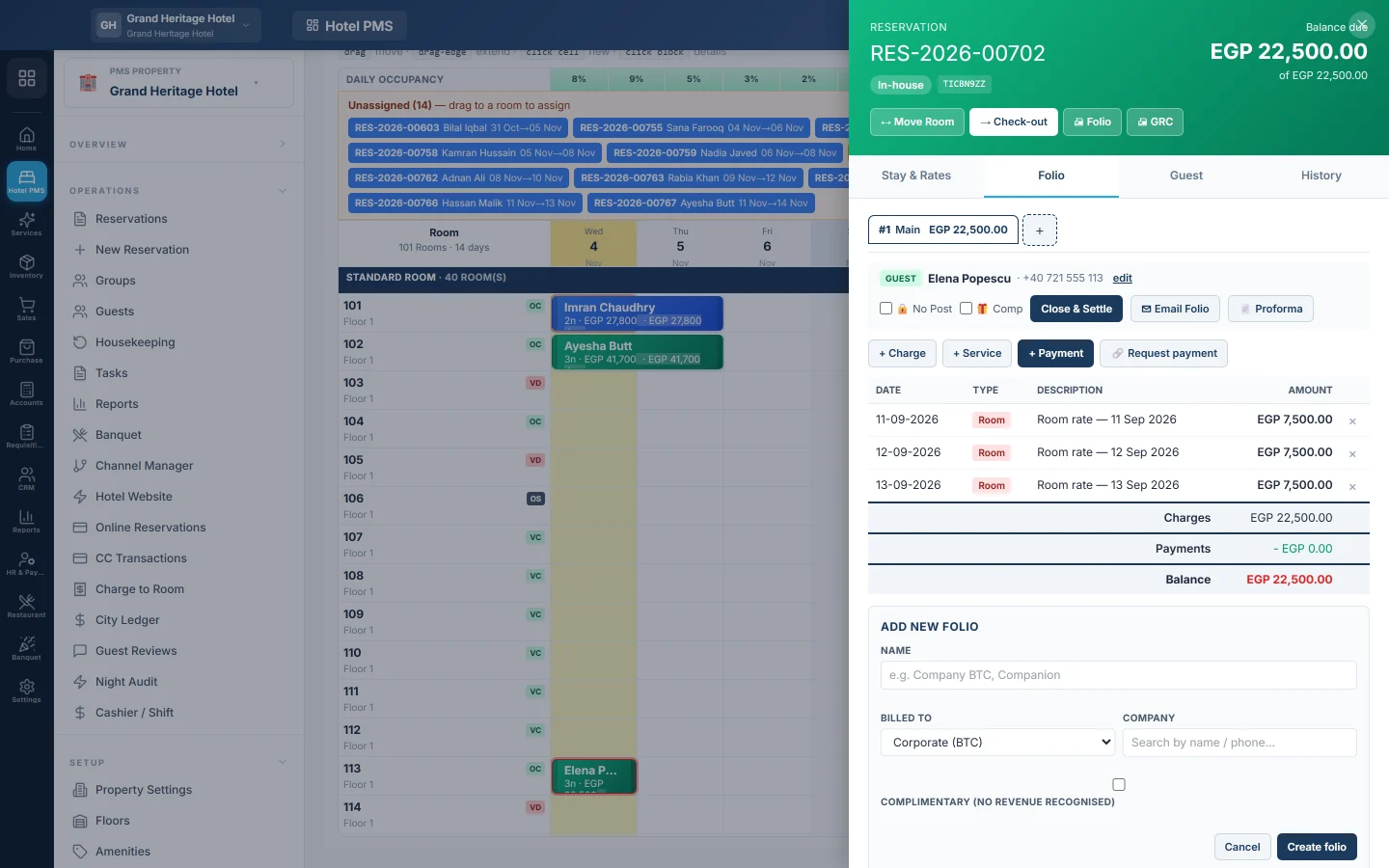
When a company pays for its guest's stay, give the stay a second folio billed to the company. The room nights go on the company folio, the guest pays their own extras, and at check-out the company folio is settled to the city ledger to be collected later.
Before you begin
- The company is a customer with a ledger. See All Customers.
- Your role can manage folios. See Users & Roles.
Where to find it
Click the guest's bar on the Front Desk (Tape Chart) and open the Folio tab. Later steps happen on City Ledger.
1. Note the agreement on the booking
On the booking form, open Billing, settlement & folios. Pick the Settlement type, for example Bill to company (BTC) or BTC — room rent only, enter the BTC reference / PO no., and name the folios, for example Folio 1 description: Company, Folio 2 description: Guest extras.
2. Add the company folio
- On the Folio tab, click Add folio.
- Enter a Name, for example Company BTC.
- Under Billed to, pick Corporate (BTC) and pick the Company.
- Click Create folio.
3. Move the room nights to the company
- Open the reservation page and click Split… in the folio card.
- Under Move to folio, pick the company folio.
- Tick the room nights under Charges to move.
- Type a Reason, for example Room to company as agreed, and click Confirm.
The guest's own folio keeps the extras, such as minibar and laundry.
4. At check-out
- Take the guest's payment on the guest's folio and settle it with Close & Settle.
- Pick the company folio and click Close & Settle. The message says the balance will be posted as AR to the company; click Close folio.
- Click Check-out. When asked about the balance due, click Check out anyway; it now sits with the company.
5. Invoice and collect
On City Ledger, tick the company's stays under Ready to invoice and click Raise invoice. When the company pays, click Collect on the invoice and record the payment.
What happens in the books
Settling the company folio debits the company's ledger with the stay's charges and credits revenue (or the guest ledger for nights the night audit already counted). The company's payment later debits cash or bank and credits the company's ledger.
Common questions
Can I post charges straight to the company folio? Yes. Pick the company folio at the top of the Folio tab before you post.
The company is over its credit limit. The Credit exposure by account card on City Ledger shows it. EloERP still lets you settle; decide with your manager.
Can the guest see the company's charges? Each folio prints on its own, so print only the guest's folio for the guest.
谢谢。 如果仍需帮助,请发邮件至 info@eloerp.net。