Post a charge to a folio
Add laundry, minibar, food, transport and other extras to a guest's bill, sell a service from your price list, split charges onto a second folio, and reverse a wrong charge.
A folio is the guest's bill. Room nights post to it at check-in; everything else the guest buys, you post as a charge. A stay can have more than one folio, for example one for the company and one for the guest's own extras.
Before you begin
- The folio is open and not set to No Post.
- For services from a price list, add them on Services & Extras.
- Your role has the permission to post folio charges. See Users & Roles.
Where to find it
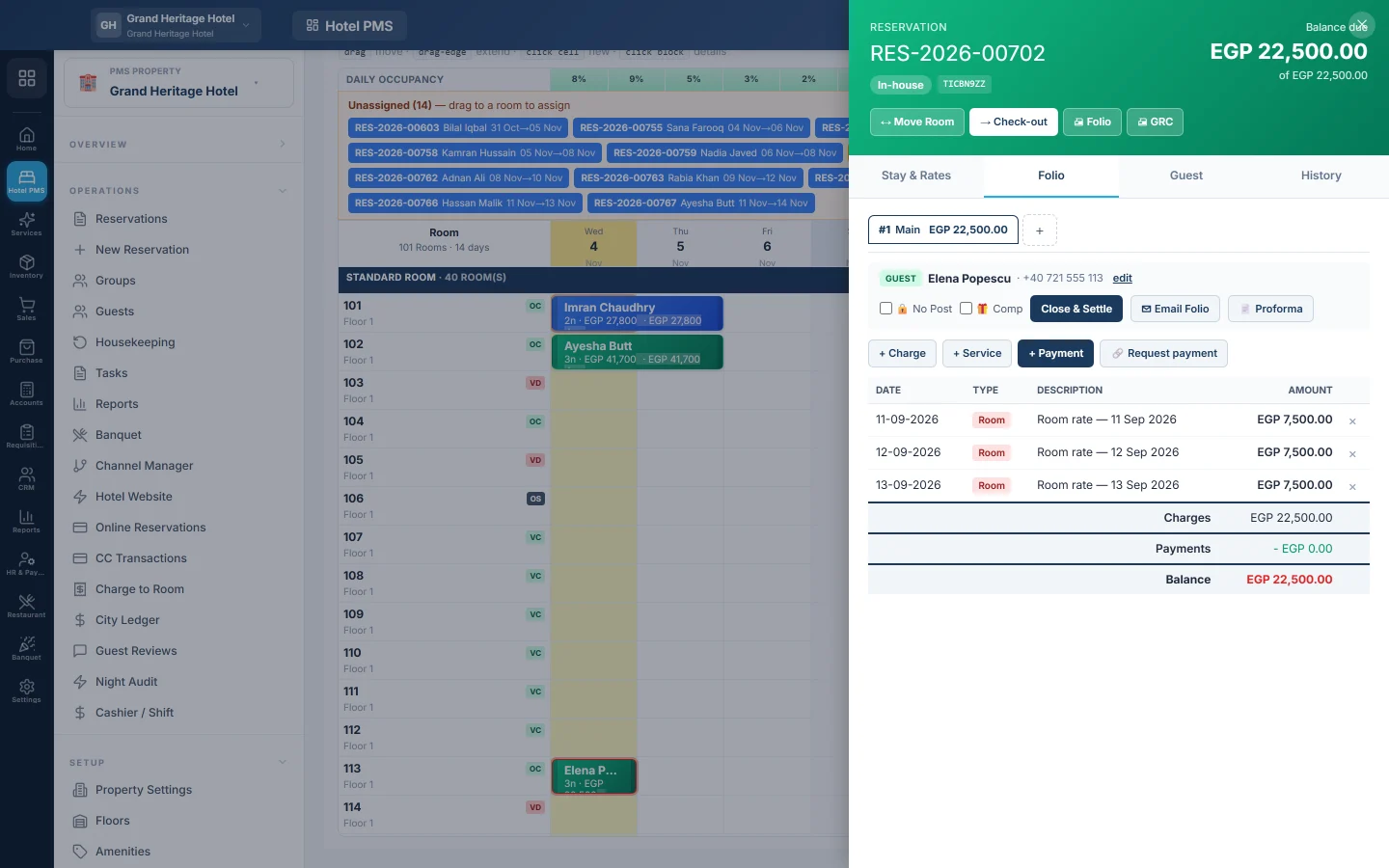
On the Front Desk (Tape Chart), click the guest's bar and open the Folio tab. Restaurant and outlet bills reach the folio from the POS, see Charge to Room.
Post a charge
- On the Folio tab, pick the folio at the top if the stay has more than one.
- Click + Charge.
- Pick the Type, for example Mini bar, Laundry or Transport.
- Enter the Qty, a Description and the Unit price.
- Click Post.
The charge appears on the folio and the balance goes up.
Sell a service from the price list
- Click + Service.
- Search, for example spa or pickup, and click the service.
- Enter the Quantity. Type a Unit price (override) only for a special price.
- Click Post to folio.
Give the company and the guest separate bills
- Click Add folio.
- Enter a Name, for example Company BTC.
- Under Billed to, pick Main guest, Another customer or Corporate (BTC), and pick the company or customer.
- Click Create folio.
To move charges that are already posted, open the reservation page, click Split… in the folio card, pick the folio under Move to folio, tick the charges and give a Reason. Transfer… moves an amount from one folio to another instead.
Correct a wrong charge
- On an open folio, click × on the line to delete it. Use this only for a line keyed in by mistake that the night audit has not counted yet.
- On the reservation page, click the reverse button on the line (its tip reads Reverse (posts an offsetting line)) and give a reason. The original line stays and a minus line dated today cancels it, so the bill shows what happened.
A line the night audit has already counted has no ×, and a delete is refused. Use Reverse: the next audit counts the correcting line, so the closed day's figures never change.
Room nights cannot be deleted while the guest is in-house. To change their price, use Change rate on the reservation page.
What happens in the books
A charge posts nothing to your accounts at once. The night audit moves each day's charges into revenue (room, food and beverage, or other income) and tax into Sales Tax Payable. Charges not yet audited become revenue when the folio is settled. See Run the night audit.
Common questions
+ Charge is greyed out. The folio is settled, closed or set to No Post. Pick another folio, or clear the No Post tick box on the folio.
A message says the business date is closed by the night audit. A charge cannot be dated inside a day that is already closed. Post it with today's date.
What does No Post mean? The folio takes no new charges, for example for a guest whose company pays only the room. Outlet bills cannot be charged to it either.
What is a complimentary folio? A folio marked Comp is settled without revenue, for example for a house guest. Tick Complimentary (no revenue recognised) when you add it.
Can I post a charge after the guest left? Only after a manager re-opens the settled folio with Reverse Settlement. See Check out and settle a folio.
Teşekkür ederiz. Hâlâ yardıma ihtiyacınız varsa info@eloerp.net adresine yazın.