Make a reservation
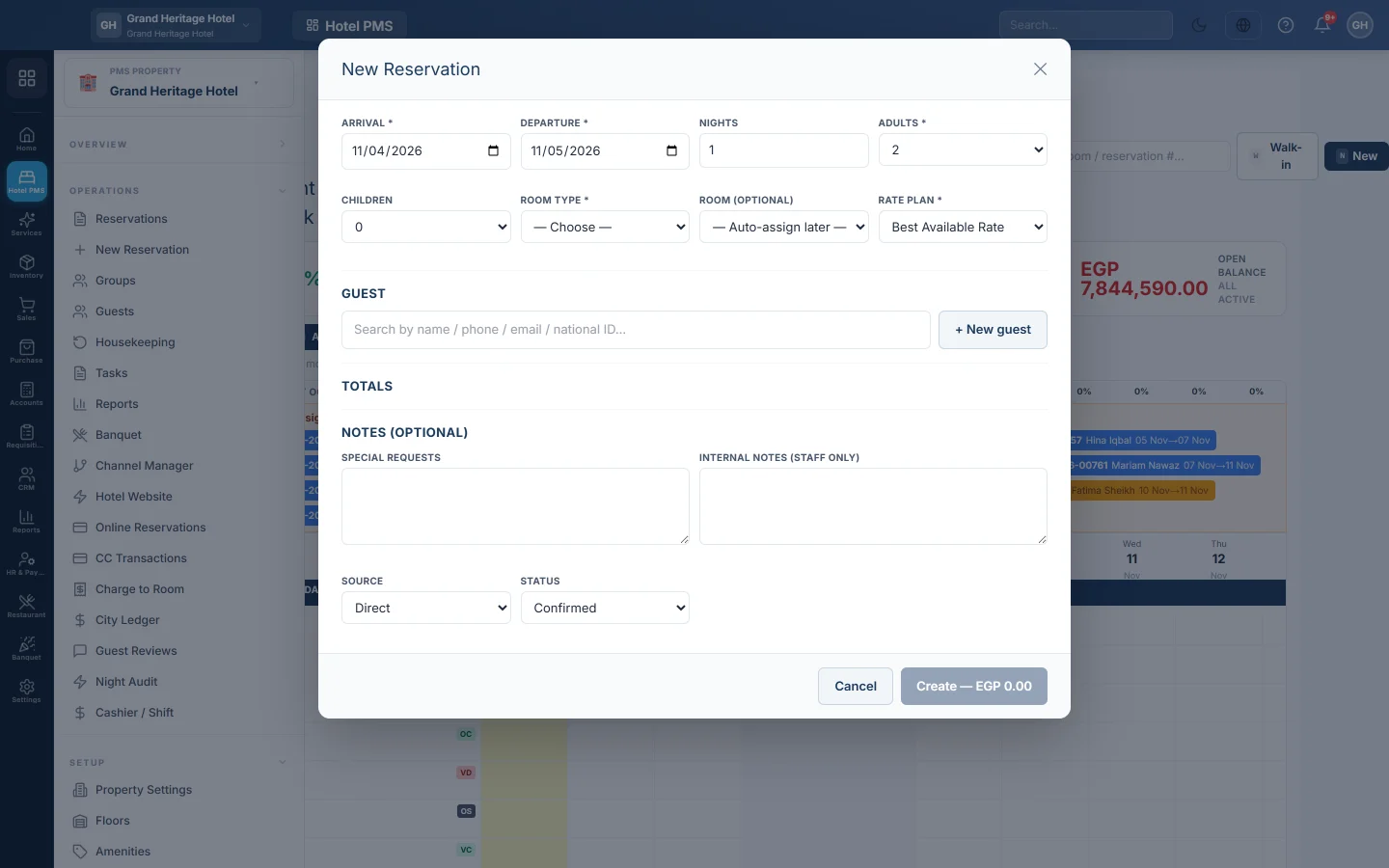
Book a room for a guest from the tape chart or the full booking form, take a deposit, and send the confirmation.
There are two ways to book a room. The quick window on the tape chart is fastest for a phone call or a guest at the desk. The full form has every field, for company and agent bookings.
Before you begin
- Your rooms, room types and a rate plan exist. See Set up your hotel: rooms and rates.
- Your role can create reservations. See Users & Roles.
Where to find it
Open Hotel → Overview → Front Desk (Tape Chart) for the quick window, or Hotel → Operations → New Reservation for the full form.
Book from the tape chart
- Find the room and click the first free night of the stay. To book without picking a room, click New.
- Check the Arrival and Departure, and enter Adults and Children.
- Check the Room Type, the Room and pick the Rate Plan. The Totals box shows the price.
- Under Guest, search by name, phone, email or national ID and pick the guest. For a new guest, click New guest, fill in the Full name and Phone, and click Save guest.
- If the guest pays now, enter Deposit paid now and pick Deposit paid by.
- Pick the Source and the Status: Confirmed, or Tentative for a booking not yet promised.
- Click Create. The button shows the total.
The new booking appears as a bar on the room, and its side panel opens.
Book with the full form
- Open New Reservation.
- Fill in Stay, Room & Rate and Guest, then the Source & Notes.
- Open Billing, settlement & folios for a company booking, or Transfers & travel for an airport pick-up.
- Enter the Deposit paid now, if any, and click Create Reservation.
See New Reservation for every field.
Confirm a booking
A Tentative, enquiry or waitlist booking must be confirmed before the guest can check in.
- Open the booking, or click its bar on the tape chart to open the side panel.
- Click Confirm booking. On the tape chart you can also right-click a tentative bar and pick Confirm booking.
- If a required deposit is still unpaid, you are asked once. Click Confirm without deposit to go ahead, or cancel and take the deposit first.
The booking is refused when no room of its type is free for those dates, or when its assigned room is held by another booking. If your property allows overbooking, it is confirmed with a warning.
Send the confirmation
When the guest has an email address, a booking confirmation is emailed when you save a confirmed booking. To print one, open the booking and click Confirmation.
What happens in the books
Saving a booking posts nothing to your accounts. A deposit is recorded as a payment on the guest's folio. It is debited to the cash or bank account of the payment method and credited to Guest Advance Deposits, a liability, until the stay is settled.
Common questions
The room I want is not in the list. It is booked, out of order or out of service for some of those nights. Pick another room or Auto-assign later.
A message says sales are stopped or arrivals are closed for a date. A rule on the Availability Chart blocks that stay. Change the dates or ask the revenue manager.
Should I use Tentative? Use Confirmed for normal bookings. A tentative booking must be confirmed with Confirm booking before check-in.
Can the guest pay the deposit online? Yes, if online payments are set up. Open the booking's folio and click Request payment to send a payment link.
Teşekkür ederiz. Hâlâ yardıma ihtiyacınız varsa info@eloerp.net adresine yazın.